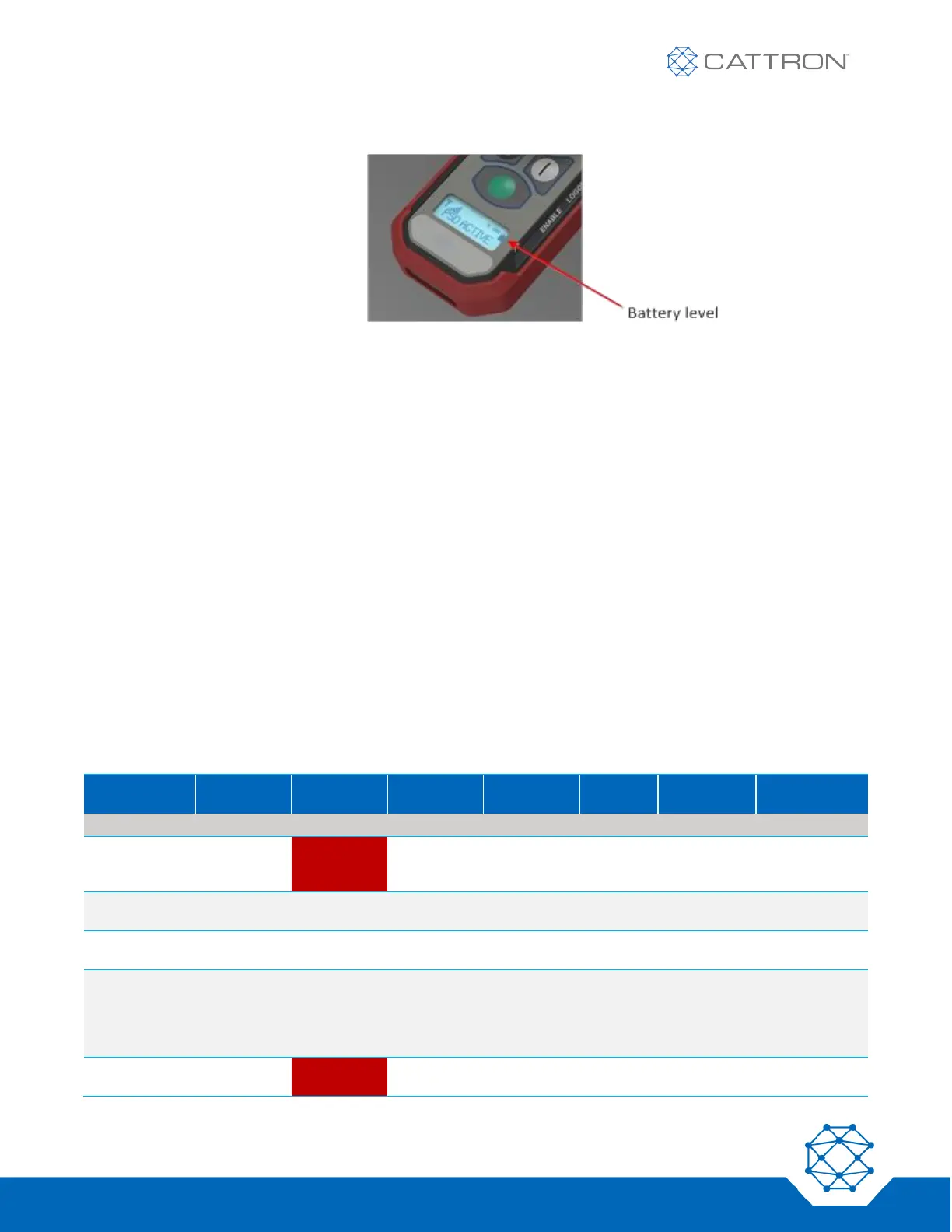
Figure 5: Battery Level Monitoring
6.2.1.4 General Status Monitoring
The main LCD area gives general status as defined in the tables below.
6.3 Joining an E-Stop Group
For a PSD to link to a group:
1. Verify that the PSD has the correct configuration for the MSD to be joined.
2. Ensure the PSD is in good physical condition and that the E-Stop switch is in the released position.
3. Briefly press the ‘|’ button on the PSD and it will power on. If the ‘I’ button is pressed again it will proceed
to step 4 below. Otherwise, the LCD will display the firmware revision for 3 seconds and then for the next
3 seconds the Master-Address / Sub-Address on line 1 and the frequency on line 2, then proceed to step
4.
4. The LEDs and the Display will show a state from the following table. If functioning properly, the LCD
displays ‘LINK? HOLD |’. If no action is taken after 60 seconds, the unit will power off.
5. Verify that the LCD display shows sufficient battery life for the duration of work to be performed.
Table 6: PSD Unlinked Operational States


 To Next Page