General layout 2 - 9
- to save measurements
The N500 instrument allows easy saving of the acquired data; for such purpose, four
different archives are available for the four different types of acquisition possible:
- waveform
- spectra (FFT)
- monitoring in time
- monitoring in speed
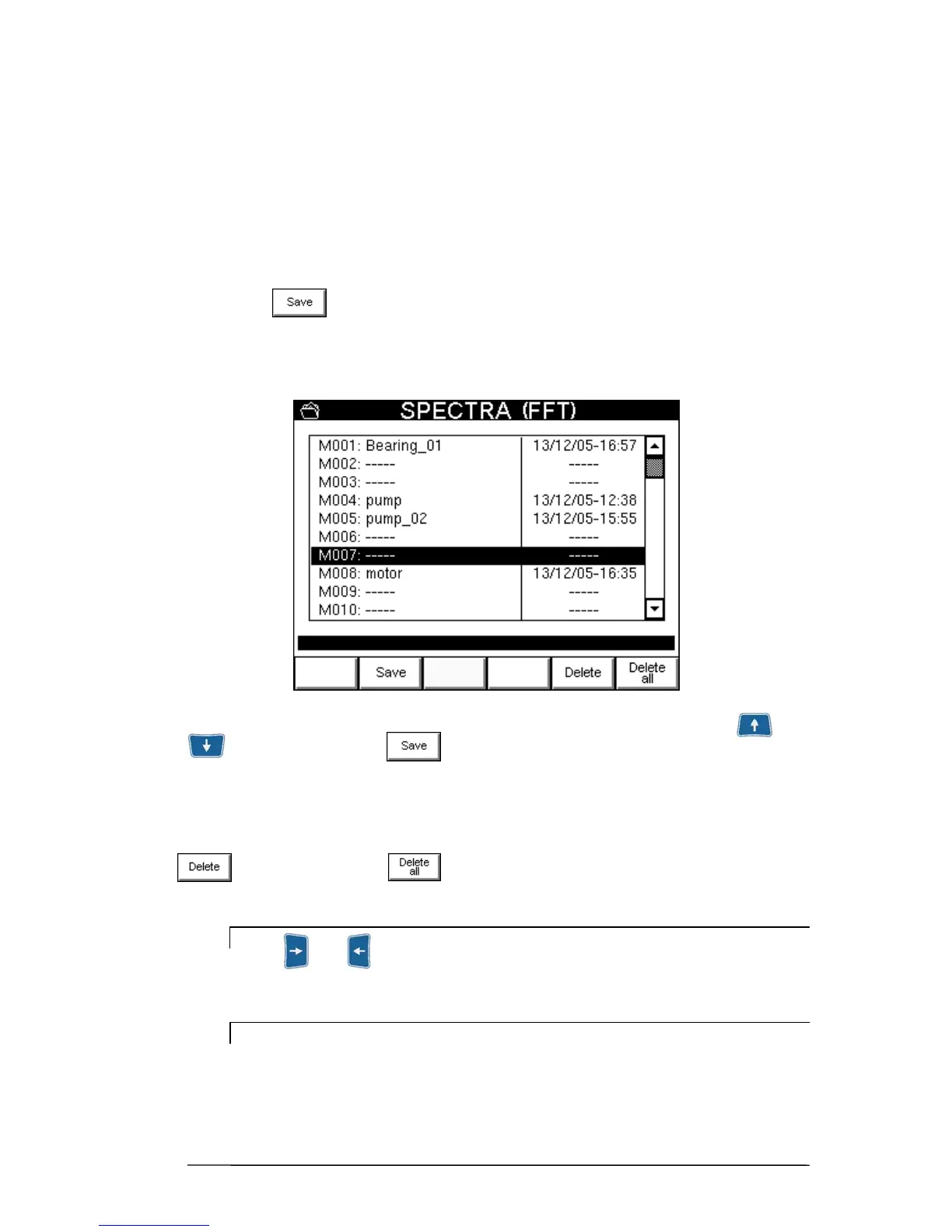
Pressing of allows displaying the archive corresponding to the measurement
made. All 50 overall positions (marked respectively with M001 … M050) are listed; the
blank ones can be recognized by the symbol -----, the other positions give the name, date
and time of saving their contents.
To select the position where to save the measurement made, use the arrow keys and
, then merely press
to display a pop-up in which to enter the required
name, as explained in 2-3 – Alphanumeric keyboard.
If a two-channel acquisition has been performed, data save is performed automatically for
both channels in the same file.
To delete a measurement and to clear the corresponding position in the archive, press
button. Instead with it is possible to fully clear the measurements archive.
N.B.
Keys and , which either increase or decrease by 10 respectively the
position selected, can be used for quick scrolling of the archive.
N.B.
As the spectrum is the type of measurement of greater interest, the N500
instrument allows memorization of up to 500 FFTs.


 To Next Page