Data manager mode 8 - 1
Chapter 8
Data manager mode
The N500 instrument allows saving the measurements made (FFT, waveforms and
monitoring) in special archives, which can be managed through this special function
directly accessible from the home screen.
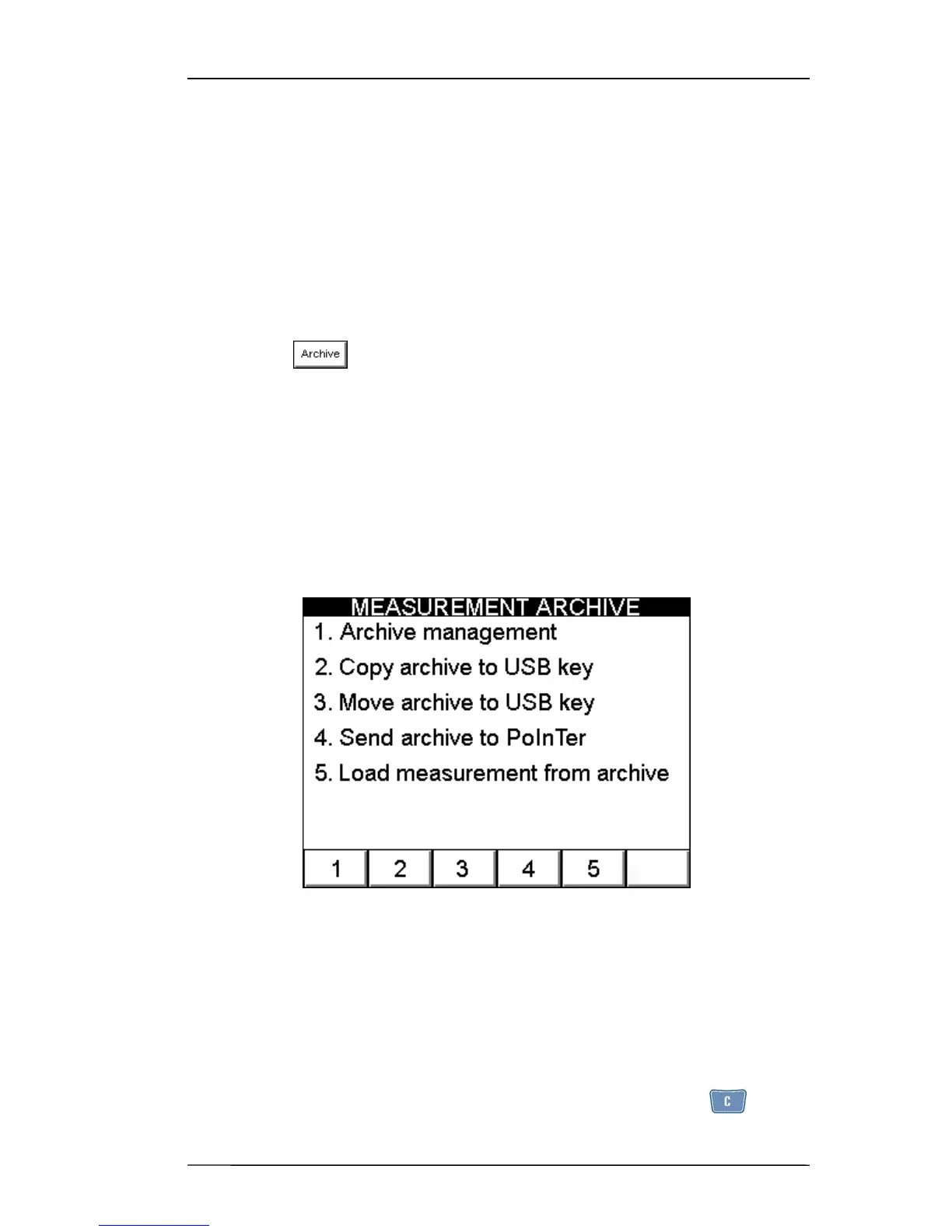
Upon pressing a MEASUREMENT ARCHIVE screen appears where it is
possible to select between the following possibilities:
– Data management (i.e. rename or eliminate the data present);
– Copy the data on the USB key (pen drive) supplied, leaving a copy of the data on the
N500 instrument;
– Shift the data on the USB key (pen drive) supplied, thus deleting the data from the
N500 instrument;
– send archive to PC using CEMB PoInTer software
– load (display) measurements already in the archive.
Archive management
Measurements saved with the N500 instrument are subdivided by type into different
archives:
– waveforms
– FFT
– Monitoring in time
– Monitoring in speed
A fifth archive is reserved for the images in the screens,captured by pressing .
(see 2-10 - Capture and saving of displayed images).


 To Next Page