1 - 2 General description
Optional accessories:
- acceleration transducer type TA-18/S complete with connection cable and
magnetic base
- proximity sensor complete with stand, cable and magnetic base
- optical fibre photocell (60,000 RPM) complete with stand and magnetic base
- extension cable, length 10 metres, for transducers
- extension cable, length 10 metres, for photocell
- portable printer for direct printing of certificates on standard thermal or
adhesive paper
- software CEMB PoInTer for data filing, management and printing.
N.B.:
After connecting the printer to the RS232 port, wait for about 5 seconds to allow
completion of the automatic recognition and initialization procedure. Only at this
point will it be possible to make a print-out by pressing relative key
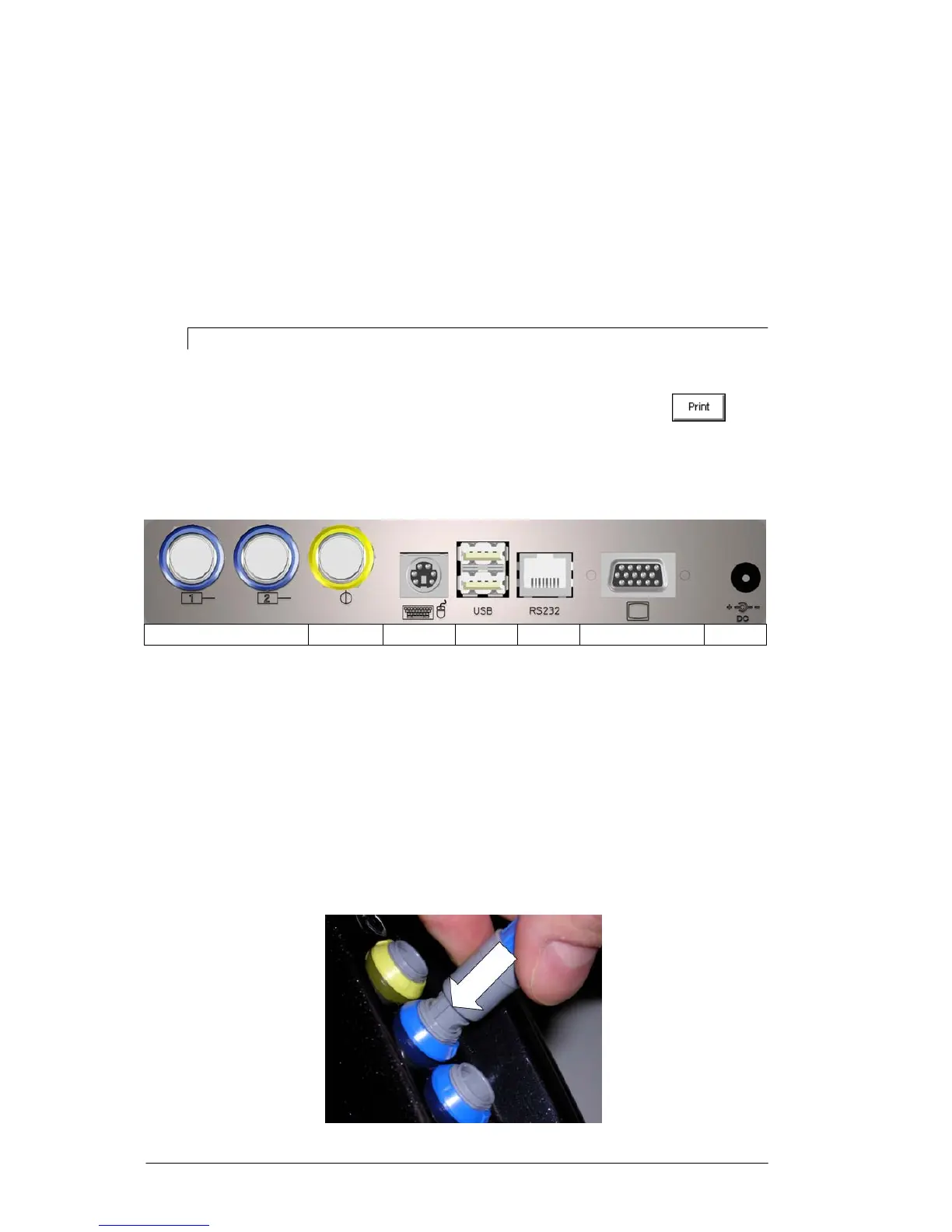
Connections
7654321
1 – battery charger
2 – VGA output 15-pin (only for CEMB Technical Service)
3 – serial port RS232 (connecting of optional portable printer)
4 – 2 USB ports type A (master)
5 – keyboard input PS2
6 – photocell input
7 – 2 inputs, measuring channels
To connect the sensors and photocell, merely plug the connector in the corresponding
socket, pushing it until it clicks into place; make sure that the safety connection is correctly
aligned as shown in the figure.


 To Next Page