9 - 2 CEMB PoInTer Program
Installation and registration
For installation of the CEMB PoInTer software, proceed to run the setup.exe program,
contained in the CD-ROM, and then click on the button without changing any
option.
In this way the software will be installed in the default program directory.
When running the software for the first time, it is necessary to select the default language
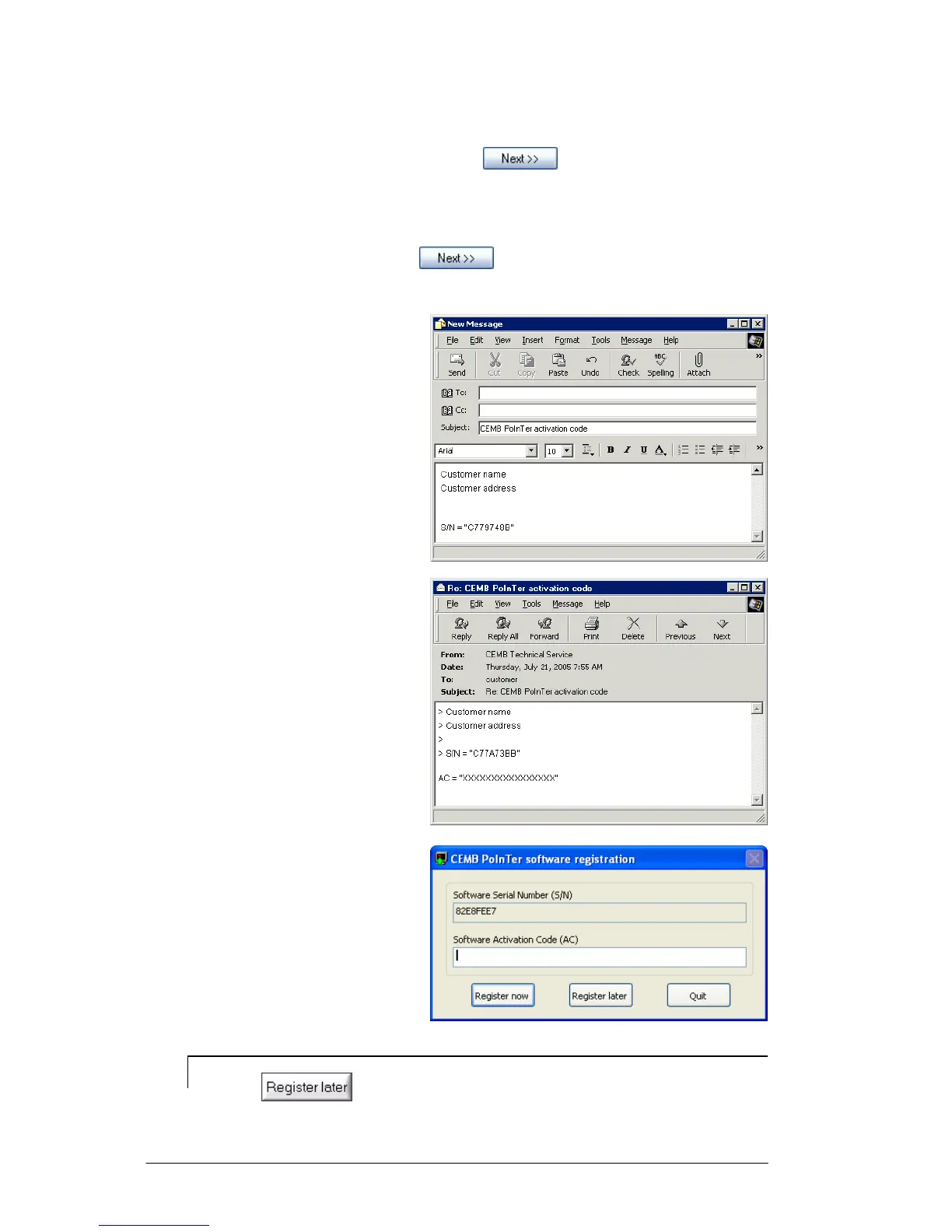
from those proposed; when the button is pressed, a pop-up appears with the
serial number (S/N) of the software and a request appears to enter the corresponding
activation code.
This code can be obtained by
contacting via E-mail the
CEMB Technical Service,
Instrument Division
(see www.cemb.com)
by specifying the object:
"CEMB PoInTer activation code"
and by citing in the message
your own data and serial number (S/N)
visible in the pop-up.
The CEMB Technical Service will reply
with an e-mail containing the
corresponding activation code (AC)
The activation code should be entered
to complete the registration procedure
and to allow the software to be used.
N.B.
Pressing allows temporary use of the software whilst waiting to
receive the correct activation code from CEMB assistance.


 To Next Page