Page 32 For technical questions, please call 1-888-866-5797. Item 62120
Mode $09 Vehicle Information
View vehicle information, such as
VIN, Calibration ID, and CVN.
Note: Not all vehicles return the
same data, results may vary from
the examples given herein.
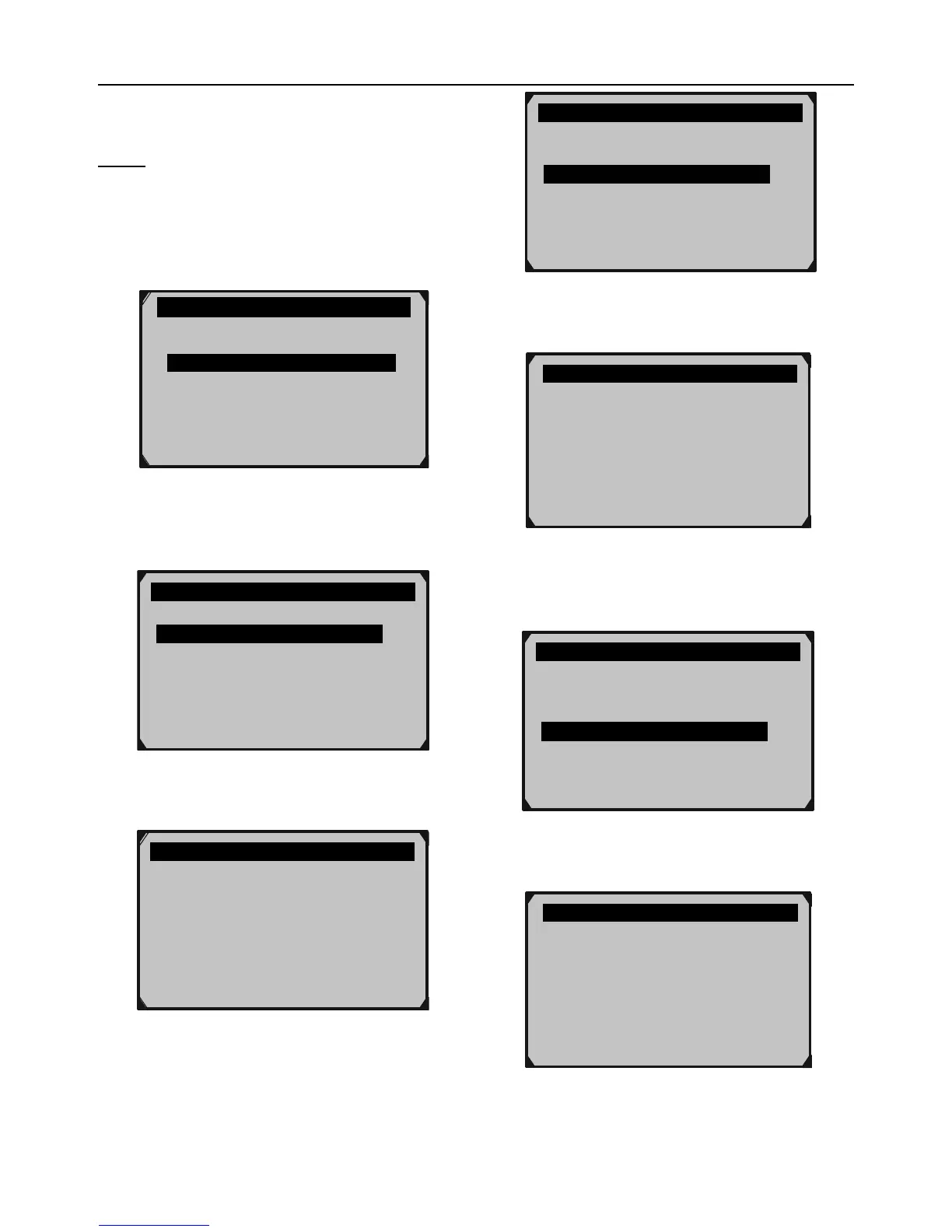
1. From Diagnostic Menu, select
Vehicle Info., then press OK.
Diagnostic Menu 9/11
Component Test
Vehicle Info.
Modules Present
Unit of Measure
Figure BR
2. From Vehicle Info., select,
Vehicle ID Number then press OK.
Vehicle Info. 1/3
Vehicle ID Number
Calibration ID
Cal. Verf. Number
Figure BS
3. View Vehicle ID Number.
Vehicle ID Number
VIN: LSVGU49JX92545482
Figure BT
4. From Vehicle Info., select,
Calibration ID then press OK.
Vehicle Info. 2/3
Vehicle ID Number
Calibration ID
Cal. Verf. Number
Figure BU
5. View Calibration ID information.
Cal ID1: 899834721101
Cal ID2: 899814707001
Cal ID3: 899814707002
Figure BV
6. From Vehicle Info., select,
Cal. Verf. Number then press OK.
Vehicle Info. 3/3
Vehicle ID Number
Calibration ID
Cal. Verf. Number
Figure BW
7. View CVN information.


 To Next Page