4. On the target WiZo, press and hold down the I/O button until a beep is heard.
a. TheLINK:OLEDthatwasashingslowlywillremainon.
b. Release the I/O button; the process will complete with rapid beeping and the
deviceswillexitconguration.
5. To test the setup, actuate the input of the WiZo where the input / trigger will take
place, and the output (relay) will make a clicking sound.
6. The user can continue to add I/O links using the above steps as required.
The output of a single device or multiple devices can be
actuated by more than one input.
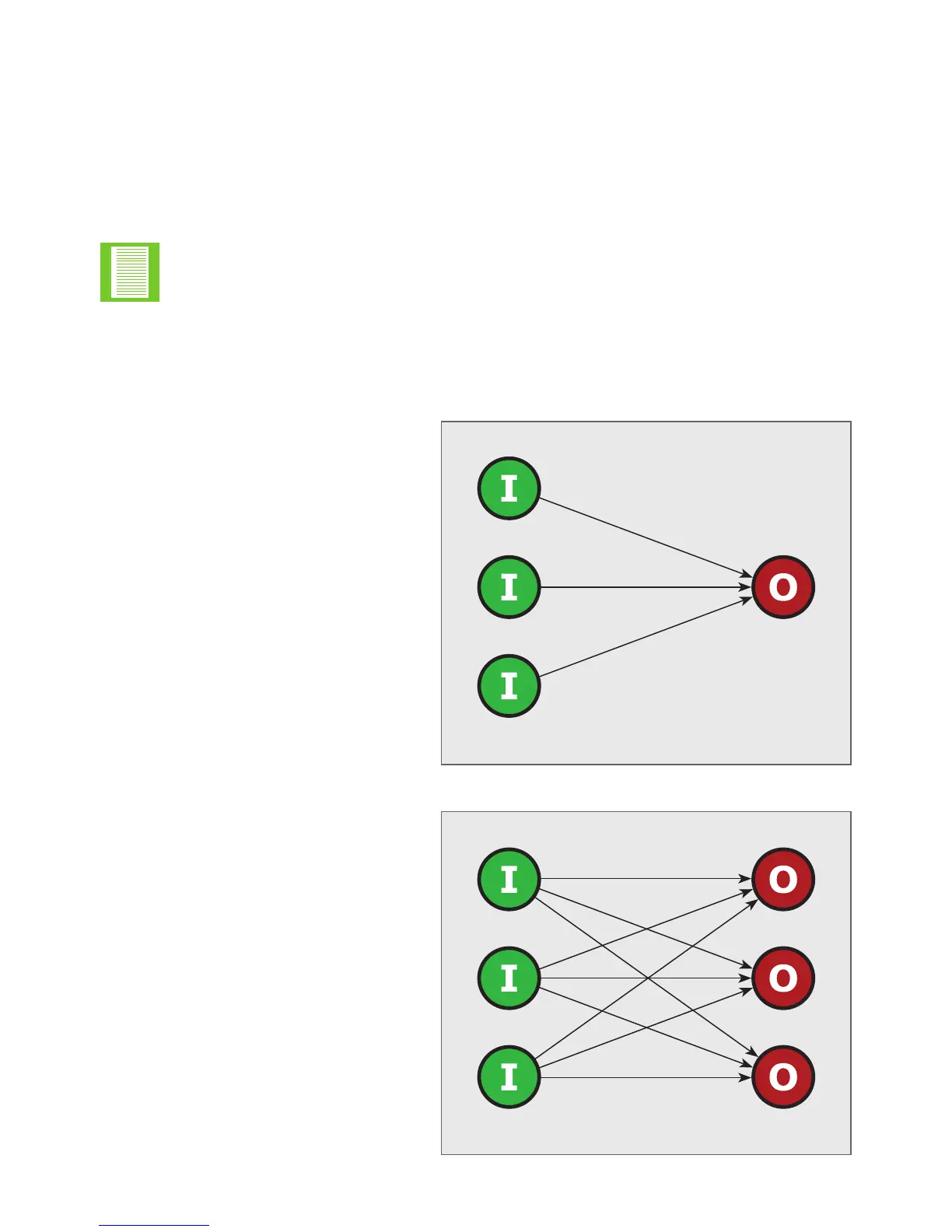
The I/O linking options shown in Figures 9 and 10 below can be implemented utilising the
steps mentioned above.
FIGURE 8. ONE TO ONE
FIGURE 8. ONE TO ONE
Many-to-One
Many-to-Many
FIGURE 9. MANY TO ONE
FIGURE 10. MANY TO MANY
Many to One
The inputs of remote WiZos can:
1. Actuate the output of the local
WiZo
Many to Many
The inputs of remote WiZos can:
1. Activate their local output, and
2. The output of remote WiZos
3. The output of more than one
remote WiZo
The outputs of the local WiZo can:
4. Be actuated by a remote WiZo
5. Be actuated by more than one
remote WiZo
QUICK START SECTIONSECTION 4


 To Next Page