page 27 www.centsys.com
When a WiZo has gone into Supervision mode, the link to the now non-existent WiZo
can be removed.
1. Press and hold down the NET and I/O buttons together for a period exceeding two
seconds.
2. The WiZo will buzz several times in rapid succession. This indicates that the link has
been broken.
3. Release the two buttons,
a. EitheroneofthesupervisionLEDswillnownolongerash.
b. The I/O link has been removed.
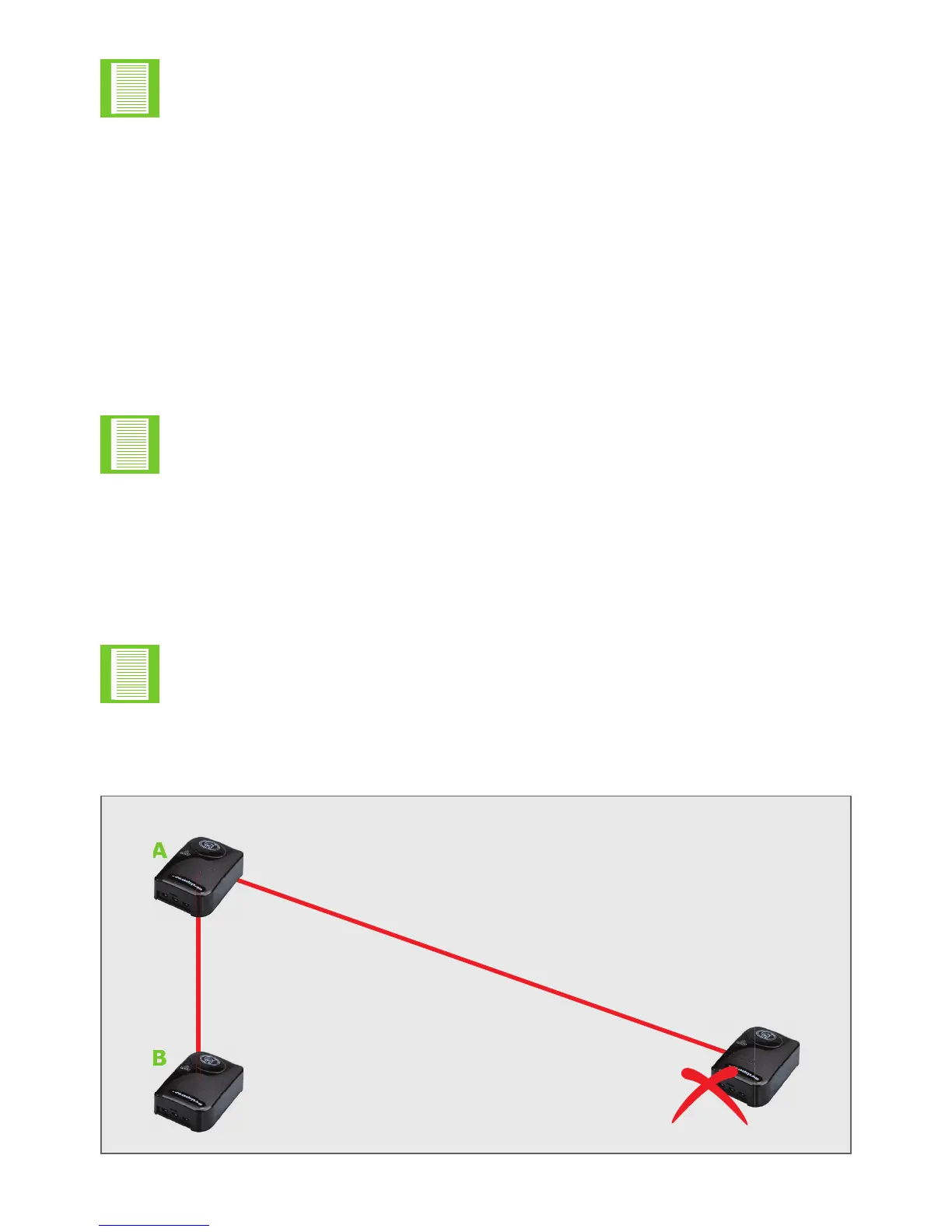
To illustrate:
1. WiZo A controls the output on WiZo C.
a. The output of WiZo A is not used.
b. and has no inbound link.
c. WiZo A’s output is connected to a G-ULTRA.
2. WiZo C loses power.
a. WiZo A goes into Supervision mode.
TheSupervisionModeNoticationfeatureisONLY available when the
output is not linked. If linked, this feature is not available.
The above process will remove the device that can’t be reached
IO Links and takes the WiZo that has lost the link out of Supervision mode.
ThiscongurationonlyactivatestheWiZo A output when WiZo C fails.
FIGURE 12. REMOVING I/O LINKS WHILE IN SUPERVISION MODE
QUICK START SECTIONSECTION 4
C
B
A
Device in Supervisory Mode


 To Next Page