page 29 www.centsys.com
6. Installation
INSTALLATIONSECTION 6
Thisportionoftheproductinstallationshouldbereservedforqualiedpersonnel
only.QualicationincludestheabilitytodierentiatebetweenACandDCpower
supplies,andprociencyinworkingwithlow-poweredelectronicsdevices.
6.1. Prepare for Installation
6.2. Potential Applications
under no circumstances to be connected to an AC power supply.
This action will damage the unit and void the warranty!
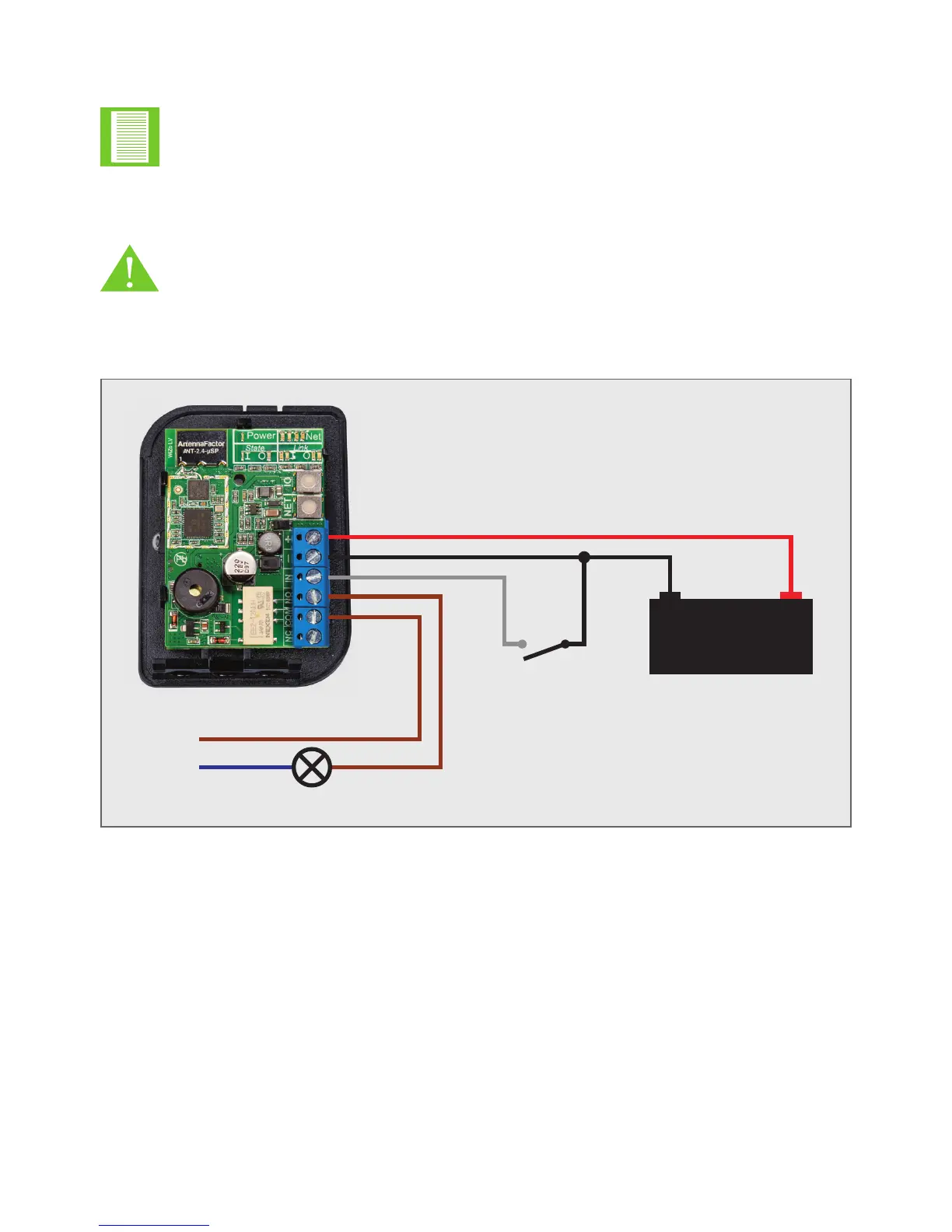
Shown in Figure 13 below is an example installation of the product; the product is not
limited to this example.
FIGURE 13. BASIC INSTALLATION EXAMPLE
Thelistbelowidentiespossibleapplication,buttheproductisnotlimitedtothese
examples and neither is the list exhaustive.
• Generalsignallingwirereplacer(On/Oapplications)
• Wireless gate motor activation and status/alarm feedback
• Geyser (and other household) control
• Control of multiple lights from multiple locations
• Pool pump control
• Activation of remote sirens and alarm warning strobes
• Remote sensing of fault conditions along long-distance fencing
• Community panic alarm system
- +
12V DC Lead Acid Battery
Push
Button
(N/O)
Light
L
N
X2X1


 To Next Page