page 9 www.centsys.com
NETWORK REDUNDANCYSECTION 2
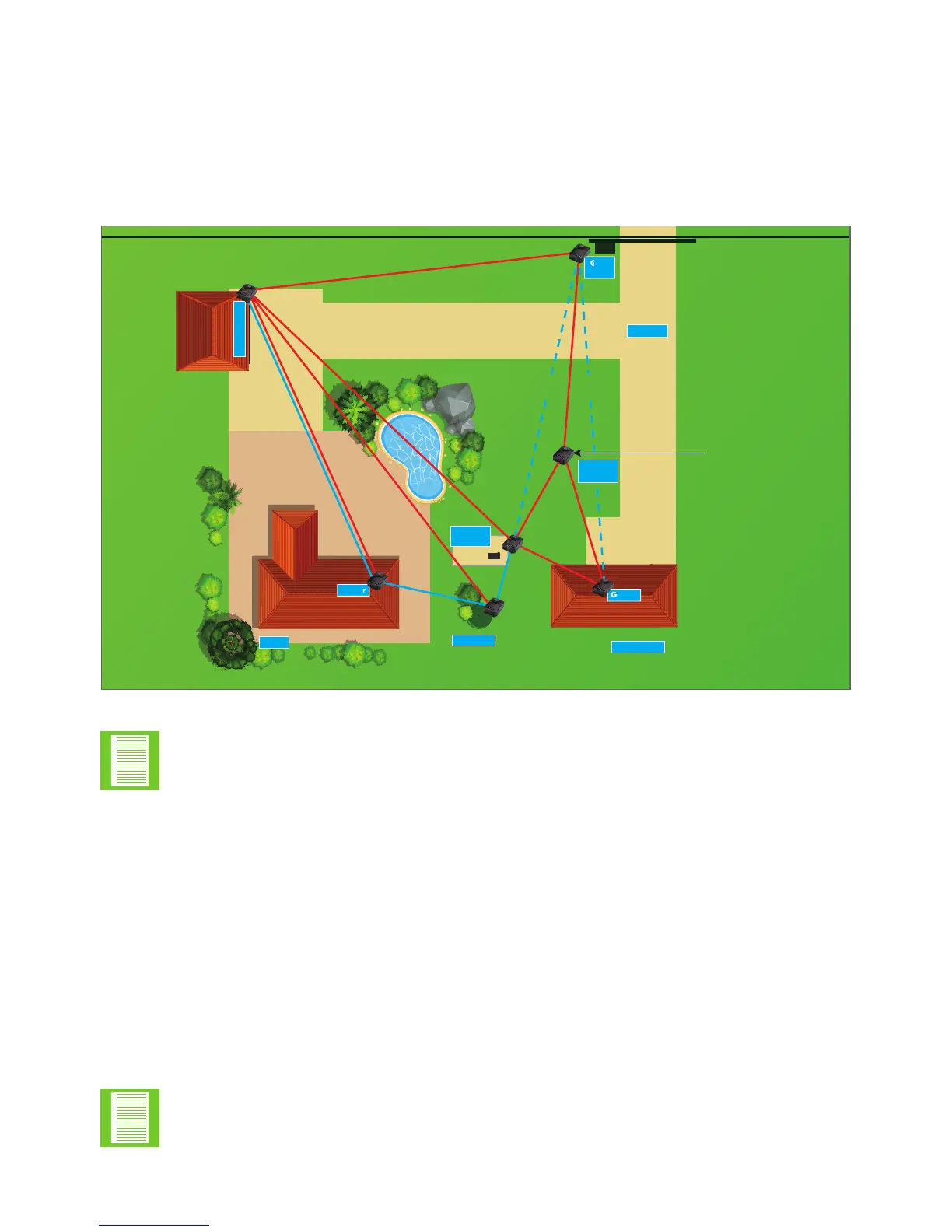
Shown in Figure 5 below is an example network, which links several common devices
into a mesh network. Owing to proximity, certain devices have more than one path to
transmit and receive messages, whereas other devices do not. It is not always possible
to install the in an ideal location to guarantee optimal signal strength;
therefore, it is important to plan carefully to ensure that, as the installer, the devices are
not installed in such a way as to reduce signal strength, but so that signal strength is at
its best.
FIGURE 5. EXAMPLE NETWORK
Driveway
Geyser
JoJo Tank
Out Building
Gate
Motor
House
Geyser
Garage Door
Borehole
Pump
When the mesh network is fully redundant two green LEDs will
illuminate in the NET area on the PCB. If only one is illuminated, this means
that the user does not have full network redundancy.
‘Lost’ refers to any number of eventualities which includes: device(s) struck by
lightning, power loss, etc., and does not necessarily refer to device failure.
The above example consists of the following:
A home which has the following devices near,
• Geyser
• JoJo Tank
• Borehole Pump
• Outbuilding Geyser
Devices which are further away from the home are,
• Garage Door
• Gate Motor


 To Next Page