12
Vu :
Your Smart Linux TV Player
+
Vu User Manual
+
13
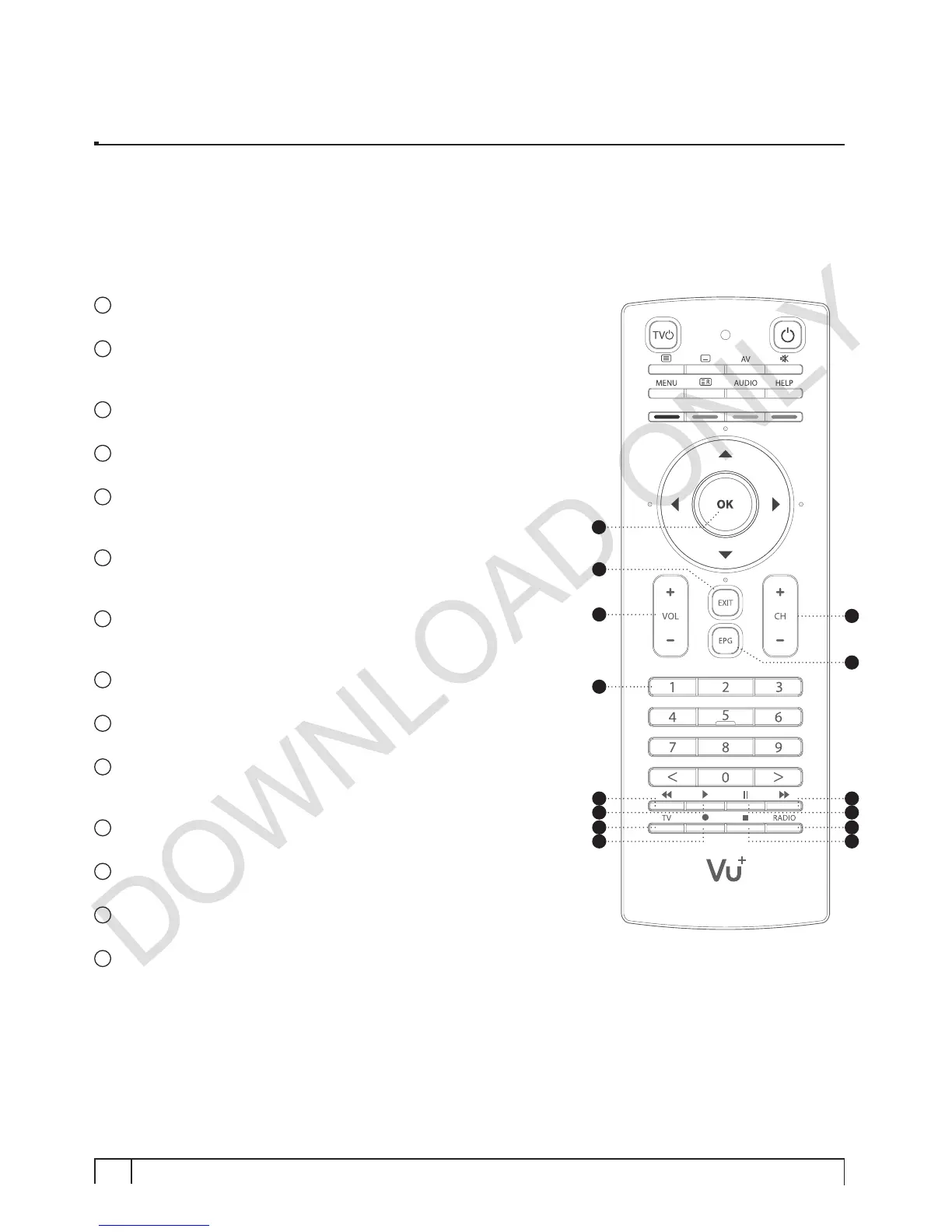
OK
Confirms the selected menu option.
14
EXIT
Exits the current menu option into the live mode, or switches one step
back of the menu.
15
Volume + / -
Adjusts the audio volume.
16
Channel + / -
Navigates through the scanned channel list.
17
EPG
Displays the Electronic Program Guide (EPG) information if
provided.
18
Numeric Keys
Enters a channel number or numbers required to be input according
to menu options.
19
Fast Rewind
Fast rewinds at up to 128 times faster than the normal speed
(x2 / 4 / 8 / 16 / 32 / 64 / 128).
20
Play
Plays the selected file (e.g. recording) at the normal speed.
21
Pause
Pauses the live program or recording play.
22
Fast Forward
Fast forwards at up to 128 times faster than the normal speed
(x2 / 4 / 8 / 16 / 32 / 64 / 128).
23
TV
Displays the TV Channel list.
24
Recording
Displays instantly the recording menu.
25
Stop
Stops playing of a recording and goes to the live mode.
26
Radio
Displays the Radio channel list.
19
23
20
24
21
25
22
26
16
17
15
14
18
13


 To Next Page