chapter 5000
page 121
1,2 - 2,0 t A.C.
SERVICE MANUAL
Electric
036-0410-07
DESCRIPTION OF THE CONSOLE STANDARD MENU
DASHBOARD
The console can be connected to the dashboard unit in the following way:
By connecting the console to another logic unit (traction, lifting or mhyrio) and selecting the relevant connection
number as shown in the map here below.
In case the console is connected to the traction logic unit
It is the connection number of the traction logic unit.
CONNECTION NUMBERS
3 TRACTION MASTER
4 TRACTION SLAVE
5 PUMP
9 MHYRIO
11 DASHBOARD
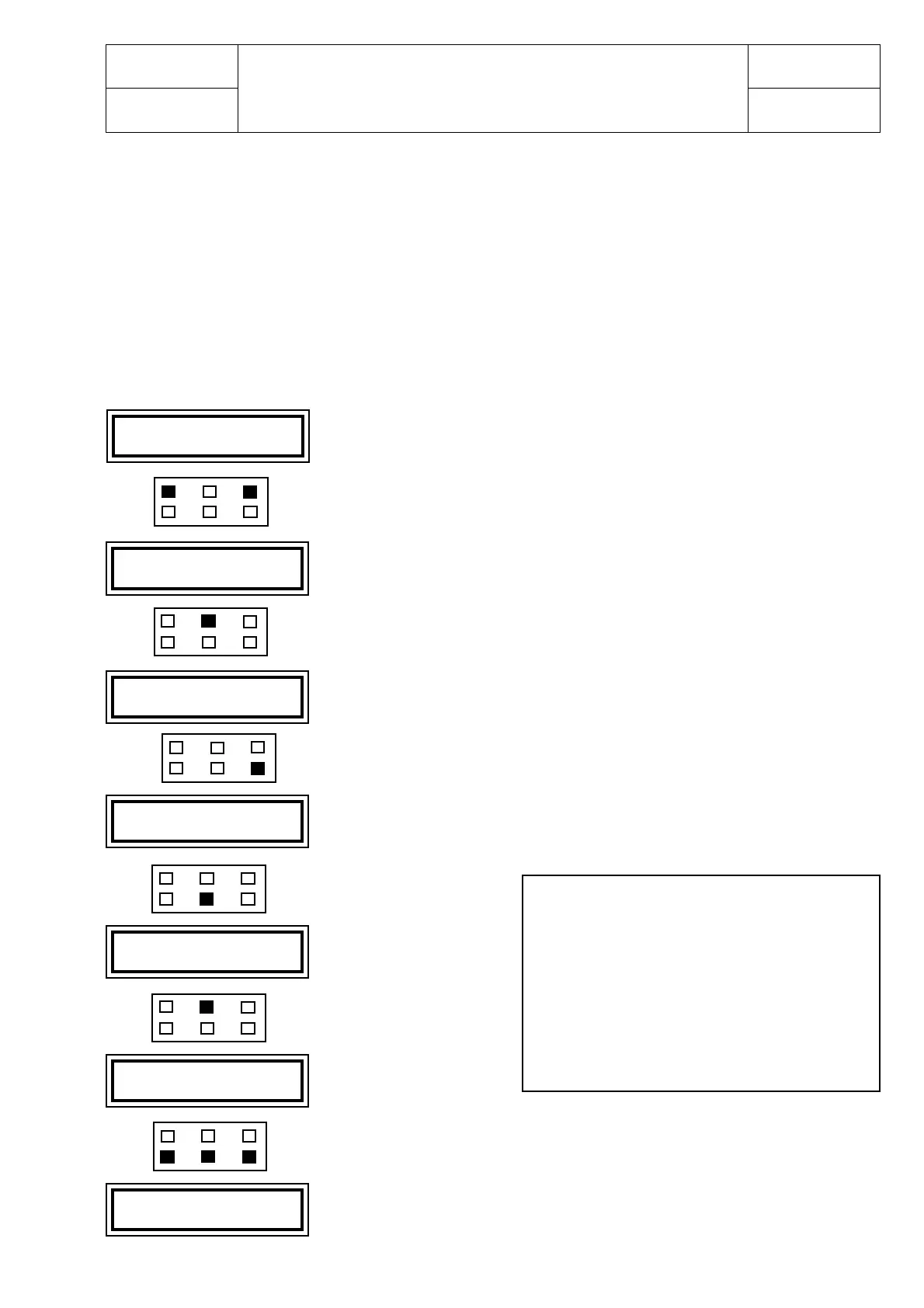
Press ROLL and PARAM together
Press ENTER
Press ROLL, OUT and SET together
Press OUT
Press ENTER
to confirm
Press SET and select the connection number of the lifting logic unit
It is the connection number of the dashboard unit.
Connected to the dashboard unit
* CONFIG. MENU *
SET MODEL
CONNECTED TO
3
CONNECTED TO
11
ARE YOU SURE?
YES=ENTER NO=OUT
* CONFIG MENU *
SET MODEL
DA2M2B C CE 1.13
48V 280A 00000
DASH CE V 1.00
24 0A 00000



 To Next Page