Configuration Page
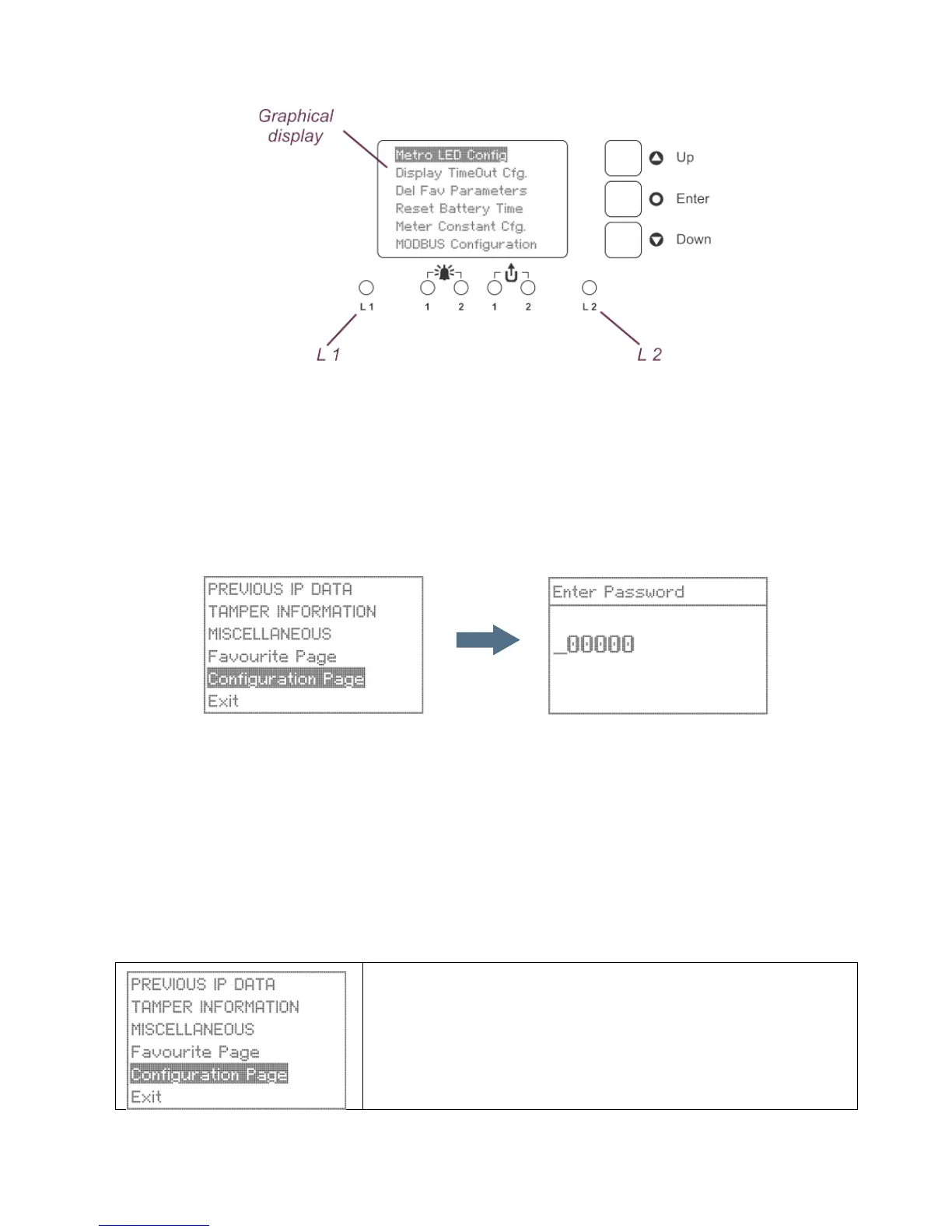
Figure 23: Front view showing metrological LEDs
The configuration pages are used to set-up and enable features such as the metrological LEDs, display timeout,
meter constant, reset battery time, MODBUS configuration and language on display. They are also used to
manage your favourite selections.
The configuration page is password protected which can be accessed only by users authorized to change the
above configurations.
At the password prompt enter the 6-digit password (default password is ‘000000’) using Up and Down buttons
Use the Down key to enter a digit at the cursor position and use the Up key to move the cursor to the right while
entering a digit. After completing the entry, press the Enter button to confirm. Correct password gives access to
the first screen of configuration page. An incorrect password will display ‘Incorrect Password’ message.
The Prometer 100 meter display can be set to different languages. The following languages are available:
• English
• Swedish
• German
• French
• Spanish
• Russian
• Arabic
The configuration page displays are shown below.
Use the Up/Down buttons to scroll to the Configuration page. The
selection will be highlighted.
Press the Enter button and enter the correct password using Up and
Down buttons to open the page.
Use the Up/Down buttons to scroll within the page and view the various
screens.


 To Next Page