162
USEINSTRUKCJE UŻYTKOWANIA
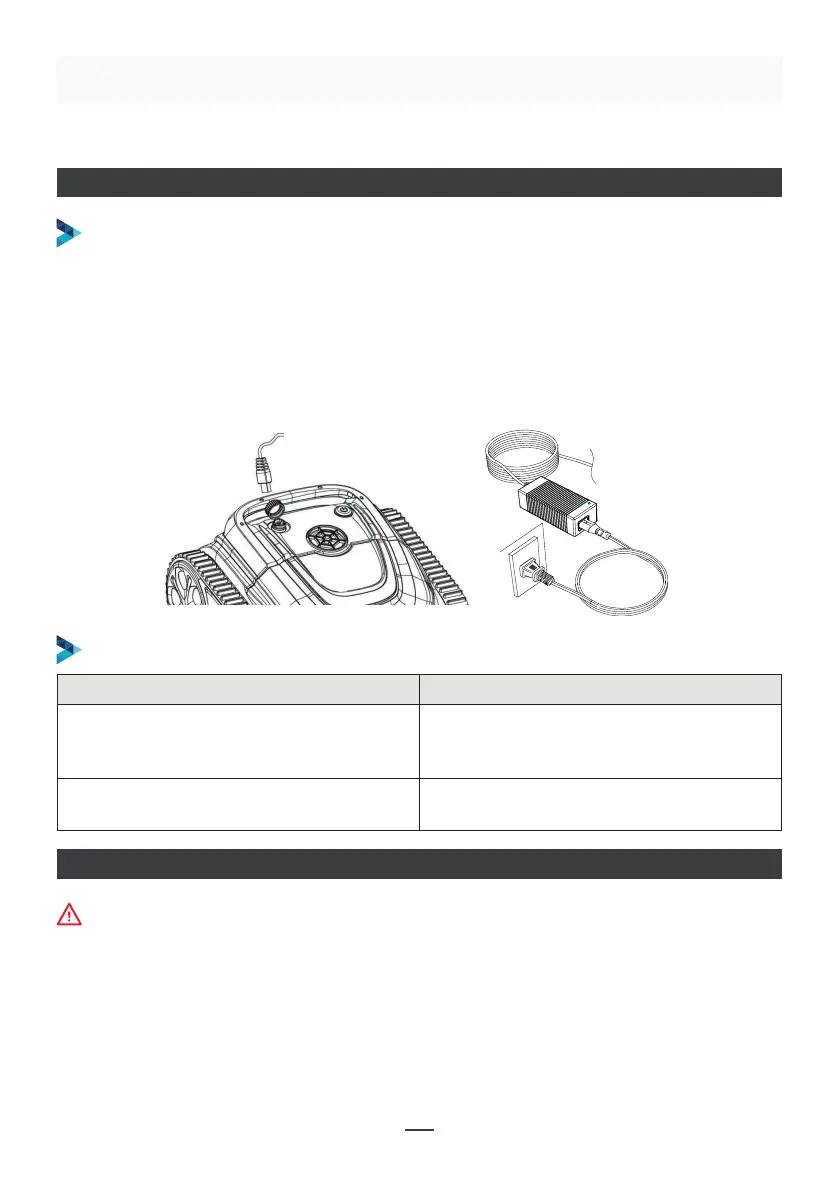
ŁADOWANIE ROBOTA
Upewnij się, że urządzenie jest wyłączone (kontrolki są całkowicie zgaszone). W celu
naładowania urządzenia wyjmij je z basenu i umieść w pomieszczeniu lub w miejscu
zabezpieczonym przed zachlapaniem. Odkręć wodoodporną zaślepkę urządzenia
(upewnij się, że port ładowania jest suchy) i podłącz port ładowania do złącza
ładowania. Gdy kontrolka ładowarki świeci się na czerwono, oznacza to, że trwa
ładowanie, a gdy zmieni kolor na zielony, oznacza to, że ładowanie zostało zakończone.
PROCEDURA ŁADOWANIA
KONTROLKA ŁADOWARKI
Make sure that the machine is turned off (the indicator lights are
completely off). When charging, please take the machine out of the
swimming pool, and place the machine indoors or in a splash-resistant
facility for charging. Unscrew the waterproof cap on the machine (ensure
that the charging port is dry) and connect the charging port with the
charging connector. When the battery charger light is red, indicating that it
is charging, when it turns green, it means that charging is completed.
4.3.1 Take out the filter basket: Place the cleaner on the shore, open the
cover plate by hand according to the position indicated in the figure (Figure
4-1), and the filter basket is shown in the figure (Figure 4-2).
4.2 Charge the robot
4.3 Clean the filter cartridge
4.2.2 Charger indicator
4.2.1 Charging Operation
LED Indicator Charging state
Green light is always on
Red light is always on Normal charging
plugged or the charging is complete
09
Figure 4-1 Figure 4-2
Wskaźnik LED Stan ładowania
Zielona dioda świeci światłem ciągłym
Oczekiwanie na ładowanie lub
akumulator nie jest podłączony, lub
ładowanie zostało zakończone
Czerwona dioda świeci się światłem
ciągłym
Normalne ładowanie
POŁĄCZENIE APLIKACJI
• Pobierz aplikację:
Sposób 1: Zeskanuj poniższy kod QR (Rysunek 5-1). Po zeskanowaniu kodu możesz kliknąć
odpowiedni sklep (Apple Store, Android Store), aby pobrać aplikację (Rysunek 5-2).
Podczas łączenia z aplikacją urządzenie musi znajdować się poza wodą.


 To Next Page
 Loading...