18
USEUTILISATION
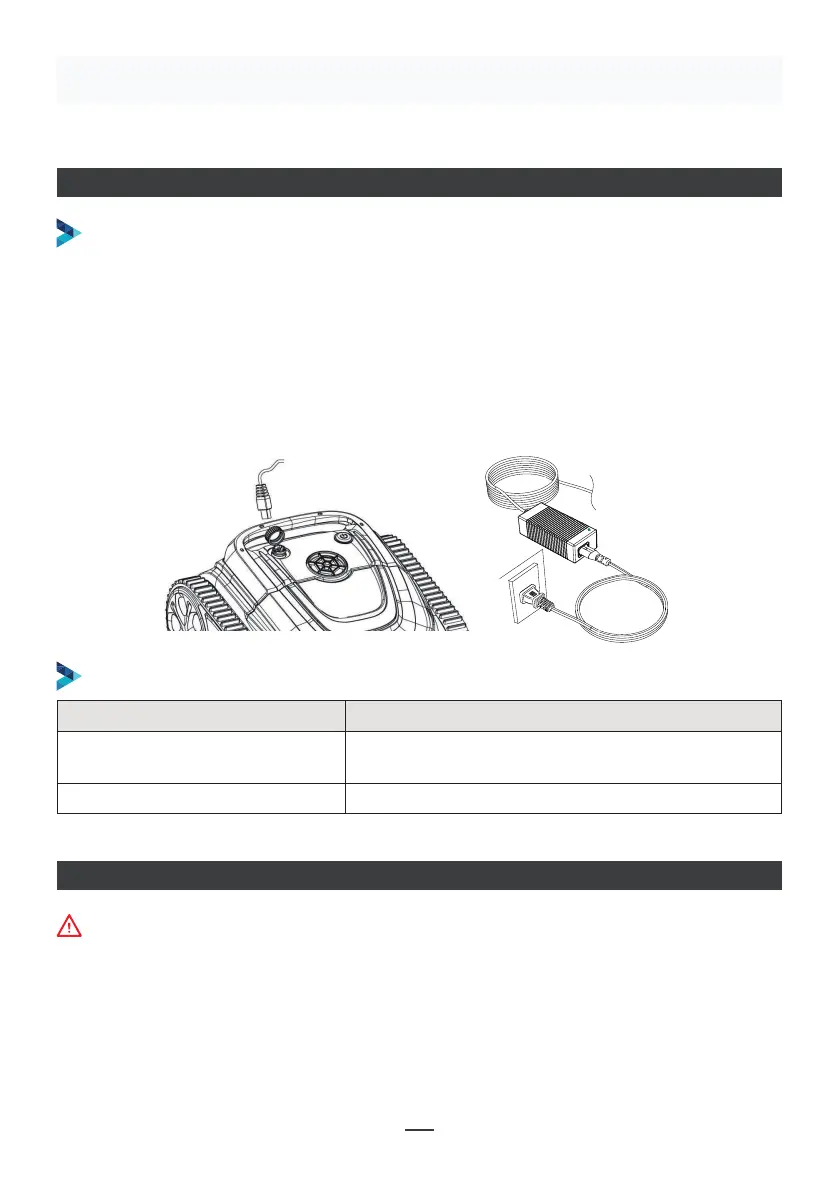
CHARGEMENT DU ROBOT
Assurez-vous que la machine est éteinte (les témoins lumineux sont complètement
éteints). Lors de la charge, sortez la machine de la piscine et placez la machine à
l’intérieur ou dans une installation à l’abri des éclaboussures pour le chargement.
Dévissez le couvercle résistant à l’eau sur la machine (assurez-vous que le port de
charge est sec) et connectez le port de charge au connecteur de charge. Lorsque le
voyant du chargeur de la batterie est rouge, cela indique qu’il est en charge, lorsqu’il
devient vert, cela signifie que la charge est terminée.
OPÉRATION DE CHARGEMENT
INDICATEUR DU CHARGEUR
Make sure that the machine is turned off (the indicator lights are
completely off). When charging, please take the machine out of the
swimming pool, and place the machine indoors or in a splash-resistant
facility for charging. Unscrew the waterproof cap on the machine (ensure
that the charging port is dry) and connect the charging port with the
charging connector. When the battery charger light is red, indicating that it
is charging, when it turns green, it means that charging is completed.
4.3.1 Take out the filter basket: Place the cleaner on the shore, open the
cover plate by hand according to the position indicated in the figure (Figure
4-1), and the filter basket is shown in the figure (Figure 4-2).
4.2 Charge the robot
4.3 Clean the filter cartridge
4.2.2 Charger indicator
4.2.1 Charging Operation
LED Indicator Charging state
Green light is always on
Red light is always on Normal charging
plugged or the charging is complete
09
Figure 4-1 Figure 4-2
Indicateur LED Statut du chargement
Le voyant vert reste allumé
En attente d'une recharge ou la batterie n’est pas
branchée ou la charge est terminée
Le voyant rouge reste allumé Chargement normal
CONNEXION DE L’APPLICATION
• Téléchargez l’application :
Méthode 1 : Scannez le QR code ci-dessous (Schéma 5-1). Après l’avoir scanné, vous pouvez
cliquer sur l’App Store correspondant (Apple Store, Android Store) pour télécharger
l’application (Schéma 5-2).
La machine ne doit pas être dans l’eau au moment de connecter l’application.


 To Next Page
 Loading...