78
USEISTRUZIONI PER L’USO
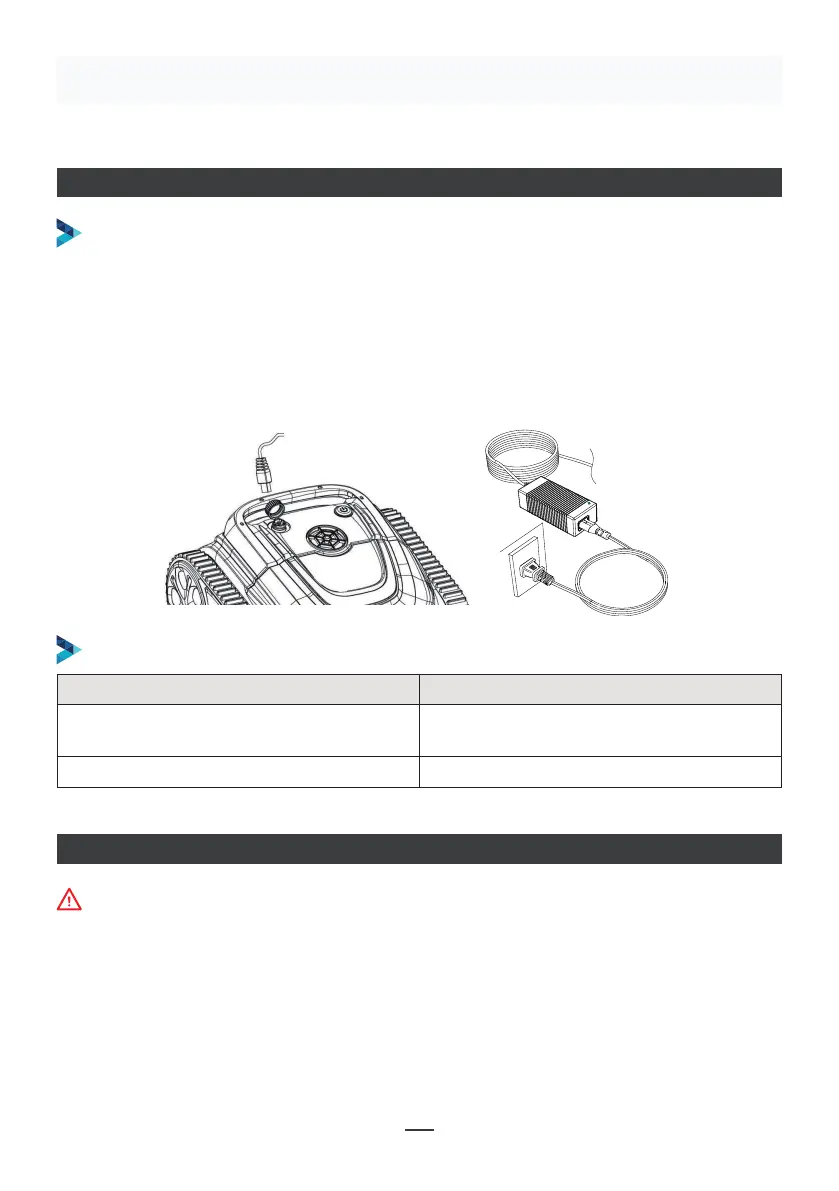
CARICARE IL ROBOT
Si assicuri che il dispositivo sia spento (le spie luminose sono completamente spente).
Durante la ricarica, la preghiamo di togliere l’apparecchio dalla piscina e di posizionarlo
al chiuso o in una struttura resistente agli schizzi. Sviti il tappo impermeabile del
dispositivo (si assicuri che la porta di ricarica sia asciutta) e colleghi la porta di ricarica
con il connettore di ricarica. Quando la spia del caricabatterie è rossa, indica che sta
caricando; quando diventa verde, significa che la carica è completata.
FUNZIONE DI CARICA
INDICATORE DEL CARICABATTERIE
Make sure that the machine is turned off (the indicator lights are
completely off). When charging, please take the machine out of the
swimming pool, and place the machine indoors or in a splash-resistant
facility for charging. Unscrew the waterproof cap on the machine (ensure
that the charging port is dry) and connect the charging port with the
charging connector. When the battery charger light is red, indicating that it
is charging, when it turns green, it means that charging is completed.
4.3.1 Take out the filter basket: Place the cleaner on the shore, open the
cover plate by hand according to the position indicated in the figure (Figure
4-1), and the filter basket is shown in the figure (Figure 4-2).
4.2 Charge the robot
4.3 Clean the filter cartridge
4.2.2 Charger indicator
4.2.1 Charging Operation
LED Indicator Charging state
Green light is always on
Red light is always on Normal charging
plugged or the charging is complete
09
Figure 4-1 Figure 4-2
Indicatore LED Stato di carica
La luce verde è sempre accesa
In attesa di ricarica, oppure la batteria
non è collegata o la ricarica è completa.
La luce rossa è sempre accesa Carica normale
CONNESSIONE APP
• Scarichi l’applicazione:
Metodo 1: Scannerizzi il codice QR qui sotto (Figura 5-1). Dopo la scansione, può cliccare sul
negozio corrispondente (Apple Store, Android Store) per scaricare l’APP (Figura 5-2).
Il dispositivo deve essere fuori dall’acqua quando si collega l’APP.


 To Next Page
 Loading...