102
USENÁVOD K POUŽITÍ
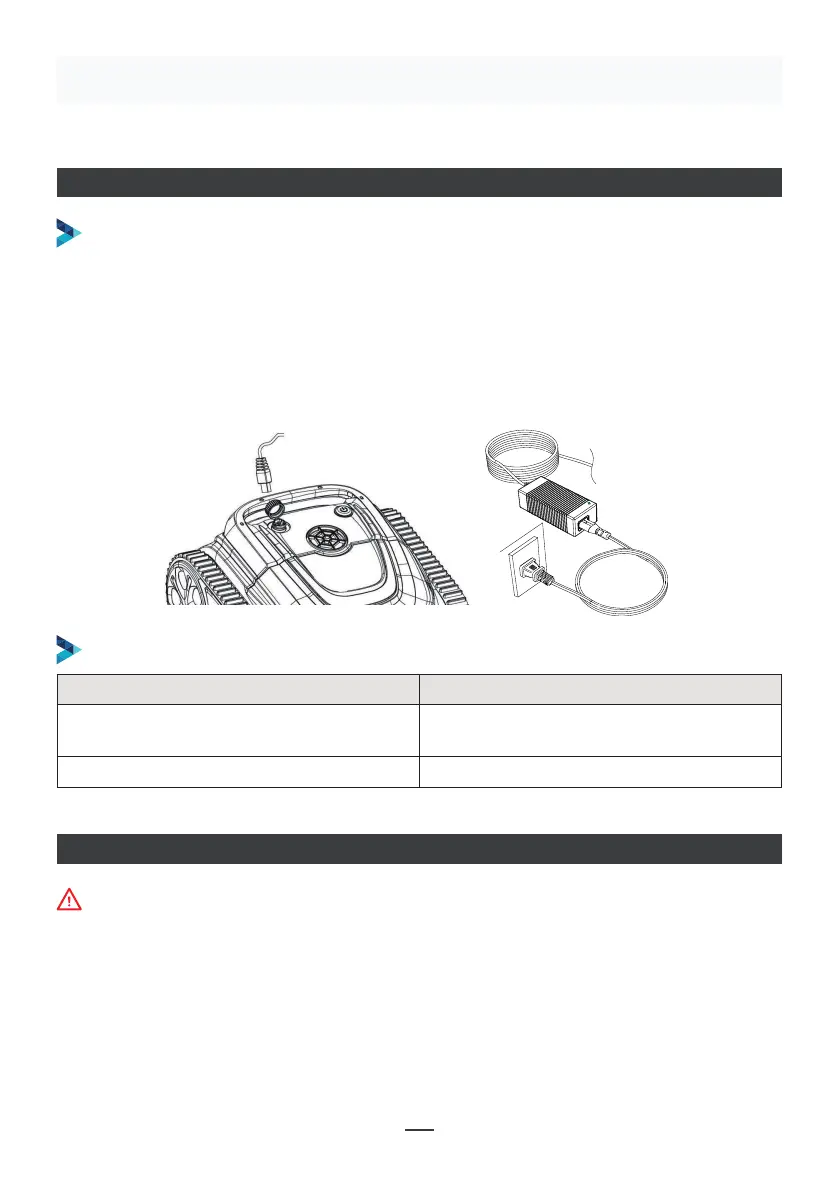
NABÍJENÍ ROBOTA
Ujistěte se, že je přístroj vypnutý (kontrolky jsou zcela zhasnuté). Za účelem nabití přístroj
vyjměte z bazénu a umístěte jej do vnitřních prostor, nebo tam, kde bude chráněn před
stříkanci vody. Odšroubujte z přístroje vodotěsnou krytku (ujistěte se, že je nabíjecí port
suchý) a propojte nabíjecí port s nabíjecím konektorem. Když kontrolka nabíječky baterie
svítí červeně, znamená to, že se přístroj nabíjí, když svítí zeleně, znamená to, že nabíjení
je dokončeno.
POSTUP NABÍJENÍ
INDIKÁTOR NABÍJEČKY
Make sure that the machine is turned off (the indicator lights are
completely off). When charging, please take the machine out of the
swimming pool, and place the machine indoors or in a splash-resistant
facility for charging. Unscrew the waterproof cap on the machine (ensure
that the charging port is dry) and connect the charging port with the
charging connector. When the battery charger light is red, indicating that it
is charging, when it turns green, it means that charging is completed.
4.3.1 Take out the filter basket: Place the cleaner on the shore, open the
cover plate by hand according to the position indicated in the figure (Figure
4-1), and the filter basket is shown in the figure (Figure 4-2).
4.2 Charge the robot
4.3 Clean the filter cartridge
4.2.2 Charger indicator
4.2.1 Charging Operation
LED Indicator Charging state
Green light is always on
Red light is always on Normal charging
plugged or the charging is complete
09
Figure 4-1 Figure 4-2
Kontrolka LED Stav nabíjení
Zelená kontrolka trvale svítí
Čeká se na nabití, nebo baterie není
zapojena, nebo je nabíjení dokončeno
Červená kontrolka trvale svítí Normální nabíjení
PŘIPOJENÍ APLIKACE
• Stáhněte si aplikaci:
1. způsob: Naskenujte níže uvedený QR kód (obrázek 5-1). Po jeho naskenování můžete
kliknout na odpovídající obchod (Apple Store, Play Store) a aplikaci si stáhnout
(obrázek 5-2).
Při připojování aplikace musí být přístroj mimo vodu.


 To Next Page
 Loading...