66
USEINSTRUÇÕES DE UTILIZAÇÃO
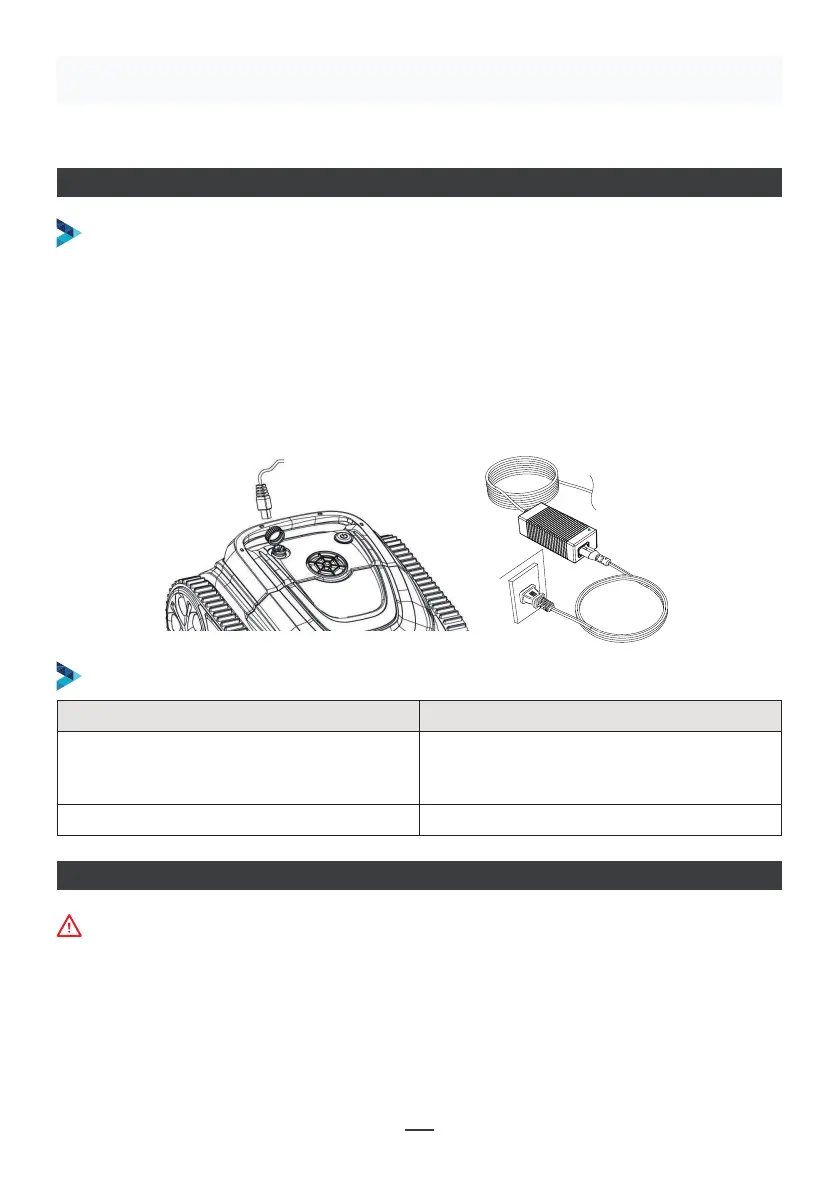
CARREGAR O ROBÔ
Certifique-se de que a máquina está desligada (as luzes indicadoras estão
completamente apagadas). Quando estiver a carregar, retire a máquina da piscina
e coloque-a dentro de casa ou num local resistente a salpicos de água para a
carregar. Desaparafuse a tampa à prova de água da máquina (certificar-se de que
a porta de carregamento está seca) e ligue a porta de carregamento ao conetor de
carregamento. Quando a luz do carregador de bateria está vermelha, indica que está
a carregar; quando fica verde, significa que o carregamento está concluído.
OPERAÇÃO DE CARREGAMENTO
INDICADOR DO CARREGADOR
Make sure that the machine is turned off (the indicator lights are
completely off). When charging, please take the machine out of the
swimming pool, and place the machine indoors or in a splash-resistant
facility for charging. Unscrew the waterproof cap on the machine (ensure
that the charging port is dry) and connect the charging port with the
charging connector. When the battery charger light is red, indicating that it
is charging, when it turns green, it means that charging is completed.
4.3.1 Take out the filter basket: Place the cleaner on the shore, open the
cover plate by hand according to the position indicated in the figure (Figure
4-1), and the filter basket is shown in the figure (Figure 4-2).
4.2 Charge the robot
4.3 Clean the filter cartridge
4.2.2 Charger indicator
4.2.1 Charging Operation
LED Indicator Charging state
Green light is always on
Red light is always on Normal charging
plugged or the charging is complete
09
Figure 4-1 Figure 4-2
Indicador LED Estado de carregamento
Luz verde sempre acesa
À espera de carregamento, ou a bateria
não está ligada ou o carregamento está
concluído
Luz vermelha sempre acesa Carregamento normal
LIGAÇÃO DA APLICAÇÃO
• Descarregar a aplicação:
Método 1: Digitalize o código QR abaixo (Figura 5-1). Após a digitalização, pode clicar na loja
correspondente (Apple Store, Android Store) para descarregar a aplicação (Figura
5-2).
A máquina deve estar fora da água quando estabelecer ligação com a APP


 To Next Page
 Loading...