90
USEANVÄNDNINGSINSTRUKTIONER
LADDA ROBOTEN
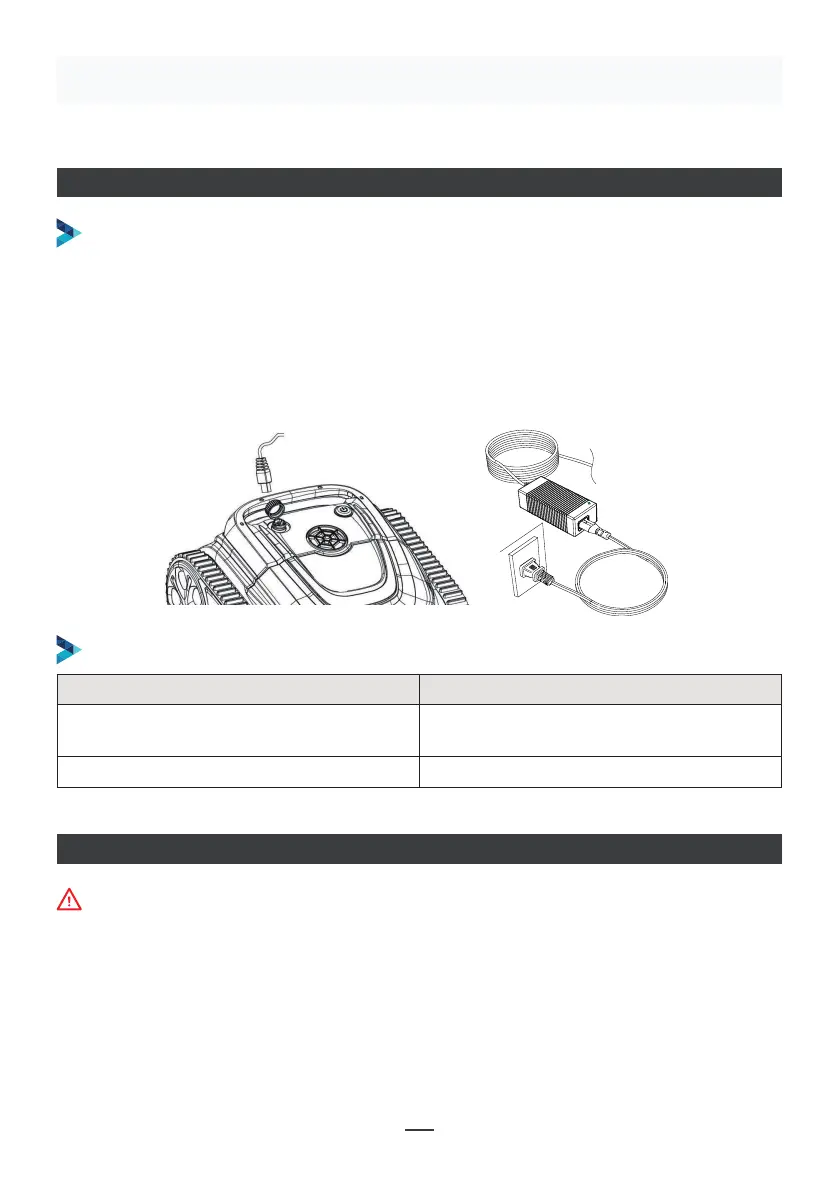
Se till att poolroboten är avstängd (indikatorlamporna är helt släckta). Vid laddning, ta
ut poolroboten ur poolen och placera den inomhus eller i en stänkbeständig anläggning
för laddning. Skruva av det vattentäta locket på maskinen (se till att laddningsporten är
torr) och anslut laddningsporten med laddningskontakten. När batteriladdarens lampa
är röd indikerar det att den laddas, när den blir grön betyder det att laddningen är klar.
LADDNINGSDRIFT
LADDNINGSINDIKATOR
Make sure that the machine is turned off (the indicator lights are
completely off). When charging, please take the machine out of the
swimming pool, and place the machine indoors or in a splash-resistant
facility for charging. Unscrew the waterproof cap on the machine (ensure
that the charging port is dry) and connect the charging port with the
charging connector. When the battery charger light is red, indicating that it
is charging, when it turns green, it means that charging is completed.
4.3.1 Take out the filter basket: Place the cleaner on the shore, open the
cover plate by hand according to the position indicated in the figure (Figure
4-1), and the filter basket is shown in the figure (Figure 4-2).
4.2 Charge the robot
4.3 Clean the filter cartridge
4.2.2 Charger indicator
4.2.1 Charging Operation
LED Indicator Charging state
Green light is always on
Red light is always on Normal charging
plugged or the charging is complete
09
Figure 4-1 Figure 4-2
LED-indikator Laddningsläge
Grönt ljus lyser alltid
Väntar på laddning, batteriet är inte
anslutet eller laddningen är klar
Röd lampa lyser alltid Normal laddning
APP-ANSLUTNING
• Ladda ner appen:
Metod 1: Skanna QR-koden nedan (bild 5-1). Efter skanning kan du klicka på motsvarande
butik (Apple Store, Android Store) för att ladda ner APPEN (bild 5-2).
Maskinen får inte vara i vattnet när du ansluter APPEN


 To Next Page
 Loading...