32
MAINTENANCEQUESTIONS FRÉQUENTESINSTRUCTION FOR USE
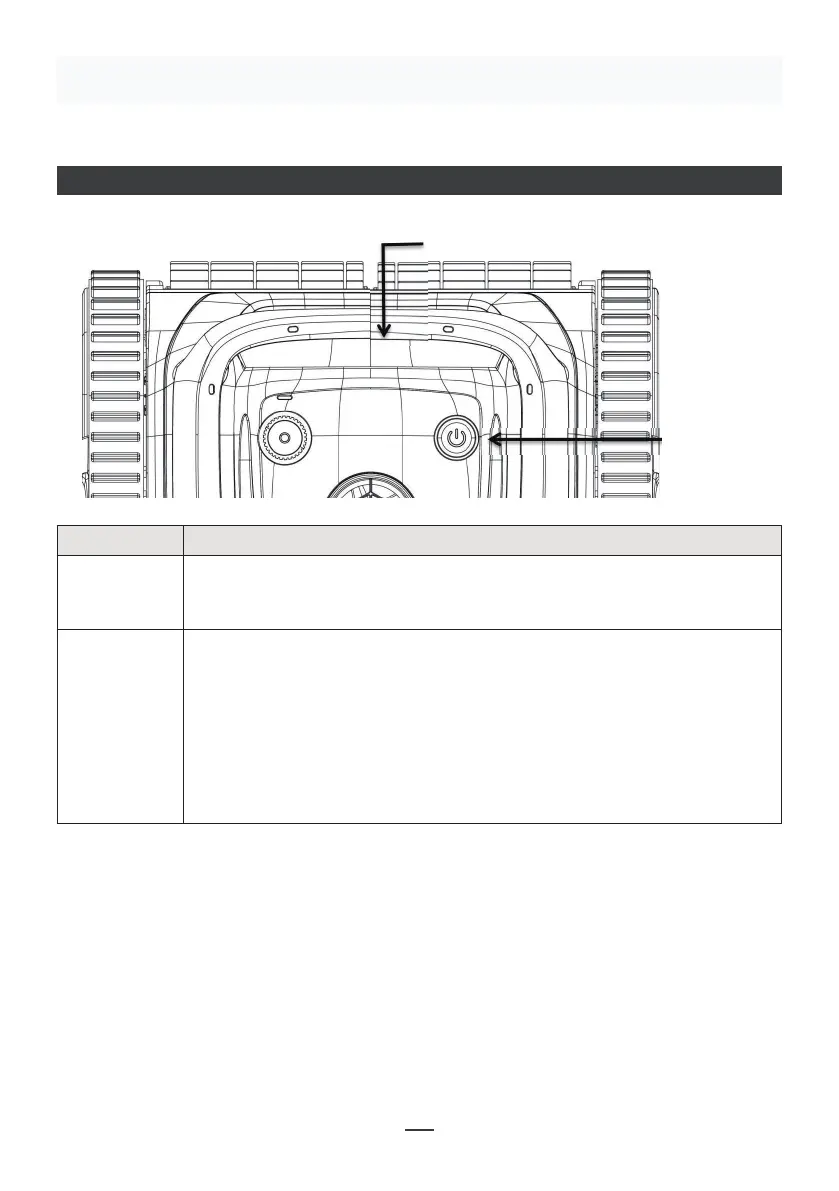
LED INDICATOR
4.1 LED lndicator
08
IV. Instruc�ons
Status indicator lights
Switch button
No. Symbol Descrip�on Descrip�on of func�ons
ON/OFF
Status Indicator
Press the ON/OFF : the blue light goes on, it
1. Blue light is always on: startup
it leans against the wall
4. Yellow light is always on: the machine has low
power, it leans against the wall and stops running
machine has failure
1:
personnel.
Status indicator lights
Switch button
Description Description of functions
ON / OFF
Press the ON/OFF : the blue light goes on, it indicates startup. Press
the button again, the red light goes on, it indicates shutdown. After
shutdown, the red light goes o.
Status
Indicator
1. Blue light is always on: startup
2. Blue light flashes: normal operation
3. Yellow light flashes: the machine has low power, it leans against the
wall
4. Yellow light is always on: the machine has low power, it leans against
the wall and stops running
5. Red light flashes and always lights up: the machine has failure
Troubleshooting:
When the red light of the machine flashes and is always on, shut down and restart the
machine. If it cannot return to normal running, please contact the after-sales service
personnel.


 To Next Page
 Loading...