114
USENÁVOD NA POUŽITIE
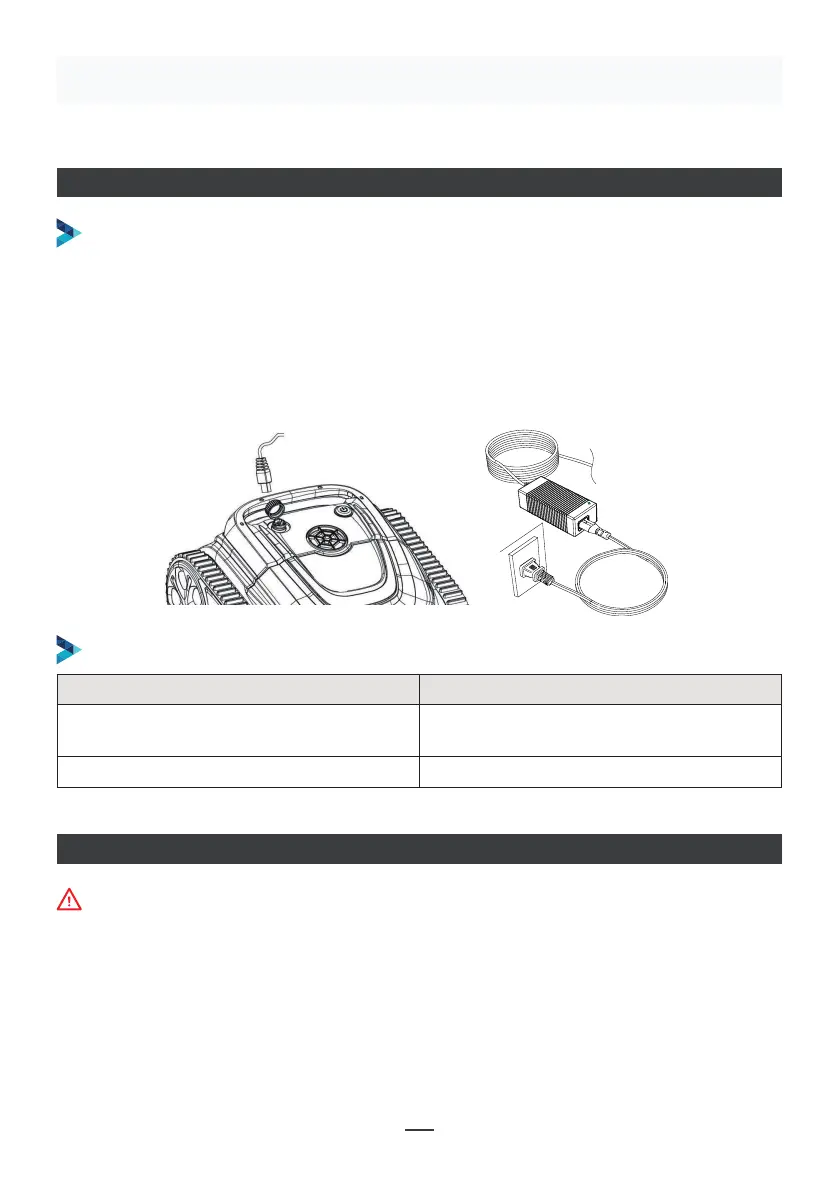
NABÍJANIE ROBOTA
Uistite sa, že je prístroj vypnutý (kontrolky sú úplne zhasnuté). Za účelom nabitia prístroj
vyberte z bazéna a umiestnite ho do vnútorných priestorov, alebo tam, kde bude
chránený pred vody. Odskrutkujte z prístroja vodotesnú krytku (uistite sa, že je nabíjací
port suchý) a prepojte nabíjací port s nabíjacím konektorom. Keď kontrolka nabíjačky
batérie svieti červeno, znamená to, že sa prístroj nabíja, keď svieti zeleno, znamená to,
že nabíjanie je dokončené.
POSTUP NABÍJANIA
INDIKÁTOR NABÍJAČKY
Make sure that the machine is turned off (the indicator lights are
completely off). When charging, please take the machine out of the
swimming pool, and place the machine indoors or in a splash-resistant
facility for charging. Unscrew the waterproof cap on the machine (ensure
that the charging port is dry) and connect the charging port with the
charging connector. When the battery charger light is red, indicating that it
is charging, when it turns green, it means that charging is completed.
4.3.1 Take out the filter basket: Place the cleaner on the shore, open the
cover plate by hand according to the position indicated in the figure (Figure
4-1), and the filter basket is shown in the figure (Figure 4-2).
4.2 Charge the robot
4.3 Clean the filter cartridge
4.2.2 Charger indicator
4.2.1 Charging Operation
LED Indicator Charging state
Green light is always on
Red light is always on Normal charging
plugged or the charging is complete
09
Figure 4-1 Figure 4-2
Kontrolka LED Stav nabíjania
Zelená kontrolka trvalo svieti
Čaká sa na nabitie, alebo nie je zapojená
batéria, alebo nabíjanie je dokončené
Červená kontrolka trvalo svieti Normálne nabíjanie
PŘIPOJENÍ APLIKACE
• Stiahnite si aplikáciu:
1. spôsob: Naskenujte nižšie uvedený QR kód (obrázok 5-1). Po jeho naskenovaní môžete
kliknúť na zodpovedajúci obchod (Apple Store, Play Store) a aplikáciu si stiahnuť
(obrázok 5-2).
Pri pripájaní aplikácie musí byť prístroj mimo vody


 To Next Page
 Loading...