20
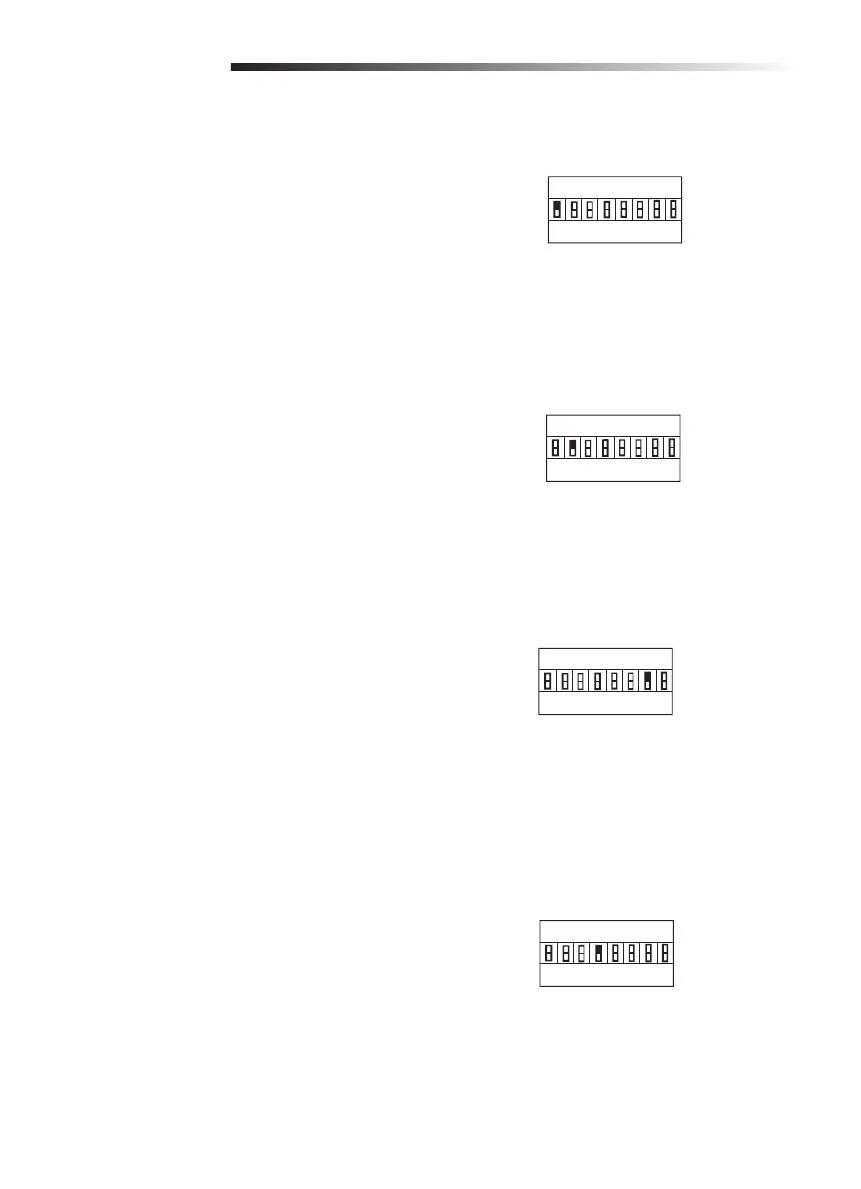
Increased Starting Force
When activated, the operator will run with higher
force for fi rst 2+/-1 seconds than the normal
running force.
1 ON = Higher starting force
1 OFF = Standard starting force
Partial Open Setting
When on, the partial open setting will open the
gate 1 meter. Refer to the Programming section for
instructions to program the remote control for this
setting.
2 ON = Partial Open ON
2 OFF = Partial Open OFF
Auto Closing Setting
Switches shall be used to set timer to close
duration from 0-105 seconds by adding the values
of each switch in the ON position. Each switch
value shall be the following:
6 ON = 15 seconds
7 ON = 30 seconds
8 ON = 60 seconds
Limit Switch Setting
Factory default is set to OFF (normal open).
4 ON = Travel limit switch is set to
normal close
4 OFF = Travel limit switch is set to
normal open
1 2 3 4 5 6 7 8
S1
ON
OFF
Increased Starting Force is on
SETTINGS
1 2 3 4 5 6 7 8
S1
ON
OFF
Partial Open is on
1 2 3 4 5 6 7 8
S1
30 Seconds
ON
OFF
1 2 3 4 5 6 7 8
S1
Normal open
ON
OFF






 To Next Page