26
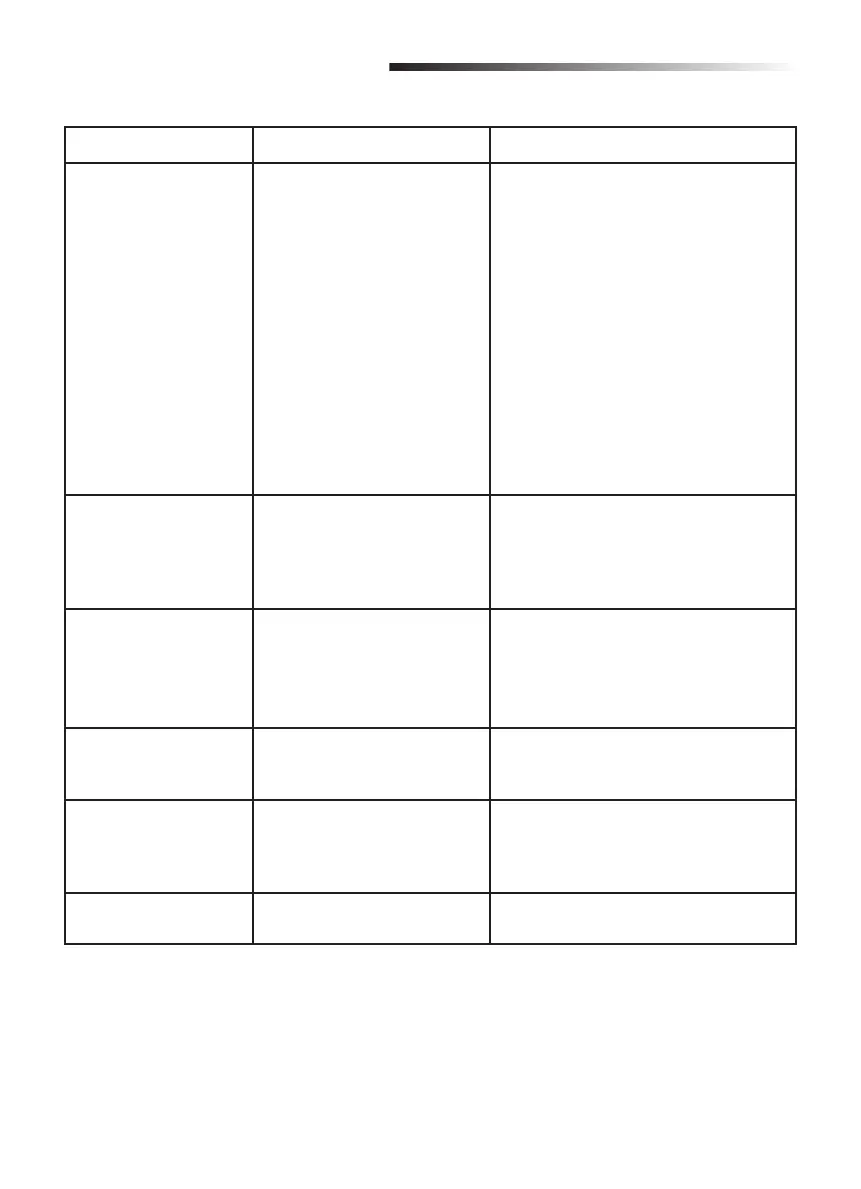
Trouble Cause Solution
The operator will not
work from the remote
control.
1. The plug is not securely
connected.
2. The clutch is disengaged.
3. Photoelectric sensor or
edge sensor malfunction.
4. The fuse is blown.
5. The remote control code
has been erased.
6. The remote control battery
power is too weak or dead.
1. Have the power supply connected
securely by a qualifi ed technician.
2. Engage the clutch with the release
key.
3. Check the photoelectric sensors and
edge sensors. If the photoelectric
sensors or edge sensors are
damaged, replace with a new pair. If
no sensors are installed, connect the
GND terminal and IR terminal with a
short cable.
4. Replace the fuse.
5. Reprogram the remote control.
6. Replace the remote control battery.
When opening or
closing the gate, the
gate does not stop
when the block touches
the limit switch.
1. The SW1 and SW2 terminal
connections are reversed.
2. The motor wire connections
are reversed.
1. Switch the SW1 and SW2 terminal
connections.
2. Switch the motor wire connections.
The gate does not
reverse when meeting
obstacles.
1. The gate closing direction
has been set incorrectly.
2. The force is set too high.
1. Set dip switch 5 to the opposite
position.
2. Turn the force setting dial
counterclockwise to adjust the force to
a proper level.
The gate opens
automatically during the
closing procedure.
The force is set too low. Turn the force setting dial clockwise to
adjust the force to a proper level.
The gate opens
automatically when
the door is completely
closed.
The gate closing direction
has been reversed and the
automatic closing gate
function is active.
Set dip switch 5 to the opposite position.
The gate does not open
completely.
The user controls the gate by
partial open button in error.
Control the gate by pressing full
opening/closing button.
TROUBLESHOOTING





 To Next Page