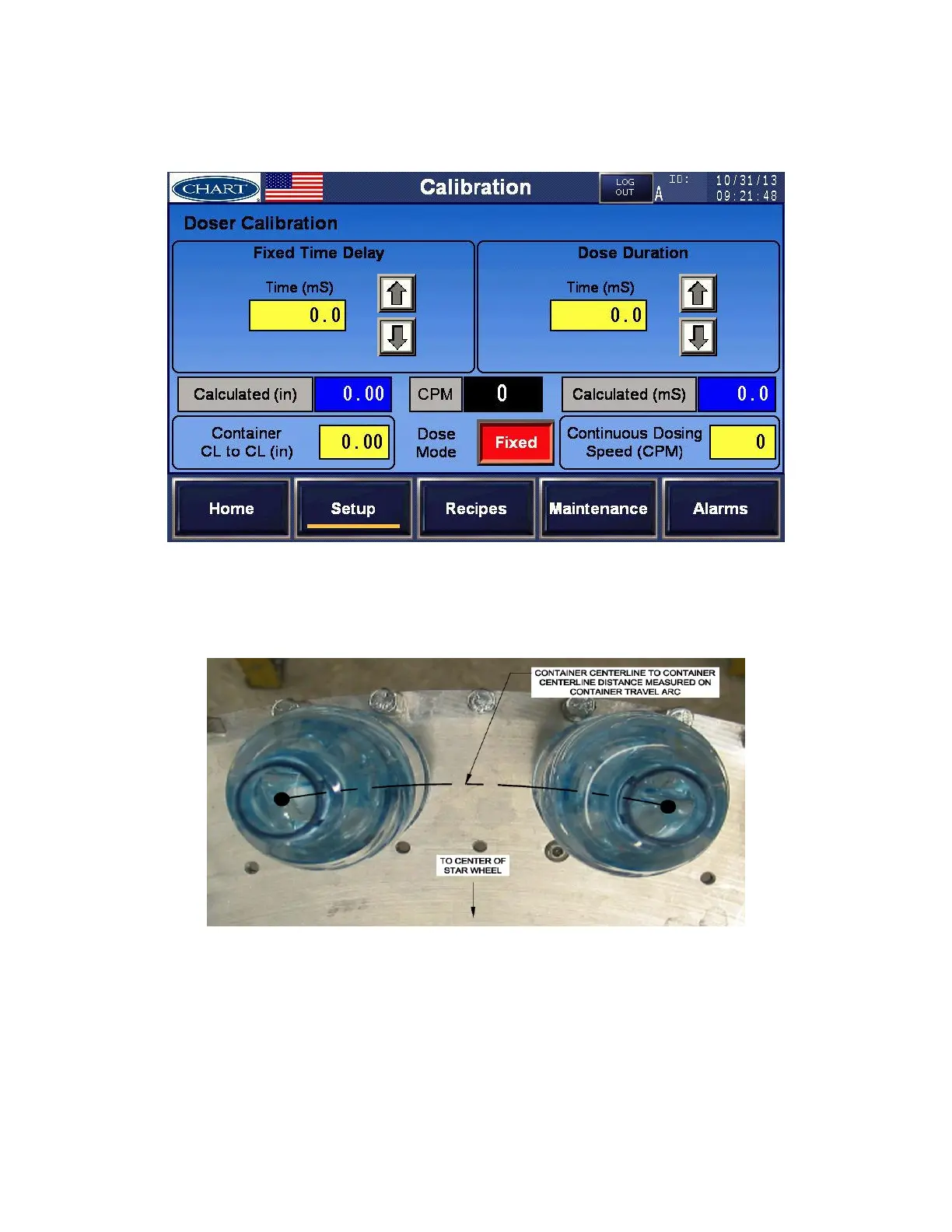
11. The calculated Dose Duration (mS) is displayed in the blue box under the Distance Delay
Calibration setup.
Fixed Dose Mode
Enter Setup Parameters for Fixed Dose Mode:
1. Measure and enter the distance between two containers, centerline to centerline in the
‘Container CL to CL’ field. See image below for additional information in determining this
value.
2. Enter the ‘Continuous Dosing Speed (CPM)’. This is the maximum speed at which the
UltraDoser 2K will dose in discrete (pulse) mode. If the line speed exceeds this user entered
value, the UltraDoser 2K will dose in continuous (stream) mode.
3. Enter the ‘Fixed Time Delay’. This is the amount of time the system will wait (in
milliseconds) after the bottle detect sensor has been detected until the dose duration (in
milliseconds) begins.


 To Next Page