Inputs/Outputs
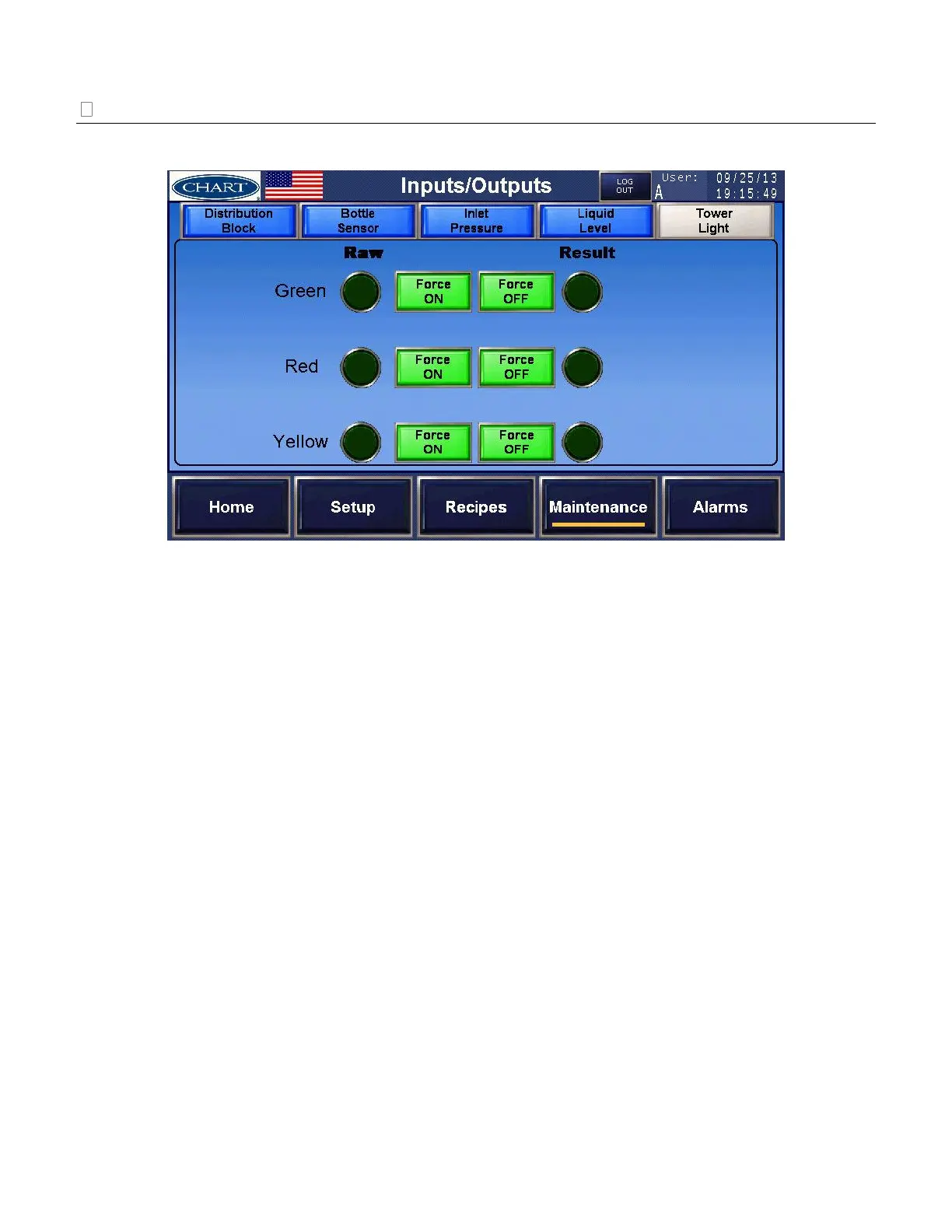
Tower Light – troubleshoot the tower lights
These are the three colored lights on top of the 2K controller.
a) Green Light – press the ‘Force On’ toggle pushbutton to turn the green light on. Press the
‘Force Off’ toggle pushbutton to turn the green light off. The force action is enabled when
the pushbutton is red. Disable both forces to return the green light to normal operation.
b) Red Light – press the ‘Force On’ toggle pushbutton to turn the red light on. Press the
‘Force Off’ toggle pushbutton to turn the red light off. The force action is enabled when
the pushbutton is red. Disable both forces to return the red light to normal operation.
c) Yellow Light – press the ‘Force On’ toggle pushbutton to turn the yellow light on. Press
the ‘Force Off’ toggle pushbutton to turn the yellow light off. The force action is enabled
when the pushbutton is red. Disable both forces to return the yellow light to normal
operation.


 To Next Page