Chevrolet Tracker MY25 Owner Manual Mexico and Caribbean (GMSA-Localizing-Mexico-18450403) - 2025
52 Instruments and Controls
Caution
When adding electrical equipment,
b
e sure to follow the proper
installation instructions.
Utilization of equipment within the power
outlet without verifying the characteristics,
not validated or certified by the device
manufacturer can cause damage not
covered by the vehicle warranty.
It is mandatory to assure maximum load
does not exceed 120W and 10A.
The extended use of devices with
the vehicle engine off can discharge
the battery.
When getting out the vehicle always
remove the accessory plugged in the
power outlet.
When not using the power outlet always
keep it close to avoid and object to fall
inside the it. Depending on the object, it can
cause short circuit and contact isolation.
Extremely important to keep the area clean.
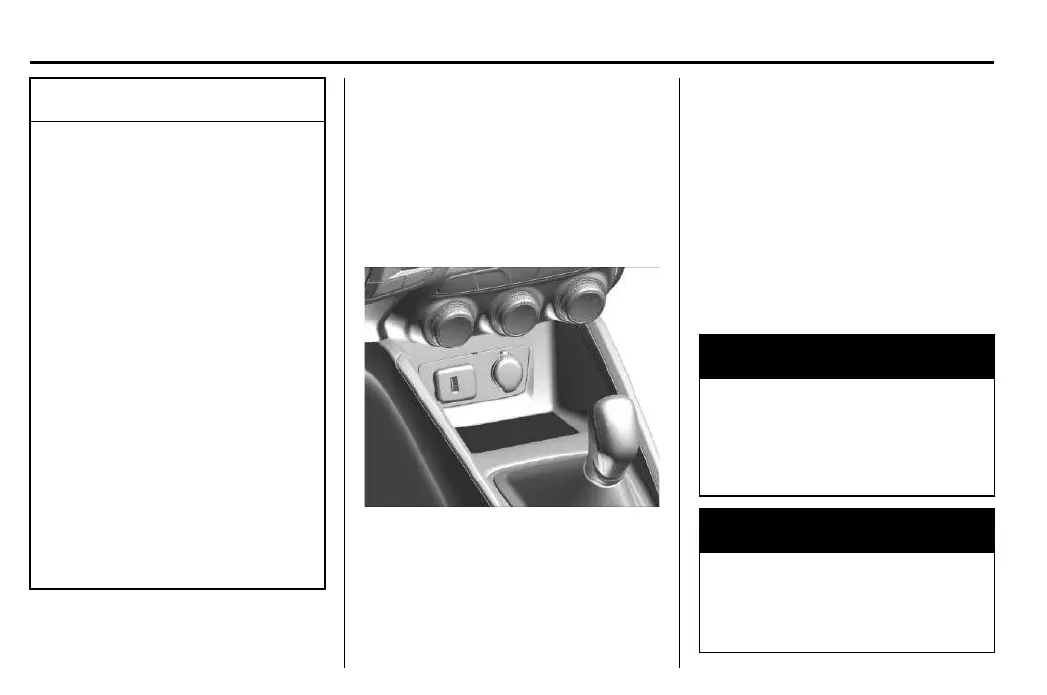
Wireless Charging (If equipped)
T
he vehicle may have awireless charging
compartment in the centre console. The
system wirelessly charges one Qi compatible
mobile device.
To check for phone or other device
compatibility, see your Chevrolet Dealership or
Authorized Repair Shop for details.
The ignition must be on in On/Run, ACC/
A
CCESSORY, or Retained Accessory Power (RAP)
must be active. The wireless charging feature
may not correctly indicate charging when the
vehicle is in RAP. See Retained Accessory Power
(RAP) 3112.
The system may not operate en extreme
w
eather conditions.
To charge amobile device:
1. Find the charging pad below the climate
control system panel.
2. Remove all objects from the charging
pad. The system may not charge if there
are any objects between the phone and
charging pad.
3. Place the mobile device face up on the
charging pad.
{ W
arning
Wireless charging can affect the operation
o
f an implanted pacemaker or other
medical devices.If you have one, it is
recommended to consult with your doctor
before using the wireless charging system.
{ W
arning
Remove all objects from the charging
p
ad before charging your compatible
smartphone. Objects, such as coins, keys,
(Continued)






 To Next Page