Chevrolet Tracker MY25 Owner Manual Mexico and Caribbean (GMSA-Localizing-Mexico-18450403) - 2025
78 Infotainment System
Finding aStation
S
eeking aStation
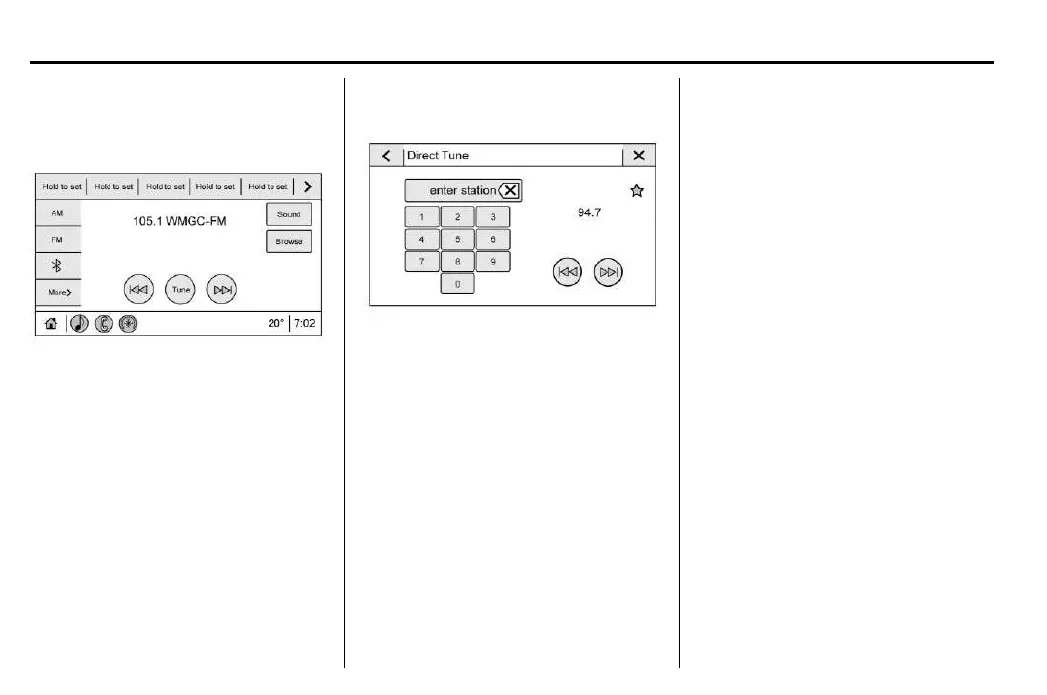
From the AM, FM option, touch g
or d on
the infotainment display to search for the
previous or next strong station or channel.
Browsing Stations
From the AM, FM display, touch Y to list all
available stations or channels. Navigate up and
down through all stations by scrolling the list.
Touch the station or channel you want to listen
to. Touch H to save the station or channel as
afavorite.
Touch Update Station List to update the active
stations in your area.
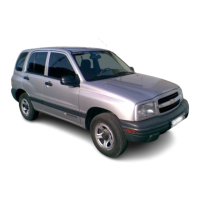
Direct Tune
Access Direct Tune by touching the Z
icon
on the infotainment display to bring up the
keypad.
Navigate up and down through all frequencies
using g or d. Directly enter astation or
channel using the keypad. When a new station
or channel is entered, the information about
that station or channel displays on the right
side. This information will update with each
new valid frequency. Touch H to save the
station as afavorite.
The keypad will gray out entries that do
n
ot contribute to avalid frequency and will
automatically place a decimal point within the
frequency number.
Touch (X) to delete one number at a time. Touch
and hold (X) to delete all numbers.
A valid AM or FM station will automatically
tune to the new frequency but not close the
Direct Tune display. Touch the Back icon or z
on the infotainment display to exit out of
Direct Tune.
The tune arrows on the right side of the Direct
Tune display tunes through the complete
station list one station step at atime per
touch. Atouch and hold advances through
stations quickly.
Storing Radio Station Favorites
Favorites show in the area at the top of
the display.
AM, FM Radio Stations : Touch and hold
apreset slot to save the current station as
afavorite. Touch asaved favorite to recall
afavorite station.
Favorites can also be stored by touching H
in astation list. This will highlight indicating
that it is now saved as afavorite.






 To Next Page