14
UK
Chloride Active
945044.066
Please use only the supplied fasteners to attach the supplied mounting brackets to the UPS or external
battery packs.
If external battery packs are included in your installation, please mount them fi rst and as low as possible.
Start with the lowest available position and work up. Your UPS should be installed last and end up on the
top of all the battery units for proper cable routing.
ATTENTION: Use all supplied mounting hardware on each UPS and external battery pack. NEVER depend
on lower devices to support other devices.
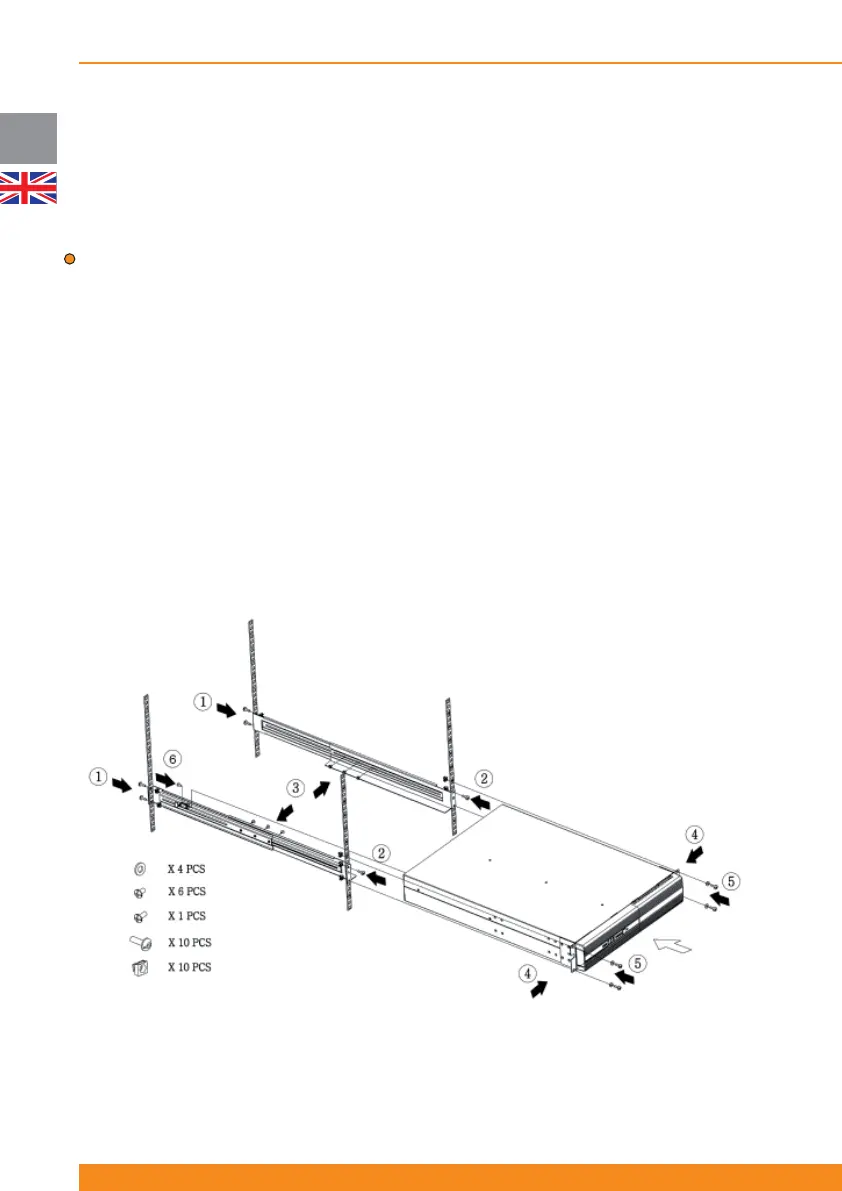
All mounting materials are available (bundled or optionally) to install the UPS into a rack. To prepare the
UPS and external batteries for use in a rack confi guration, fi rst install the sliding rails (optional accessory),
and then install the UPS and batteries following the steps below:
1. Attach rear of rails to rear of rack with two screws provided
2. Attach front of rails to front of rack with one screw provided
3. Assemble side rails and secure each rail together with three screws
4. Attach front brackets to each side of UPS with four screws on each side
5. Slide UPS into position in the rack and secure with two screws on each side of UPS
6. Attach rail to rear side of the UPS (fi xing point for safer transportation)
7. Repeat the above steps for each UPS or battery pack to be mounted
After mechanical installation is complete, please read section 4 for proper commissioning and operation of
the system.



 To Next Page