21
Chloride Active
UK
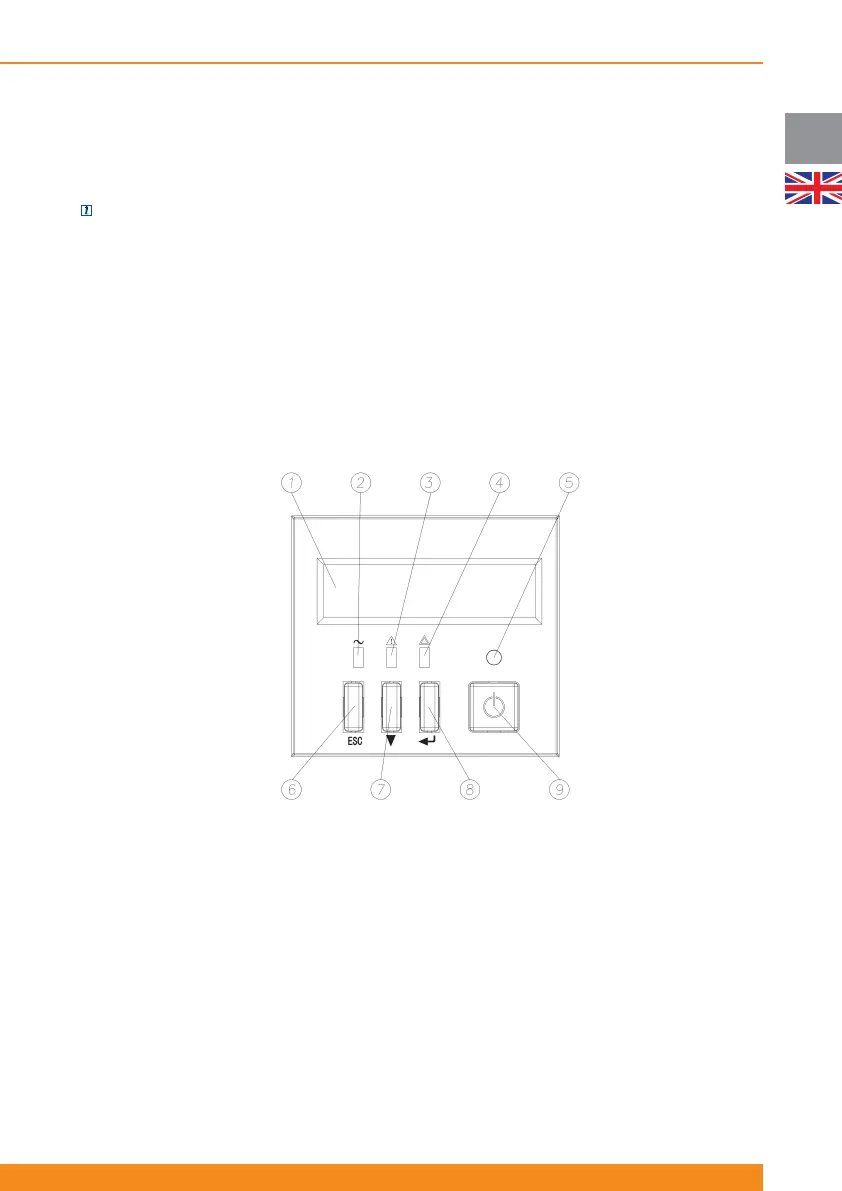
4.2.2 Units with LCD Display
Depending on your local market, the UPS can be equipped with a front panel with a LCD Display instead of
LED indicators.
NOTE: for units with front panels with LED indicators, front panels with LCD display are available as an
accessory and have to be ordered separately
1. Display
2. Mains LED (green): illuminates if mains input power is within tolerances
3. Bypass Mode/ECO Mode LED (orange): illuminates if the unit is in bypass (forced, due to ECO mode…)
4. Fault LED (red): illuminates if the unit is reporting a fault: battery fault, inverter fault, BUS fault…
5. Inverter ON LED (green): illuminates if the inverter is ON
6. ESC Button (goes up one level on the menu hierarchy). Note: press this button for three seconds to reset
the LCM alarm (alarm which indicates end of estimated battery life).
7. Scroll-Down Button (scrolls down through menus and submenus)
8. ENTER Button (goes down one level on the menu hierarchy or selects the displayed option)
9. Inverter ON/OFF Button (Switches on/off the inverter)



 To Next Page