23
Chloride Active
UK
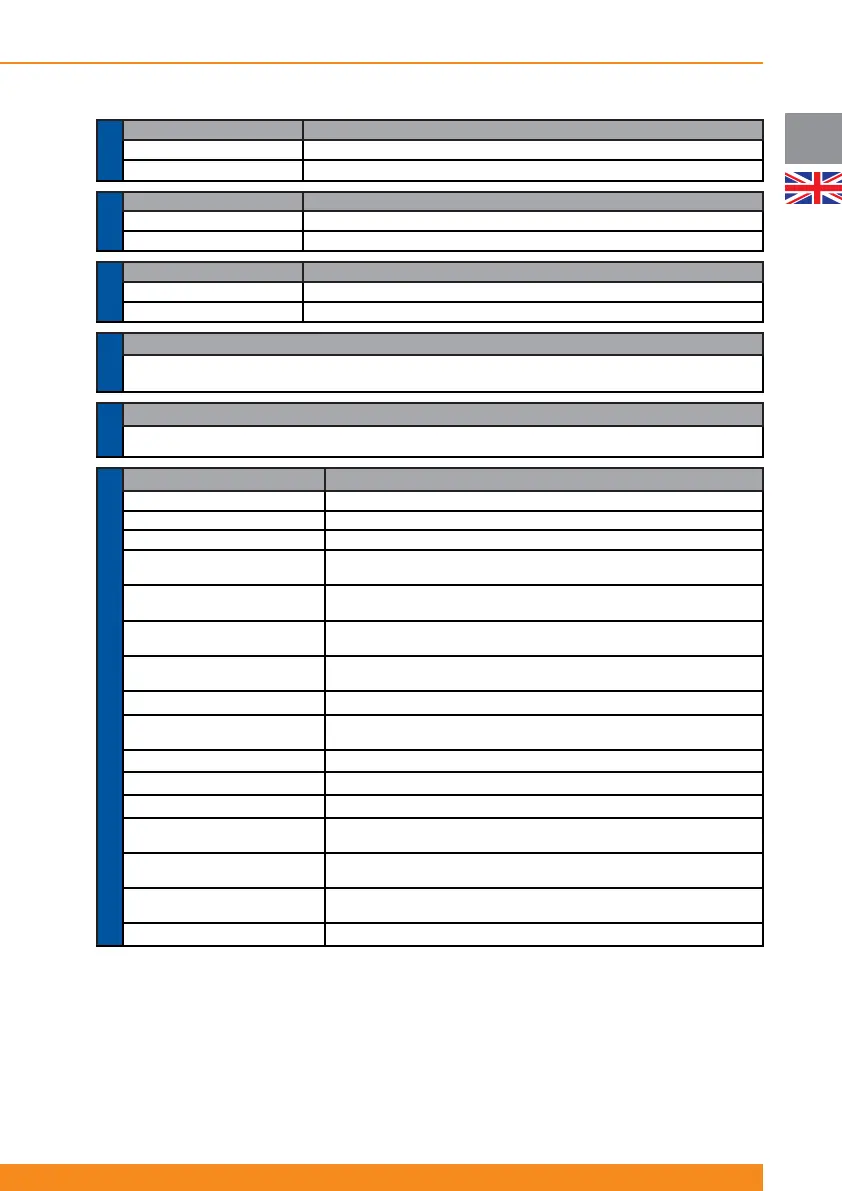
Submenu Functionality
1.1 Acoustic Alarm Activation or deactivation of acoustic alarm (buzzer)
1.2 Manual Battery Test Performs a battery test when this option is selected
MENU 1.-
CONTROL
Submenu Functionality
2.1 UPS Status Displays global UPS Status (operation mode, faults, warnings…)
2.2 Input/Output Status Displays input and output values (voltage, frequency, load…)
MENU 2.-
STATUS
Submenu Functionality
3.1 Language Language selection (English, Spanish, Italian, French, Portuguese, German)
3.2 Output Voltage Selects nominal output voltage (200V, 208V, 220V, 230V or 240V)
MENU 3.-
SETUP
Functionality
Displays the last fi ve events (faults, warnings…) stored by the UPS and the runtime when they happened. These
stored events are explained in section 4.2.2.2
MENU 4.-
LOGGING
Functionality
Displays power rating, serial number of the UPS, fi rmware version and current unit runtime
MENU 5.-
ABOUT
Submenu Functionality
6.1 Frequency Converter Enables or disables this operation mode (please check 4.1.5 and 4.4.6 for more details)
6.2 Output Frequency Selects nominal output frequency: 50Hz or 60Hz (only frequency converter mode)
6.3 Manual Bypass Forces the UPS to bypass mode and vice-versa
6.4 Controllable Outlet 1 Manual
Setting
Switches on/off outlet 1 (1st group of output controllable sockets)
6.5 Controllable Outlet 2 Manual
Setting
Switches on/off outlet 2 (2nd group of output controllable sockets)
6.6 Controllable Outlet 1 Level
Selects remaining battery capacity level (75%, 50%, 25% or 0%) below which
outlet 1 (1st group of output controllable sockets) automatically switches off
6.7 Controllable Outlet 2 Level
Selects remaining battery capacity level (75%, 50%, 25% or 0%) below which
outlet 2 (2nd group of output controllable sockets) automatically switches off
6.8 Cold Start Enables/disables this functionality (start-up without mains power)
6.9 Auto Re-Start
Enables/disables this functionality (automatic start-up after autonomy time has
fi nished and upon mains power comeback)
6.10 ECO Mode Enables or disables this operation mode (please check 4.1.4 and 4.4.5 for more details)
6.11 Site Wiring Fault
Enables/disables this functionality (detection of input phase-neutral inversion)
6.12 Automatic Battery Test Sets automatic battery test interval (daily, weekly, monthly…)
6.13 External Battery Capacity
Selects external battery capacity (Ah) for special / customized confi gurations,
in steps of 9Ah up to 250Ah (value selected pressing scroll-down button)
6.14 External Charger Selection
Selects the number of external battery chargers (available as accessory for
special / customized confi gurations) connected, from 1 to 3
6.15 Pre-alarm Level Selection
Selects the remaining battery capacity level (75%, 50%, 25% or 0%) below
which the “Battery Low” signal is activated
6.16 Protocol selection Communication protocol selection for particular advanced applications
MENU 6.- ADVANCED OPTIONS
Menu 6 includes options for advanced user and, consequently, access to this menu is protected with a password
(a certain combination of keys).
When this menu is selected, you will be asked to press the code keys (PRESS CODE KEYS (CHECK U.
MANUAL)). Correct code keys combination is:
Press ESC button and release it - press scroll-down button and release it - press ENTER button and release it.
If this sequence and combination of keys is followed, access to the menu will be granted and the display will
show ACCESS GRANTED ATTENTION! If not, an error message will show (ACCESS DENIED WRONG
CODE KEYS).



 To Next Page