EL DC Instalation and operation manual v13.docx
49 / 56
7. HUMAN MACHINE INTERFACE
CINERGIA delivers, within the scope of the supply, a Human Machine Interface software that
communicates with the equipment using MODBUS protocol.
The software is based on a Tab Dialog, in which each tab has one of the following purposes:
- OPERATION
- ALARM
- SUPERVISION
- UNIPOLAR (CURRENT, POWER, IMPEDANCE, VOLTAGE)
- BIPOLAR (CURRENT, POWER, IMPEDANCE, VOLTAGE)
- DC SEQUENCE
Further information of each kind of tab can be found in the following sections.
7.1. Operation
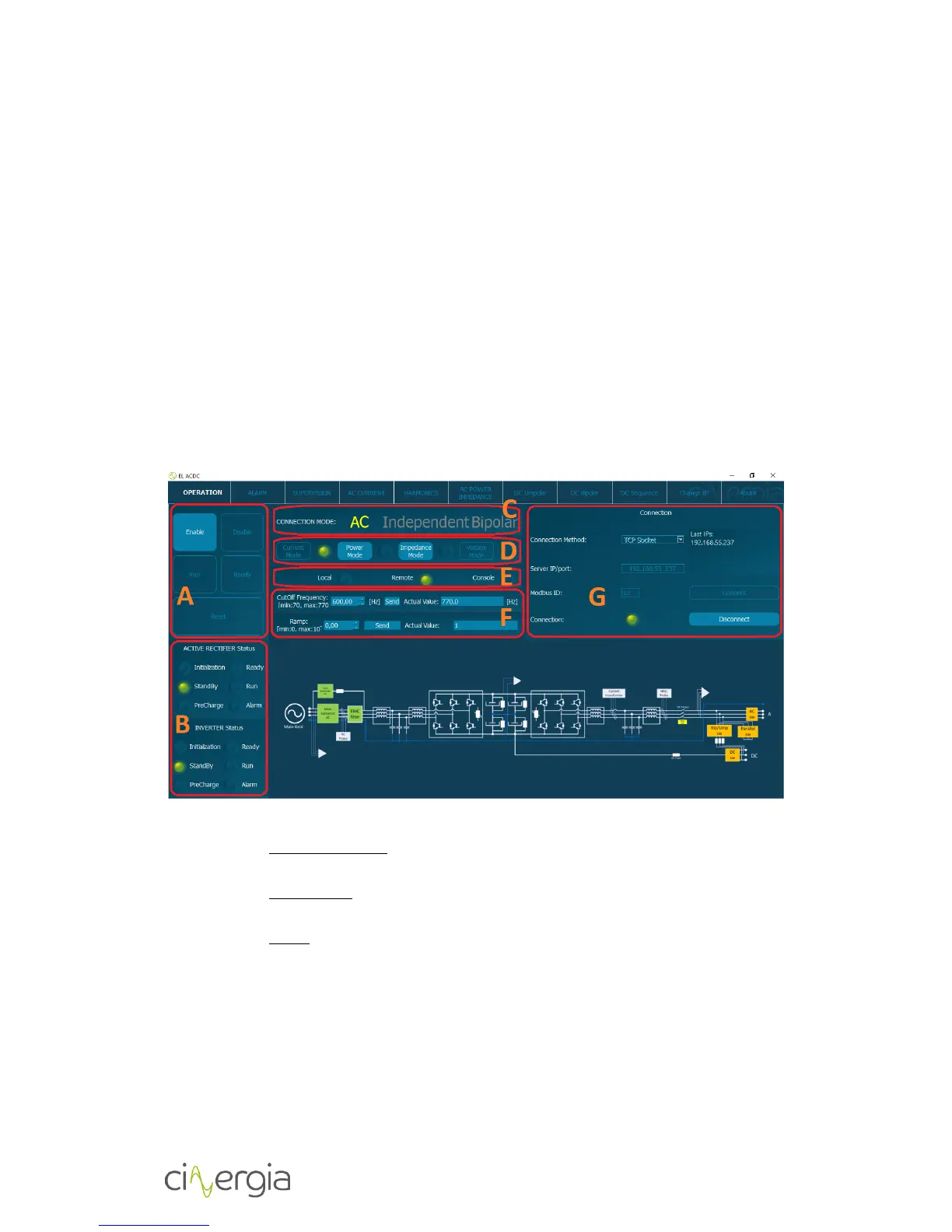
- A: Information about the status of the equipment and buttons to control it:
- Enable / Disable: the corresponding led shows whether the equipment is
enabled or disabled.
- Run / Ready: the corresponding led shows whether the equipment is running or
is ready for operation.
- Reset: it allows the user to reset all the alarms that have occurred and that have
been previously announced.
- B: Information about of Active Rectifier and Inverter status.
- C: Connection mode. Informs about the connection:
- DC independent/parallel unipolar
- DC independent bipolar (note that parallel bipolar is not allowed)
- D: Choose the control mode (CI, CC, CP or CV) in any state instead of RUN.
- E: Informs about which is the equipment’s control:
- Local: control from LCD screen.


 To Next Page