EL DC Instalation and operation manual v13.docx
39 / 56
5.2.2. Operational
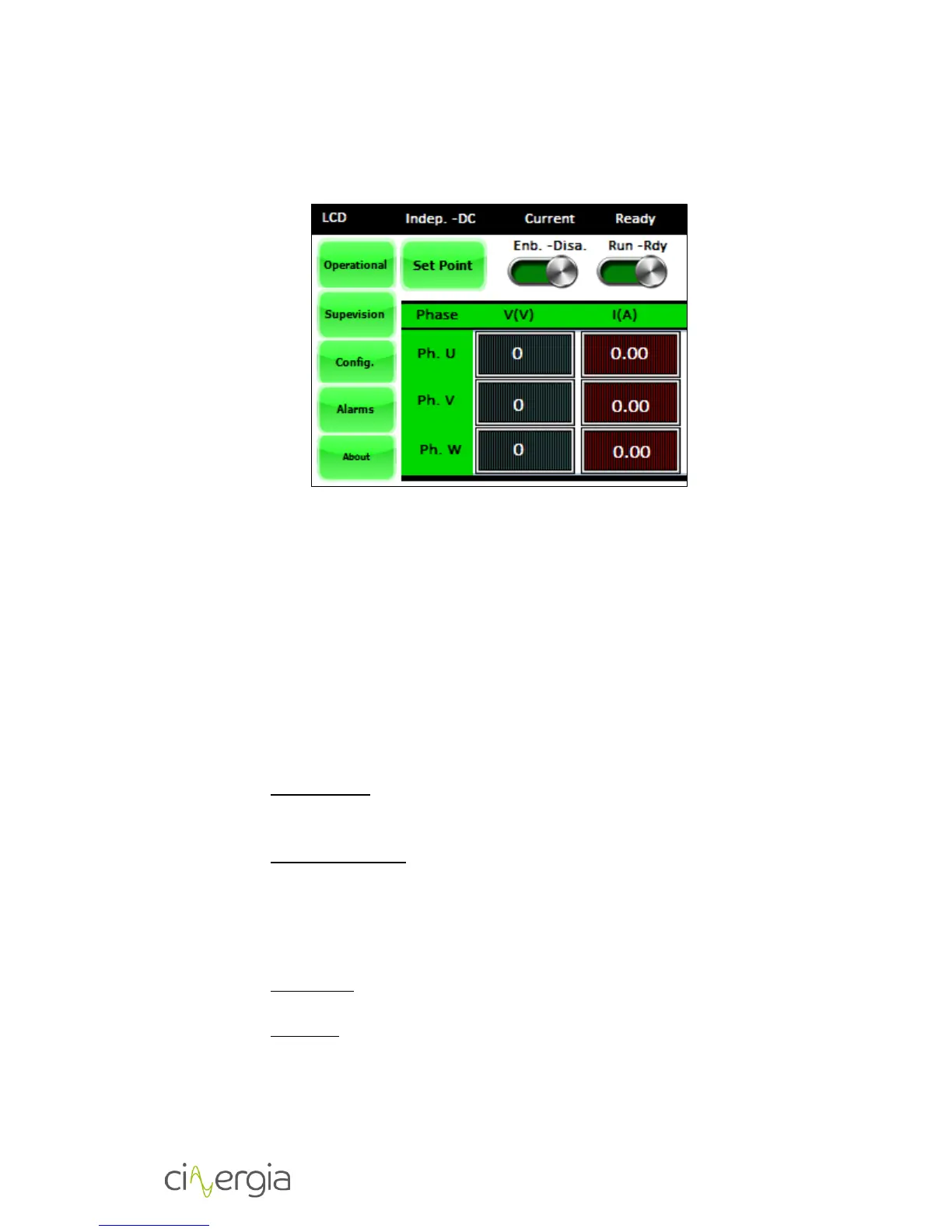
The main purpose of the Operational menu is allowing the user to introduce set-points as well
as manage the power supply State Machine (as long as the Local control is activated).
The user gets to read the following information as well:
Output voltage
Output current
The output current has a resolution until the second decimal, while the output voltage is
truncated on the units.
State Machine
By means of the ENABLE/DISABLE and RUN/READY buttons the user can manage the
power converters State Machine as long as the Control variable is set to LCD.
ENABLE/DISABLE: the function of this button depends on the power converters state:
o Standby State: the ENABLE/DISEABLE button is released. By pressing the
ENABLE/DISEABLE button the user orders the system to move to the Ready
state.
o Ready & Run States: the ENABLE/DISEABLE button is pressed. By pressing the
ENABLE/DISEABLE button the user orders the system to disable the power
converters.
The ENABLE/DISEABLE button has no effect in every other state.
RUN/READY: the function of this button depends on the power converters state:
o Ready State: the RUN/READY button is released. By pressing the RUN button
the user orders the system to move to Run State.
o Run State: the RUN/READY button is pressed. By pressing the RUN button the
user orders the system to return to Ready State.
The RUN/READY button has no effect in every other state.


 To Next Page