DA-1000 User’s Manual
17
Chapter 1: Product Introductions
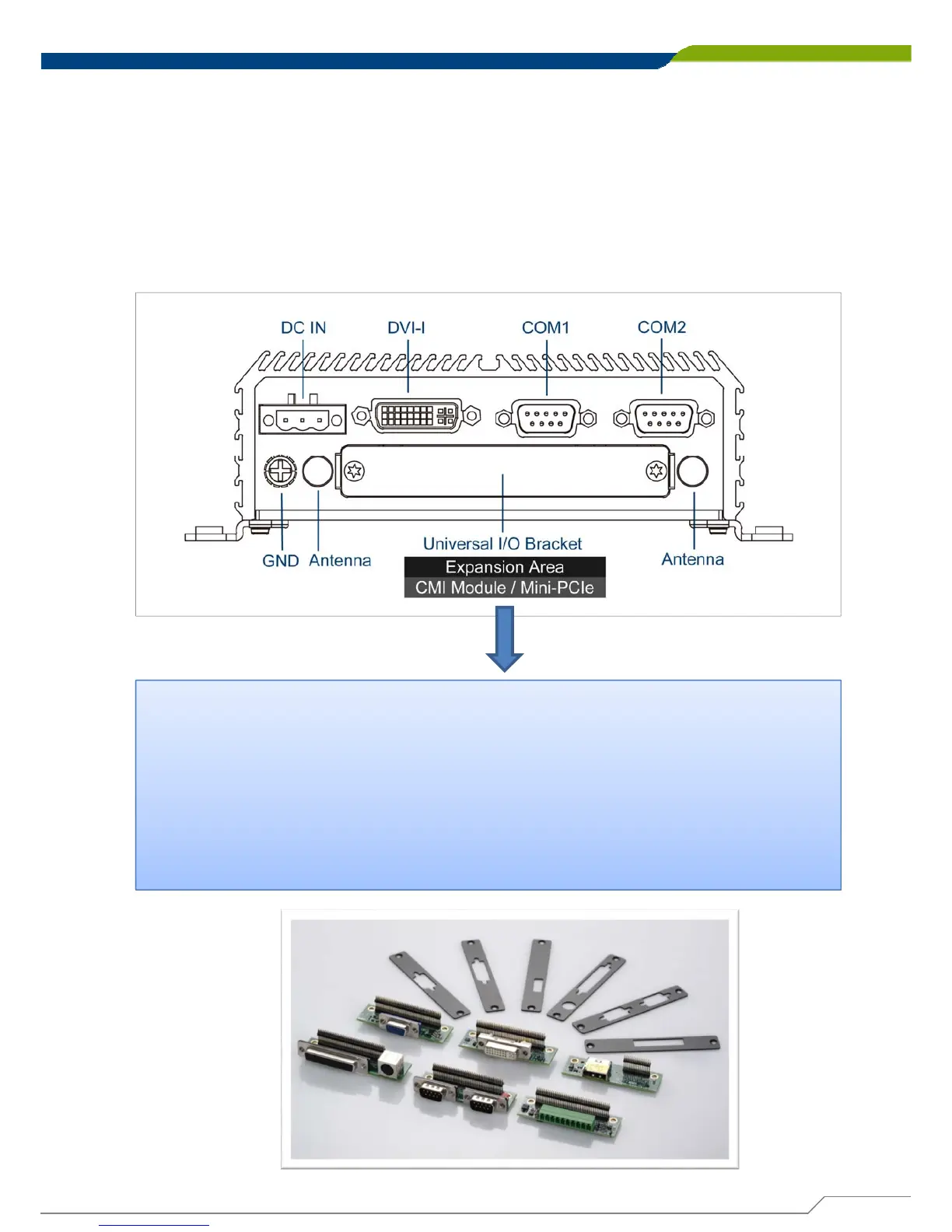
Rear Panel
DC IN Terminal Block
Used to plug a DC power input with terminal block
DVI-I Port
Used to connect a DVI monitor or connect optional
split cable for dual display mode
Antenna Hole
Used to connect an antenna for optional Mini-PCIe
WiFi module
COM Port
COM 1 ~ COM 2 support RS232/422/485 serial
device
Universal I/O Bracket
This expansion area is reserved for Mini-PCIe expansion or Cincoze
own pin-defined interface (CMI). CMI interface supports various type
of I/O modules such as COM / DIO / DisplayPort / DVI / LPT & PS2 /
VGA.
Do not change the CMI module by yourself, it may cause damage to
your DA-1000. Please contact with your regional dealer for more
information about it.



 To Next Page