2-19
Catalyst 3650 Switch Hardware Installation Guide
OL-29734-01
Chapter 2 Switch Installation
Connecting Devices to the Ethernet Ports
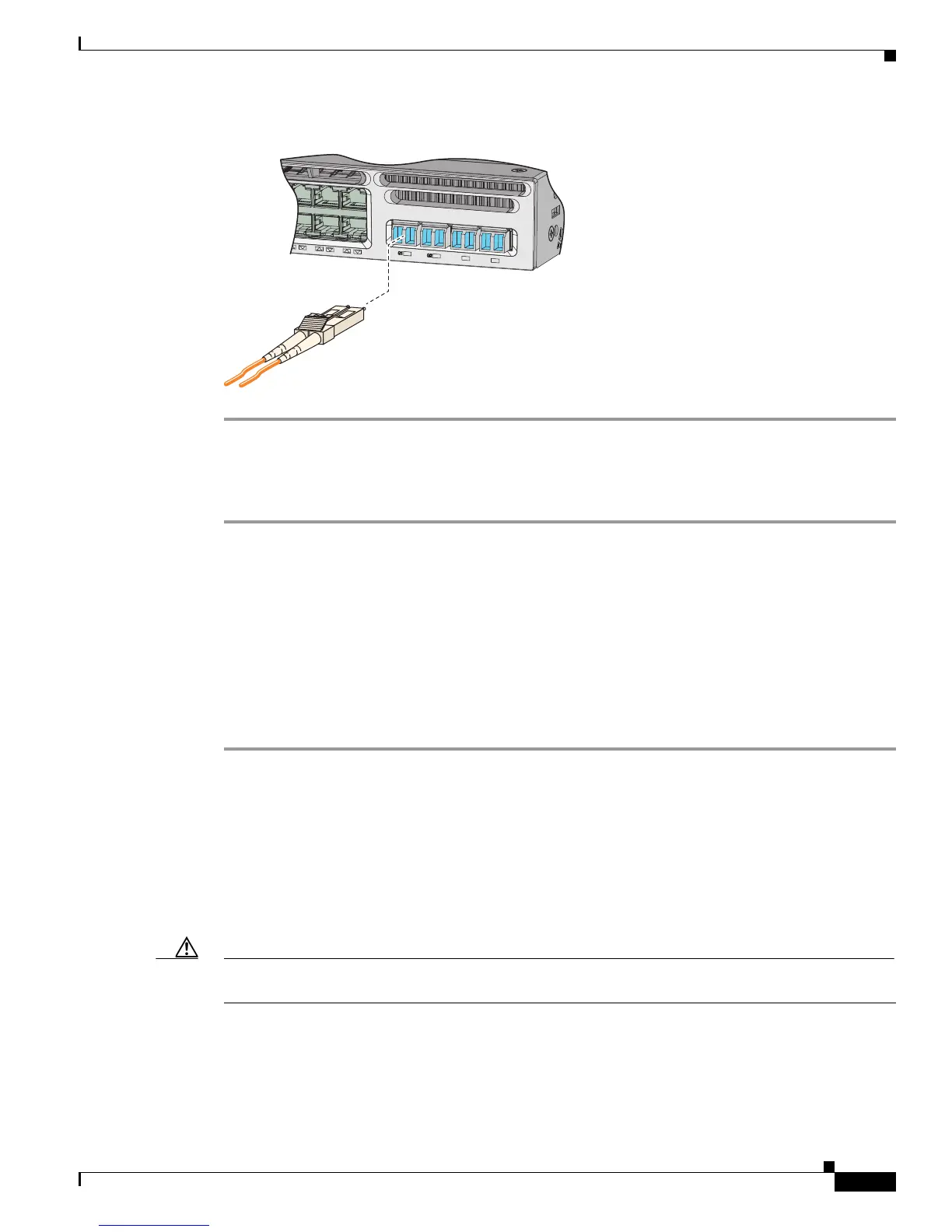
Figure 2-16 Connecting an SFP Cable to an SFP Module Installed in an Uplink Port
Removing SFP or SFP+ Modules
Step 1 Attach an ESD-preventive wrist strap to your wrist and to an earth ground surface.
Step 2 Disconnect the cable from the SFP module. For reattachment, note which cable connector plug is send
(TX) and which is receive (RX).
Step 3 Insert a dust plug into the optical ports of the SFP module to keep the optical interfaces clean.
Step 4 If the module has a bale-clasp latch, pull the bale out and down to eject the module. If you cannot use
your finger to open the latch, use a small, flat-blade screwdriver or other long, narrow instrument to open
it.
Step 5 Grasp the SFP module, and carefully remove it from the slot.
Step 6 Place the SFP module in an antistatic bag or other protective environment.
Connecting Devices to the Ethernet Ports
• 10/100/1000 Ethernet Port Connections, page 2-20
• 100M/1G/2.5G/5G/10G Ethernet Port Connections, page 2-20
• PoE+ Port and Cisco UPOE™ Connections, page 2-20
Caution Category 5e and Category 6 cables can store high levels of static electricity. Always ground the cables
to a suitable and safe earth ground before connecting them to the switch or other devices.
347773
48X
Cat
alyst 365
0
48
PoE+
2X1
0
G
TE3
T
E4
G3
G4













 To Next Page