54
Access
Jumpy_en_Chap02_ouvertures_ed01-2016
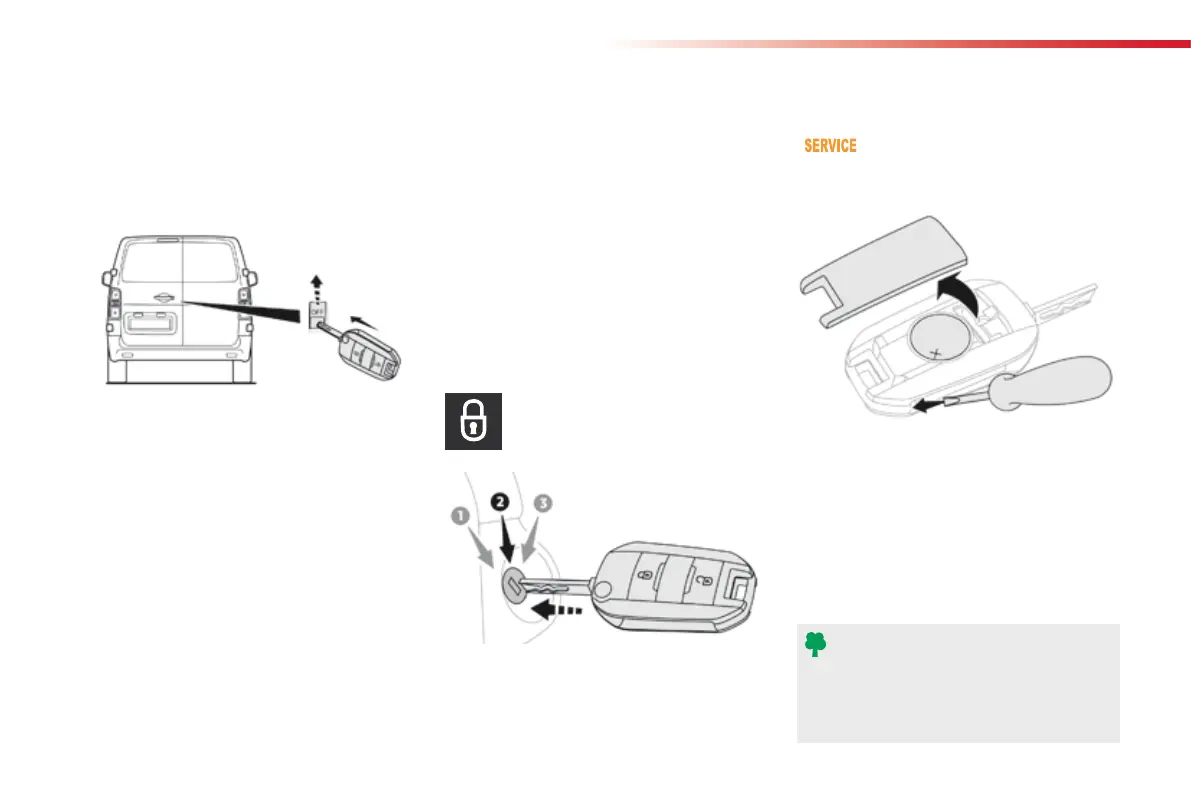
Changing the battery
Do not throw the remote control
batteries away, they contain metals
which are harmful to the environment.
Take them to an approved collection
point.
If the battery is flat, you are
informed by lighting of this warning
lamp in the instrument panel, an audible signal
and a message in the screen.
Reinitialisation
Locking the side-hinged doors
F If fitted to your vehicle, check that the
electric child lock is not on.
F Open the left-hand door.
Battery ref.: CR1620 / 3 volts.
F Lock the driver's door using
the
key.
F
Press one of the remote control
buttons.
F
Turn the key to position 2 (Ignition on).
F Switch off the ignition and remove the key
from the ignition switch.
The remote control is fully operational again.
Unlocking
F Use the interior door handle.
Remote control problem
Following disconnection of the vehicle battery,
replacement of the remote control battery or
in the event of a remote control malfunction,
you can no longer unlock, lock or locate your
vehicle.
F
First of all, use the key in the lock to unlock
or lock your vehicle.
F Then reinitialise the remote control.
If the problem persists, contact a CITROËN
dealer as soon as possible.
F
Unclip the cover using a screwdriver in the
cut-out.
F Remove the cover.
F
Extract the flat battery from its location.
F
Place the new battery into its location
observing the original direction.
F Clip the cover in place.
F Insert the key into the latch aperture on the
edge of the door (without forcing) and slide
the assembly upward.
F
Remove the key.
F
Close the door and check from the outside
that it has locked correctly.



 To Next Page