222
Driving
Jumpy_en_Chap06_conduite_ed01-2016
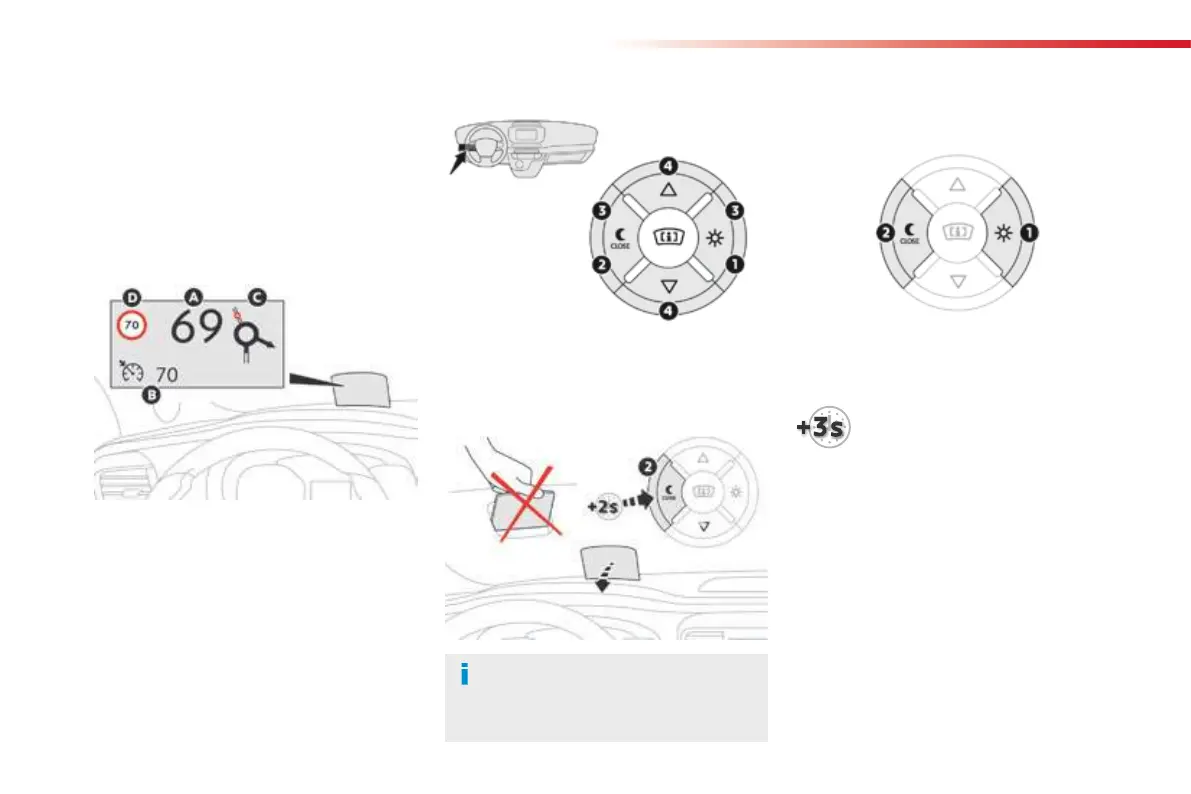
1. On.
2.
Off (long press).
3.
Brightness adjustment.
4.
Display height adjustment.
Once the system has been activated, the
following information is grouped together in the
head-up display:
A.
The speed of your vehicle.
B.
Cruise control/speed limiter information.
C. If your vehicle is so equipped, inter-vehicle
distance information, automatic emergency
braking alerts and navigation instructions.
D. If your vehicle is so equipped, speed limit
information.
System which projects various information onto
a smoked blade in the driver's field of vision so
that they do not have to take their eyes off the
road.
Buttons
Displays during operation
Head-up display
For more information on Navigation,
refer to the Audio and telematics
section.
F
With the engine running, press button 1 to
activate the system and deploy the blade.
Activation / Deactivation
F Press and hold button 2 to
deactivate the system and retract
the blade.
The activated/deactivated state is saved and
retained on restarting the engine.



 To Next Page