3.6
Code Condition Likely Corrective Action
AL205 Incorrect Start (SRO) Hydraulic function lever not
in Neutral.
AL217 Wrong Battery Voltage Check battery for Proper
Voltage.
AL245 Wrong Battery Voltage Check battery for Proper
Voltage.
AL248 Parking Brake Self Test Call Service Technician.
Other Truck needs service Call Service Technician.
Multi-Function Handle
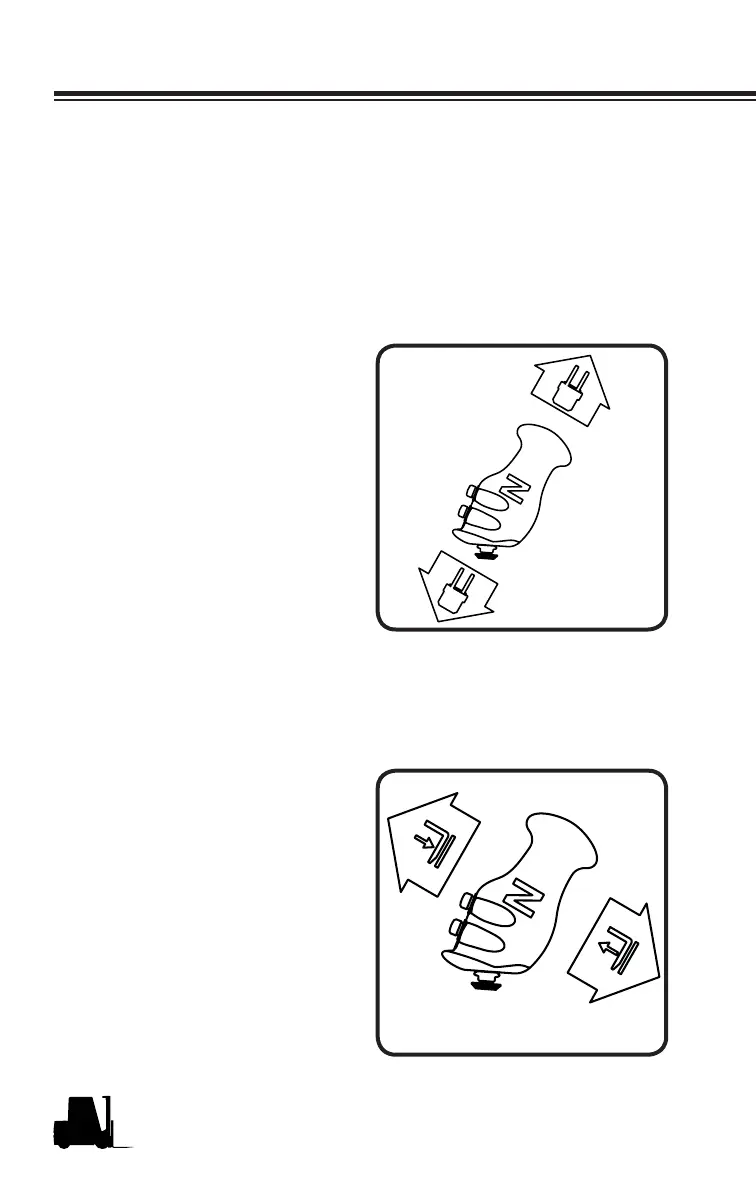
Multi-Function Handle
(Direction Control)
To move the truck either forward
or reverse, move the handle in the
direction that you want the truck
to move. Move the multi function
handle toward the front of the truck
(to the drivers right) to go forward. To
move in the reverse direction, move
the handle toward the rear of the
truck (to the drivers left). The farther
you move the multi function handle
the faster the truck will travel.
NOTICE
The direction control handle
must be in neutral position
prior to turning the key to the
ON position.
Lift / Lower Control
To lift or lower the upright you must
also use the multi function control
lever. Pull back the multi function
handle to lift the forks. To lower the
forks, push forward on the control
handle. If the tilt restriction indicator
is ON, it indicates that the upright is
outside of the tilt restricted area. The
upright will only raise to the top of the
free-lift stage and then stop when
tilted outside the allowable range.
Tilt the upright to the vertical position
to continue raising the forks.



 To Next Page