5.14
Stacking
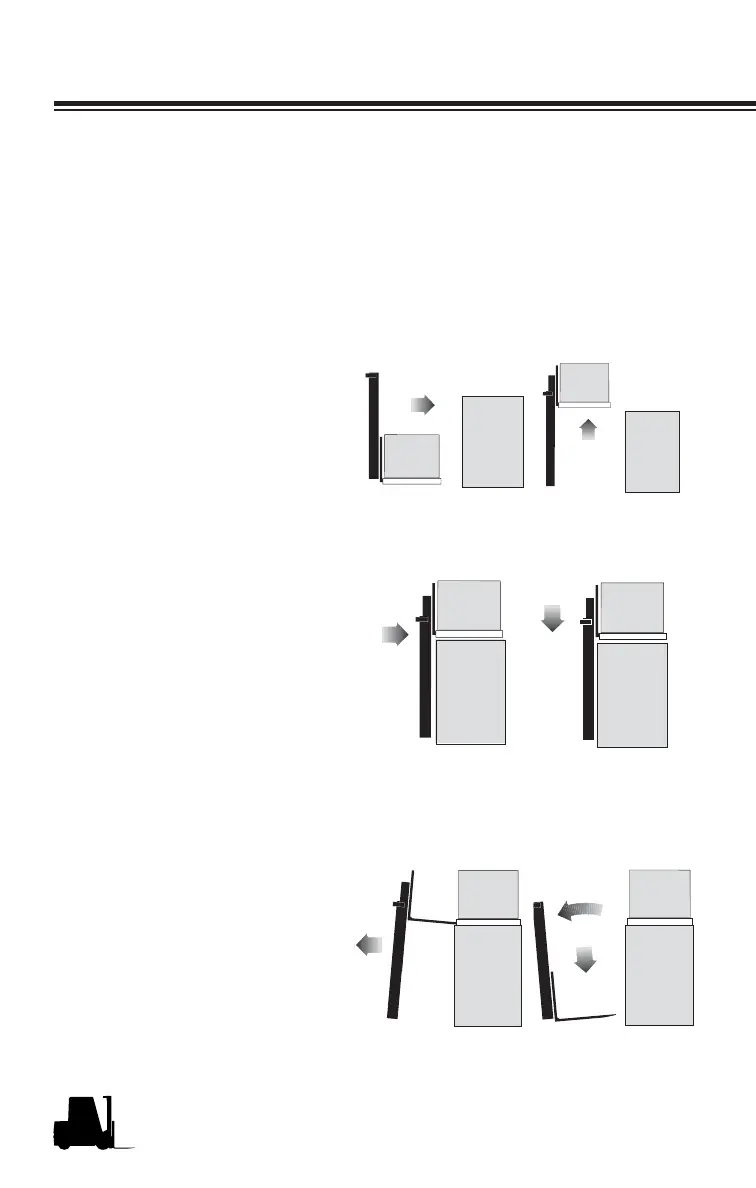
To put a load on a stack:
Approach slowly and align the lift truck and load squarely with the stack.
Level the load as the lift truck is nearing the stack using the Fork Level
function. Move forward, slowly, until the load is almost touching the
stack. The leading edge and sides of the load pallet should be lined
up exactly with the near edge and side of the load or rack on which
you are stacking.
Fig 1 Stop close to the stack
and level the forks using
the Fork Level function.
Fig 2 Lift (raise) the load high
enough to clear the top
surface of the stack.
Fig 3 Slowly move the load into
position. Be careful not to
damage or move adjacent
loads.
Fig 4 When the load is aligned
with the stack beneath it,
carefully lower the load
onto the top surface of the
stack.
Fig 5 Lower (drop) the forks
slightly to clear (disen-
gage) the load pallet. Tilt
the forks forward slightly,
if necessary.
Fig 6 Check your travel path,
then carefully back away
until the forks are clear of
the stack. Stop and lower
the forks to the travel posi-
tion (6 to 8 inches above
the ground), then tilt back
to travel.
Fig 5
Fig 6
Fig 1
Fig 2
Fig 3
Fig 4
Stacking
7180
718048
718045
718046
718049
718050



 To Next Page