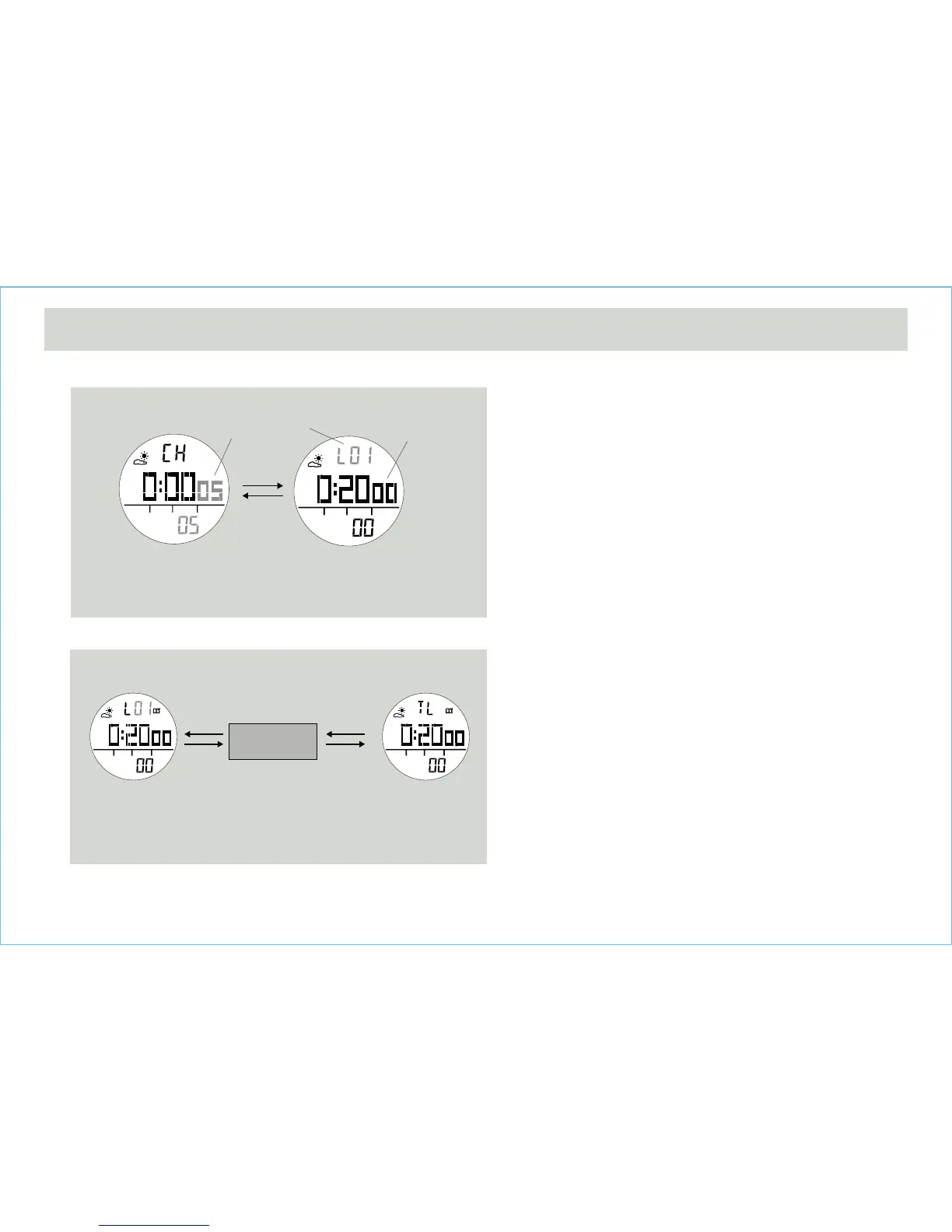
How to Record Lap Time
• The chronograph can measure elapsed time without
stopping the counting - lap time.
• The Chronograph Mode allows recording lap time up to
10 laps.
• When the chronograph is counting, press the [L/R]
button once to record a lap time (this key operation will
not affect the counting).
• The lap number and lap time will appear on the display
for 10 seconds, and it returns to counting display
automatically.
• Repeat the steps mentioned above to get another lap
time.
How to Recall Lap Times
• To recall lap time, hold down the [M] button in the
Chronograph Display.
• When the Lap 1 Time Display appears, press the [S/S]
or [L/R] button to check the next or previous lap time
respectively.
• Hold down the [M] button to go back to the Chronograph
Display.
How to Reset Lap times
• To record a new set of lap time, hold the [L/R] button for
2 seconds when it is stopped.
6.1 Chronograph Mode - Recording and Recalling Lap Time
the next lap
memories
Lap Times Recall Sequence
10 seconds
To Record Lap Time
[L/R]
[S/S]
[L/R]
[S/S]
[L/R]
the digits
is running
the lap
number
the next lap
memories
the lap time will
freeze for 10
seconds
Chronograph
Lap Display
Total Time
Display
Lap 1 Time
Display
Chronograph
Running Display


 To Next Page