How to Use the Timer
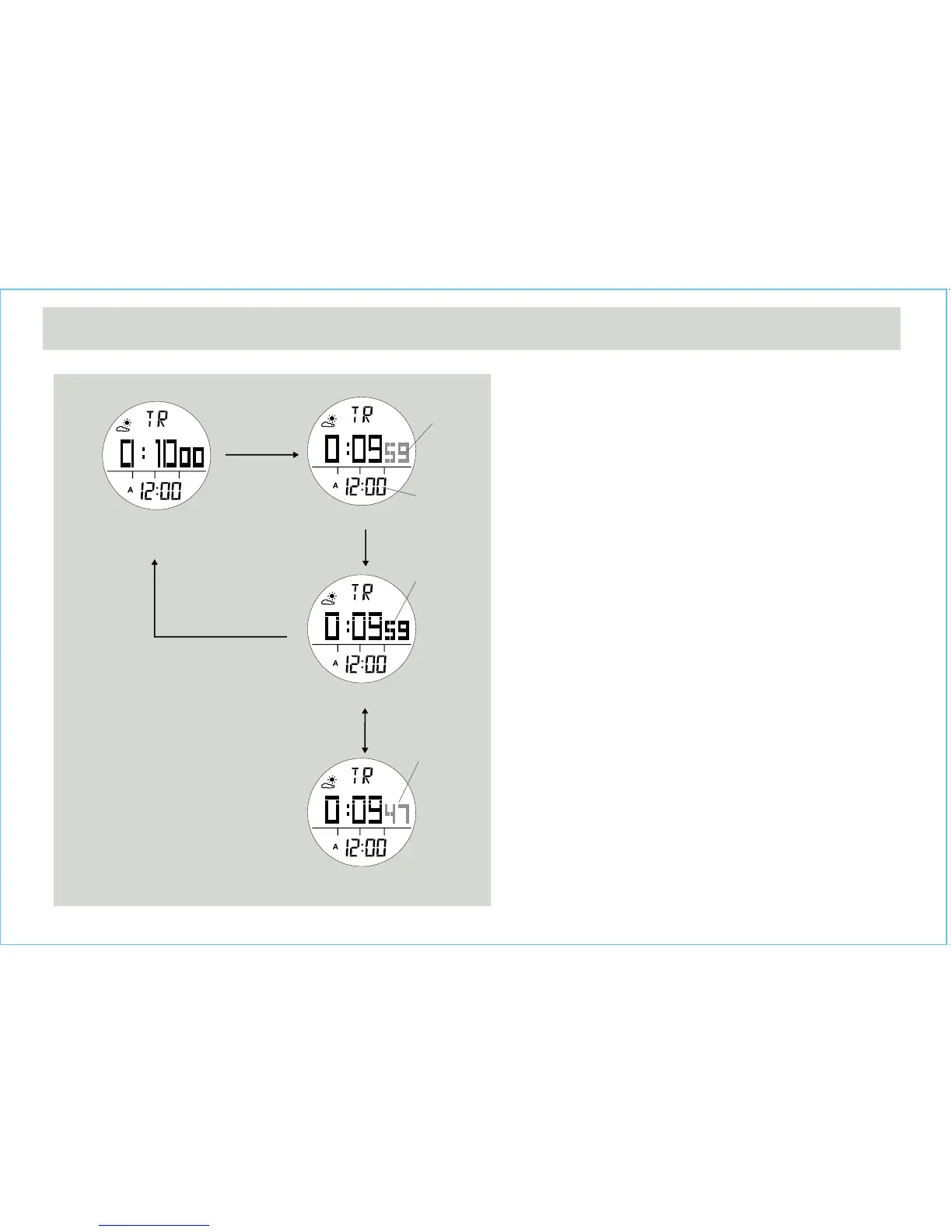
• When the Timer is set, press the [S/S] button to start the
timer. Press the [S/S] button once again to stop the
timer.
Timer Alarm Sound
• In the last 10 minutes, the Watch will beep for every
minute.
• In the last minute, the Watch will beep for every 10
seconds. In the last 5 seconds, the Watch will beep for
every second.
• When it reaches 0, a beep sound will last for 30
seconds. Pressing any button can stop the beep sound.
How to Reload the Timer
• The last target time will be reloaded automatically at the
end of the 30-second beep sound.
• Press the [L/R] button when the timer is stopped.
7.2 Timer Mode - Using the Timer
Counting Display
Timer Display
(Timer is set at 10 minutes)
Stop Counting Display
Counting Display
[S/S]
[L/R]
[S/S]
[S/S]
digits start
counting
digits start
counting
again
digits stop
counting
real Time
clock
Timer Mode


 To Next Page