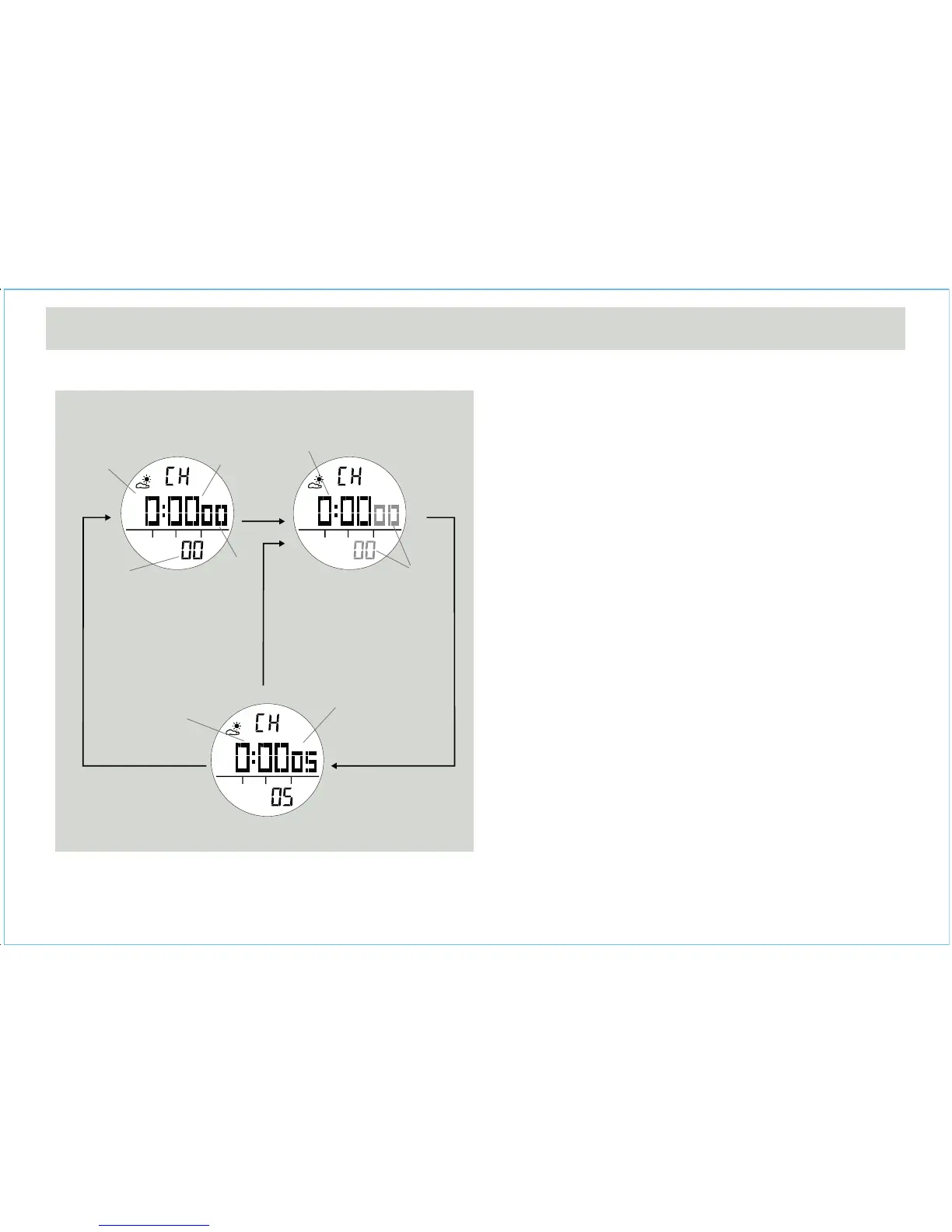
Chronograph Mode
• The Watch includes a function to measure elapsed time,
accumulative elapsed time and lap times - Chronograph
Mode.
• The display shows an 'All Zeros' display when the
chronograph is selected the first time or it is reset.
How to Start/Stop the Chronograph
• When the chronograph is stopped (not counting), press
the [S/S] button once to start the chronograph
(counting); press the [S/S] button once again to stop the
chronograph (not counting). Repeating these steps will
get an accumulative elapsed time.
How to Reset the Chronograph
• To record a new set of elapsed time, hold the [L/R]
button for 2 seconds to reset the chronograph to the 'All
Zeros' display when the chronograph is stopped.
• In the 'All Zeros' display, the chronograph is ready for a
new counting.
6.0 Chronograph Mode - Start/Stop the Chronograph
Chronograph
Counting Display
Chronograph Stop Display
Chronograph
'All Zero' Display
hold
[L/R]
the digits
stop counting
Digits
running
1/100 sec
Total
Time
hours
minutes
seconds
[S/S]
Elapsed
time
[S/S]
[S/S]


 To Next Page