Functional Display
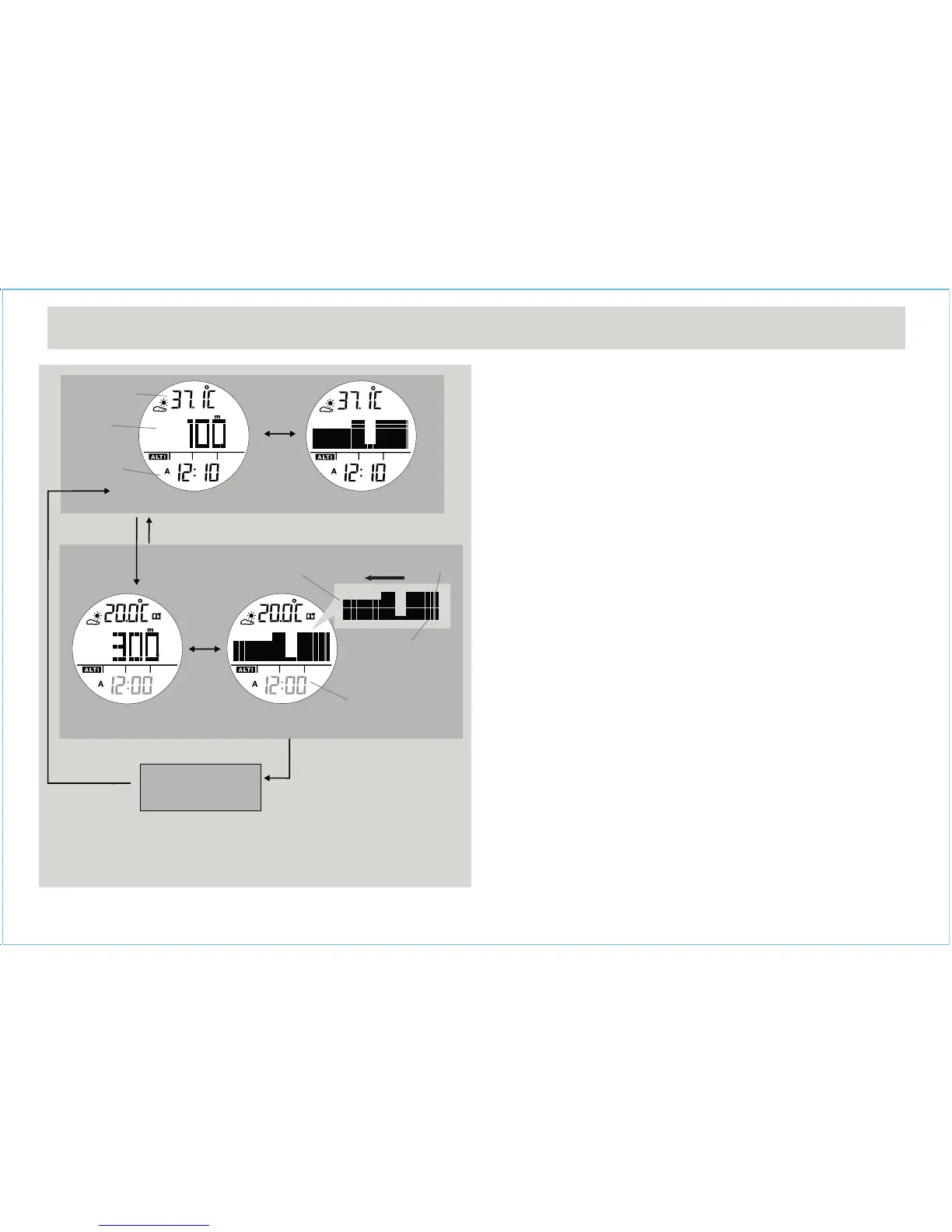
• Altimeter mode includes two functional displays: altitude
value or altitude tendency, which are shown in the
middle of display.
• The top line shows the temperature and bottom line
shows the time.
History Display
• The watch can stores up to 34 past hourly data
including altitude and temperature.
• Press [L/R] to recall the latest hourly data,
corresponding history data (altitude and temperature)
with flashing time-stamp will be shown.
• Press [L/R] to recall next hourly data as adjacent
diagram.
• Hold [L/R] for 2 seconds can return to current time
display instantly.
IMPORTANT: If you want to have an accurate reading of
air temperature, you must take off the watch from the wrist
that prevents body temperature effect on your watch.
IMPORTANT: Altimeter updated rate is 1 second for the
first 5 minutes, then 10 seconds for next 24 hours and 1
minute afterward.
9.0 Altimeter Mode - Temperature and History Display
[S/S]
[S/S]
[L/R] hold [L/R]
[L/R]
[L/R]
time stamp
Altitude Value Altitude Tendency
Altimeter Mode
current
temperature
cursor moving
direction
flashing cursor
(1st record at
the hour)
current
attitude
current
time
current
time
-23 hour
History Display
History Display
History Display
(-2 to -34 hour )


 To Next Page