COMMISSIONING
Settingthe AirDischargeDamper
AirBalancingprocedureforCOLDFRONTCooling:
AirBalancingprocedureforSUPPLEMENTARY Cooling:
a. ConnectallexternalductworktotheClimateWizardinpreparationforbalancingthesystem.
b. Ensuremain AirConditioningplantfansarerunningatfullspeed-consultwithBuilding
Managerand/or AirConditioningcontractor.
c. StarttheClimateWizardinMANUAL andVENT modesonfullspeed.
d. AdjusttheClimateWizarddamperuntilthepressureinthetransitionstabilisesasfollows:
CW-H10 240Pa
CW-H15 215Pa
e. Proceedtobalancetheexternalductandoutletsinyourusualmanner.
f. Checkandifnecessaryre-adjusttheClimateWizarddamperbacktotheabovevalues.
g. Lockthedamperinitsfinalposition
a. ConnectallexternalductworktotheClimateWizardinpreparationforbalancingthesystem.
b. IncaseaductisattachedtotheClimateWizarddischarge,setthelouvresindesiredposition.
c. Ensuremain AirConditioningplantfansarerunningatfullspeed-consultwithBuilding
Managerand/or AirConditioningcontractor.
d. StarttheClimateWizardinMANUAL andVENT modesonfullspeed.
e. AdjusttheClimateWizarddamperuntilthepressureinthetransitionstabilisesasfollows:
CW-H10 240Pa
CW-H15 215Pa
f. Proceedtobalancetheexternalductandoutletsinyourusualmanner.
g. Checkandifnecessaryre-adjusttheClimateWizarddamperbacktotheabovevalues.
h. Lockthedamperinitsfinalposition
CW CW
COLDFRONTCOOLING
AC AC
CW
SUPPLEMENTARY COOLING
AC
19
SeeleyInternationalPtyLtd
TurningtheCooleron
TESTING THE COOLER
Once you are satisfied that the Cooler is installed and commissioned correctly, run it to ensure that everything is working as it
should.
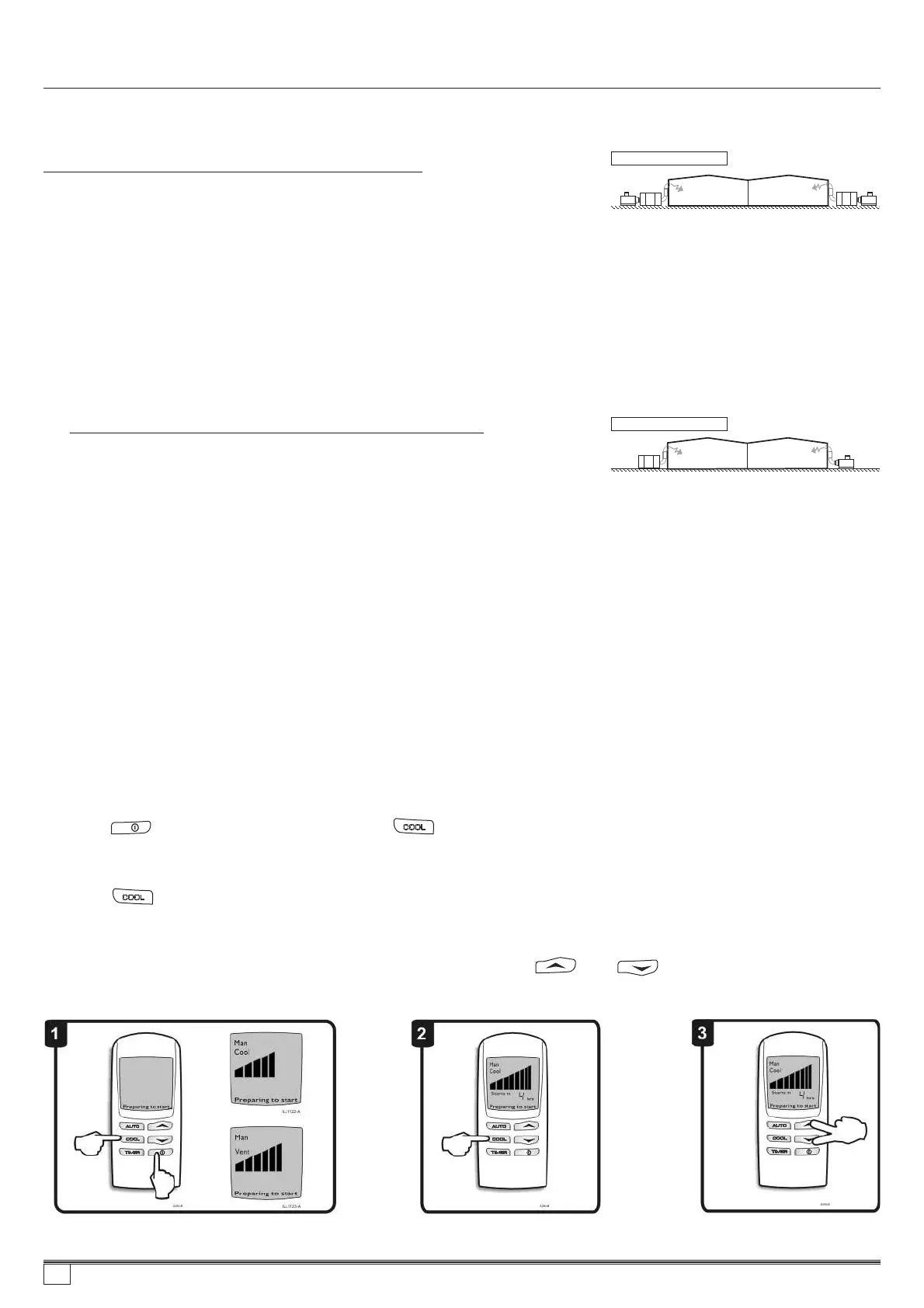
Press the button to start the cooler. Press the button to toggle between “Cool” and “Vent”on the display to switch
the pumps on or off . Vent mode disables the pumps. Check that the cooler runs quietly and with a balanced distribution
of air to all outlets.
Pressthebuttontotogglebetween“Cool”and“Vent”onthedisplaytoswitchthepumponoroff .With
controlin“Cool”mode,checkthatthereiswaterbeingpumpedwithinthecooler. Thisismosteasilydonebyobservingthe
waterturbulenceinthevicinityofthepumps.
Ensure there are no water leaks. Drain the reservoir by pressing both the and buttons together , with the
wall control in the “OFF” state. Check the drain fittings and pipes, making sure there are no leaks.
(Fig. 1)
(Fig.2)
(Fig. 3)
Turning cooler on, check fan operation
Checkpumpoperation
Check drain operation
859736-A AU1007


 To Next Page