ILL1118-A
ILL1124-A
OPERATINGINSTRUCTIONS
SeeleyInternationalPtyLtd
WallControl
TURNINGTHECOOLERON
PREPARINGTOSTART
MANUAL MODE
Thewallcontrolcanbeswitchedonandoffbypressingthebutton. Thewallcontrolwillremembertheprevious
settingitwasinwhenthecoolerwaslastused.
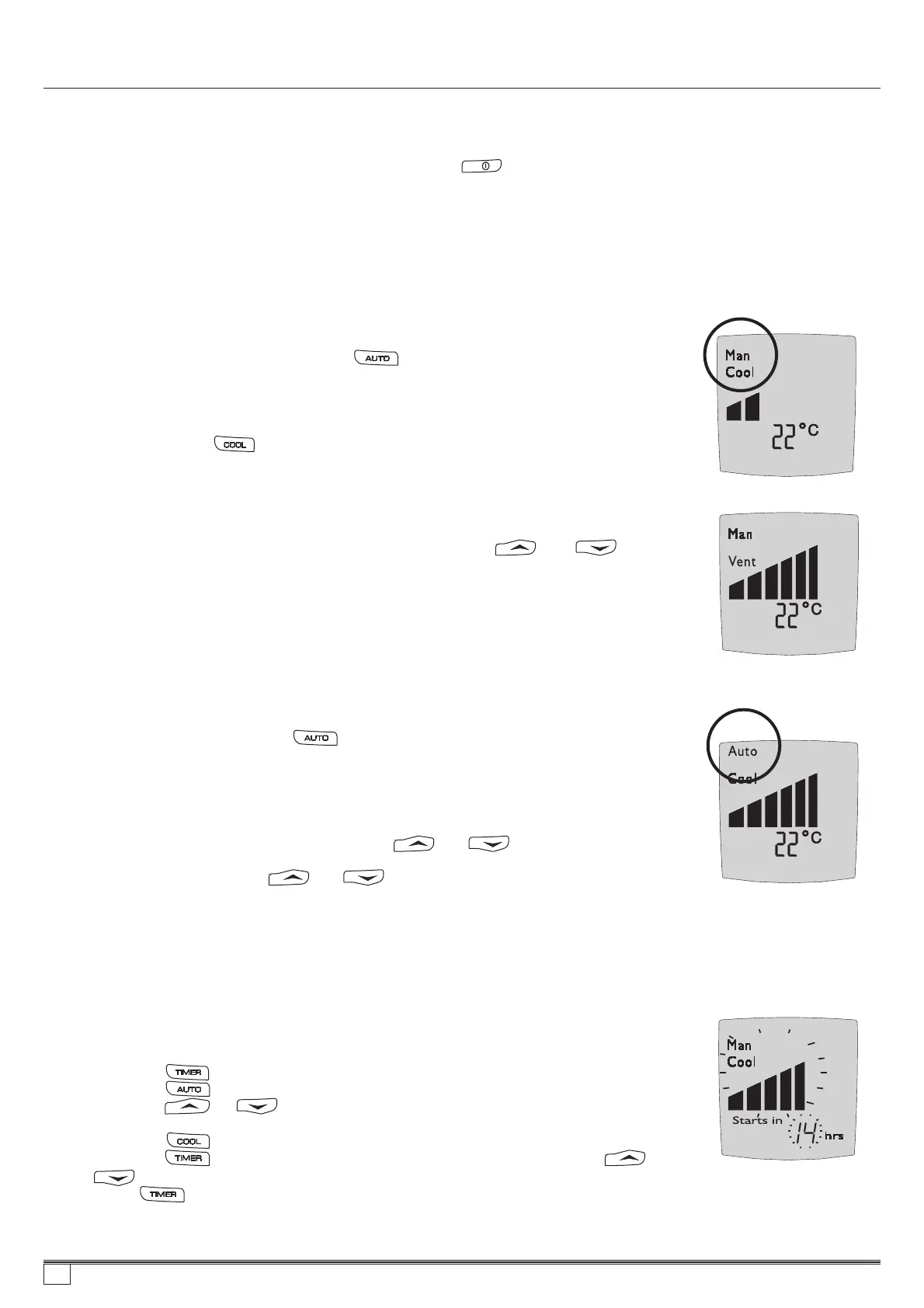
WiththewallcontrolswitchedON,pressthebuttonuntilMANisshownonthedisplay.
YoumaythenpressthebuttontoswitchbetweenCOOL andVENT
(VENT =freshairbeingdeliveredbutnotcooled).
Wheneveryouselect AUTOmodeorCOOL inMANUAL mode,thecoolerwilltakeafewminutestostartasitfillswith
waterandsaturatesthecoolingpads. Thetimewillbedecreasedifthereservoirisfullorthecoolerhasonlyrecently
beenturnedOFF.
OnceCOOL orVENT hasbeenselected,thewallcontrolwillmaintainaconstantfanspeed.
Thisisindicatedbythebargraphshownonthedisplay.
Toincreaseordecreasethefanspeedrequired,presseithertheorbutton.
Toselectthe AUTOmodepressthebuttonuntil AUTOisshownonthedisplay.
In AUTOmodethecoolerwillrememberthelastsettingusedandtrytoachievethis.Itmay
varydependingontheday’sconditions.Pressingorbuttonwillchangethe
displayed‘room’ temperaturetoaflashing‘setpoint’ temperature. This‘setpoint’ temperature
canbeadjustedbypressingtheorbuttonswhilstthe‘setpoint”temperature
Isbeingdisplayed.
The cooler can be programmed to start at a specific time or stop at a specific time.
The delayed start time can only be programmed when the cooler is OFF. To program the cooler to start in a certain amount of
hours use the following sequence:
(1)......Pressthebutton.
(2)......Pressthebuttonuntil“MAN”isdisplayedonthescreen.
(3)......Presstheorbuttonuntilthedesiredfanspeedisdisplayedbythebars
inthemiddleofthescreen.
(4)......Pressthe buttontoseteitherCOOL orVENT.
(5)......Pressthe buttonandthe‘startsin’ timewillstartflashing.Usetheand
buttonstoselectthedesiredtime.
(6)......Pressagain.
AUTOMODE
DELAYEDSTART ANDSTOP
Programminginmanualmode
ILL1122-A
ILL1123-A
21
859736-A AU1007


 To Next Page