ILL1119-A
OPERATINGINSTRUCTIONS
SeeleyInternationalPtyLtd
Service
ILL1120-A
WallControl
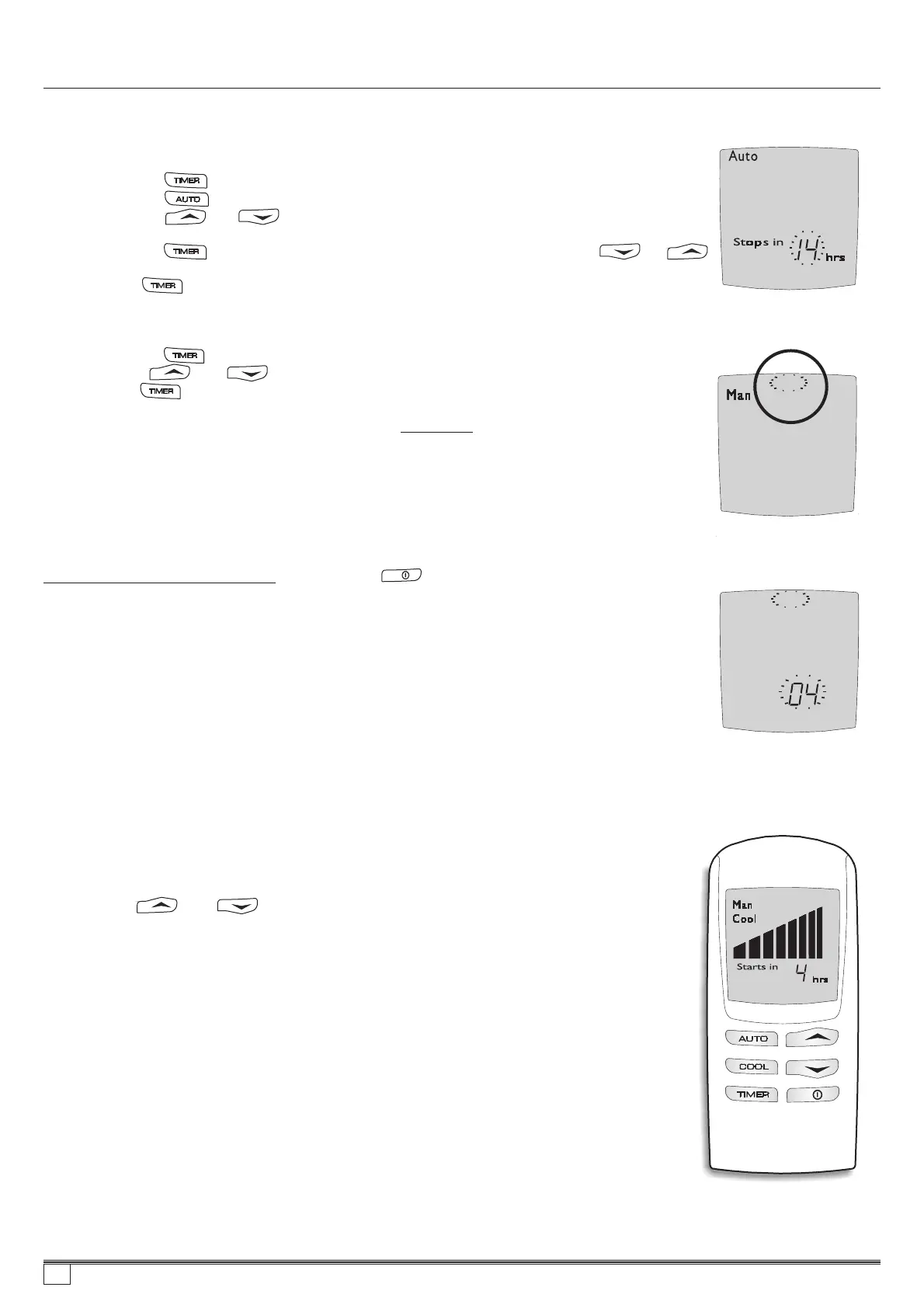
Programminginautomode
(1)......Pressthebutton.
Pressthebuttonuntilflashing AUTOandsettemperaturearedisplayed.
Presstheor buttonuntilthedesiredtemperatureisdisplayedonthe
Screen.
(3)......Pressthebuttonandthe‘startsin’ timewillstartflashing.Usethe or
buttontoselectthehour.
(4)......Pressagain.
ThedelayedstoptimecanonlybeprogrammedwhenthecoolerisON. Toprogram
thedelayedtimeinwhichyouwantthecoolertostopusethefollowingsequence:
(1)......Selectthebuttonandthe‘stopsin’ timewillstartflashing.
Usetheandbuttonstoselectthedesiredofftime.
(2)......Pressagain.
Delayedstartandstoptimesmustbere-set thattheyarerequired.
(2)......
NOTE: everyday
SERVICEMODE
Whenafaulthasbeenrecognisedbythewallcontroltheword“Service”flashesonthe
screen.When“Service”isdisplayeditmaybenecessaryforyoutocontactyourService
Agent.However,beforedoingso,turnthewallcontrolOFF. Youwillnoticeanumber
flashingatthebottomofthescreen. Thisnumberindicatesthecodeforthefaultthathas
occurred.
Pleasewritethisnumberdown, thenpushthebuttontoturnthecoolerbackon.
Ifafterashorttime“Service”isagainshownonthedisplay,turnthewallcontrolOFFand
checkiftheflashingnumberisthesame.Ifitis,checkthefollowingpossibleproblems.
However,wedorecommendthatanychecksbecarriedoutbyanauthoriseddealeror
serviceagent.
(1)......Checkthatyourlocalwaterauthorityhasnottemporarilydisconnectedthewaterin
yourarea.
(2)......Checkthatthewatersupplytaptothecooleristurnedon.
(1)......Checkthatthedrainisnotblocked.
IfthesedonotfixtheproblemthencontactyourService Agent. Youwillneedtoquotethe
flashingnumberthatyouwrotedown.
Ifthepowersupplyfailsforlessthan5secondsthecoolerwillretainitscurrentsettings.
Thatis,itwillstopforthetimethepowerisoffbutresumeoperationwhenthepowercomes
backonagain.
Ifthepowerfailsformorethan5secondsthecoolerwillautomaticallyturnitselfoff.
Accordingtothechosenparameter(A7),ifvalue00isset,whenpowercomesbackon,the
coolerwillnotresumeoperation. Youwillhavetore-startitatthewallcontrol.
Ifparameter01isset,thecoolerwillre-startagainwhenpowerisrestored.
If‘02’ or‘03’ isdisplayed
If‘04’ isdisplayed
DRAINMODE
(CoolerswitchedOFF)
POWEROUTAGES
Pressingtheandbuttonsatthesametimefor2secondswillopenthedrain
valveandemptythewaterinthereservoir. Thewallcontrolwilldisplay“dr”onthescreen.
Drainingthewaterwillleavethereservoircleananddryuntilitisnextused. Thisfunctionis
notmandatorybecausethewaterwillbedrainedfromthereservoirautomaticallyaftera
pre-settimedelay,inordertokeepthecoolerhealthyanddryuntilitisusedagainnext
time.
Service
ILL1121-A
A294-B
22
859736-A AU1007


 To Next Page