10
MA_QN_MP
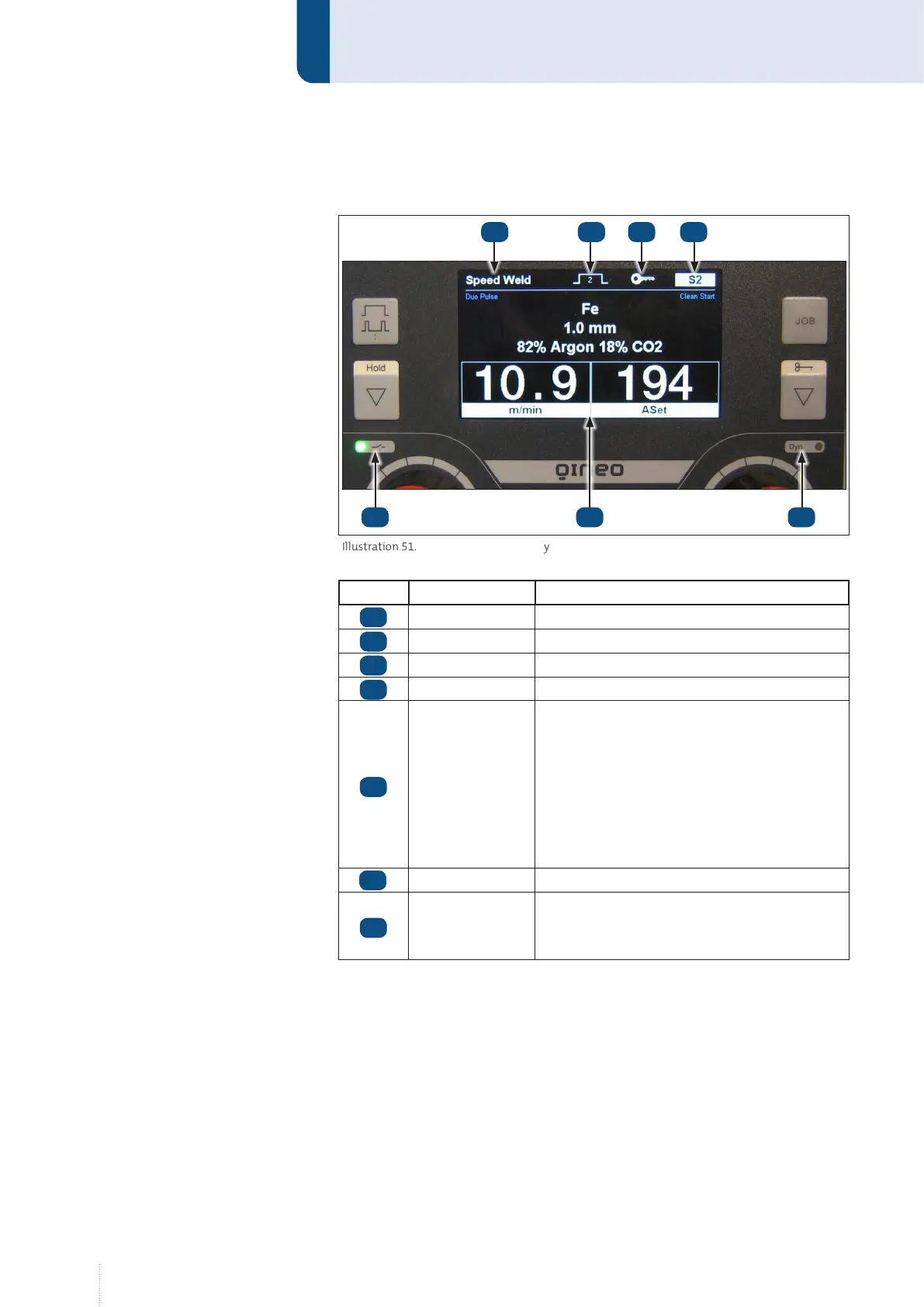
Structure and function
1.2 Display
Item Designation Function
Process Display active processes
Operating mode Display active operating mode
Function lock Display locked functions active
Job number Display active job/rapid memory
Status display
LED:
Green - Welding power source switched on
Blue - Welding process runs
Red (blinking) - Error message
Red/blue (alternating) -
Error message while welding
Main display Display of the welding measurement values
Fine adjustment
LED on: Rotary knob (6) adjusts the dynamic
LED off: Rotary knob (6) adjusts the arc
length
1.3 Hold value display
The hold value display shows the averaged values for the last weld for
10 seconds. To activate the hold value display, press the Hold button until
the display changes.
After the welding process, the hold display will automatically be displayed
for 5 seconds. This function can be deactivated in the configuration menu
under "General".
Illustration 51. Master Plus Display
8
12
9 10 11
13 14
8
9
10
11
12
13
14



 To Next Page