Compact controller ER 2022S and ER 2022SA
5. Operation
5.6.2
Operation
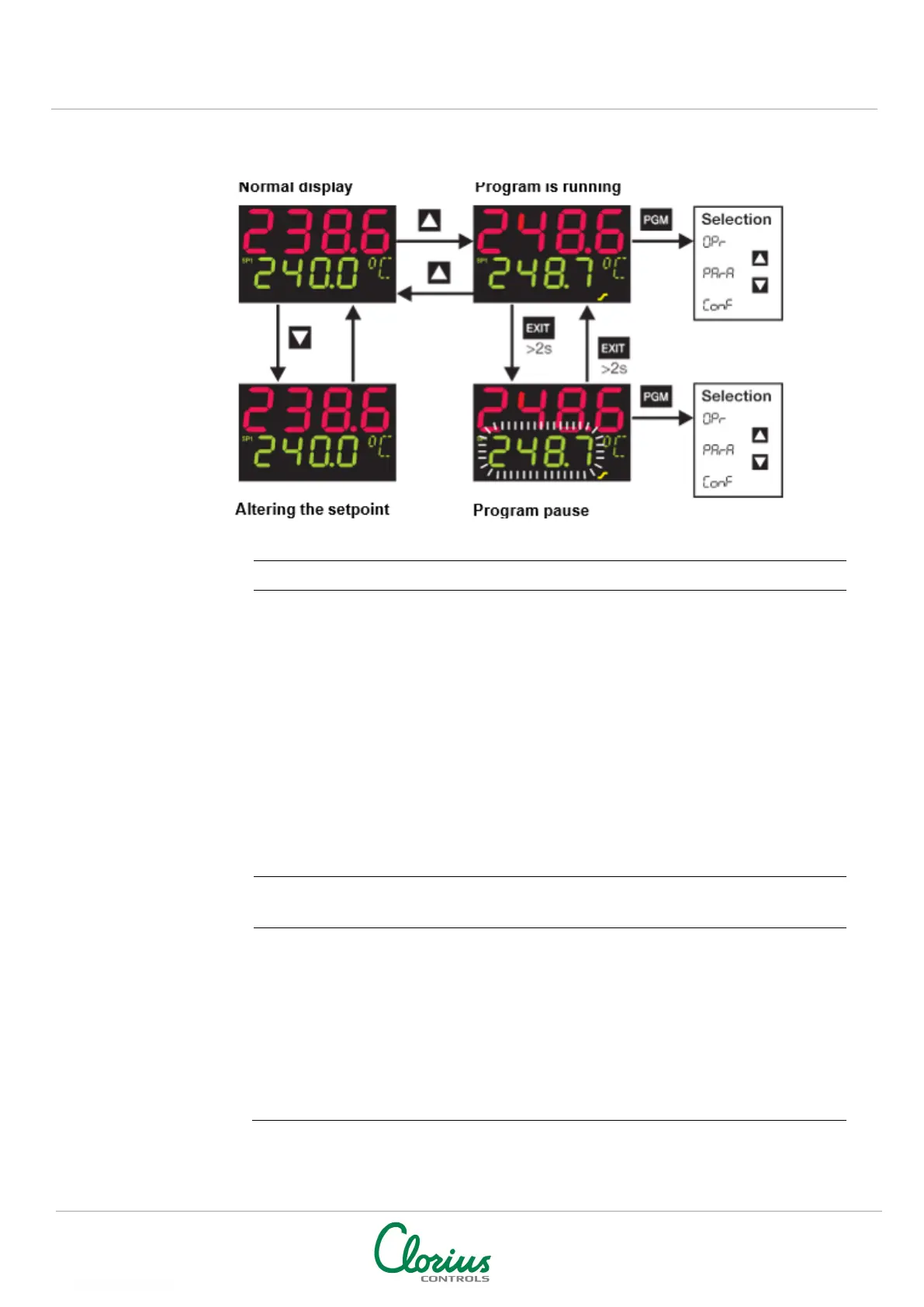
No program run in normal display, the controller controls to the selected setpoint
From normal display:
h
Change to setpoint input with D
h
Alter the present setpoint with
I
and
D
(the value is accepted
program
From normal display:
h
Start program
with
I
(the ramp symbol
lights up”!)
A delay time can be configured through the setup program. When the delay
time has elapsed, “
Strt
” is shown in the lower display, and then the
program
When the program is running:
program
When the program is running:
h Pause program with
X
(>2
sec) (the lower display
blinks!)
h Continue with
X
(>2 sec)
The program is canceled in the event of a power
failure.
Additional program control functions via binary
functions.
Chapter 8.6 “Binary functions “binF””


 To Next Page