OPERATING MANUAL
800.749.2761 www.coachcomm.com
49
X-Ware
X-Ware is X-System’s proprietary intercom management software, and its easy-to-use touch screen interface provides fast
access to critical information and settings, allowing efcient management of large systems.
Within X-Ware, you can manage user settings, set up and manage proles, assign dry pairs, and access system diagnostics.
Home Screen
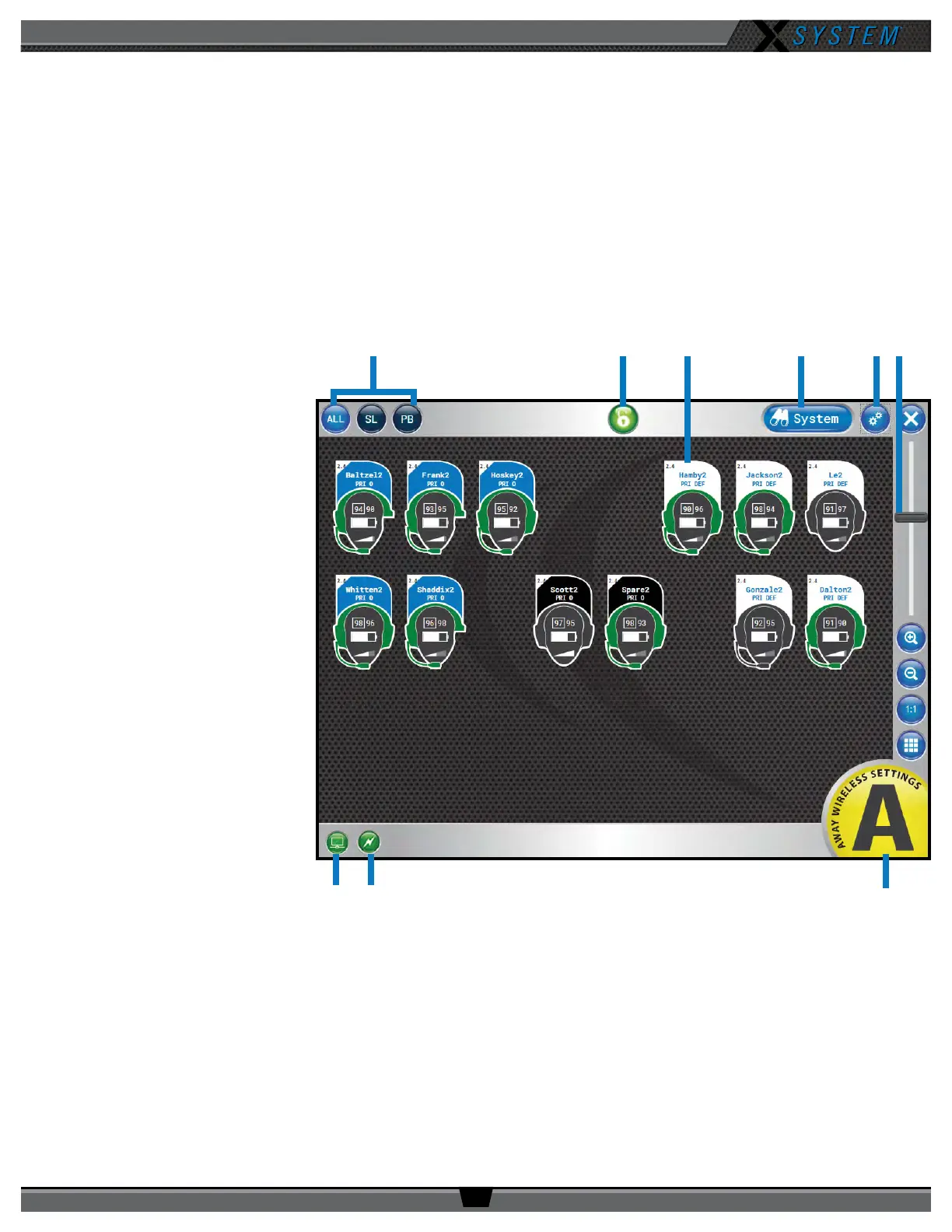
When X-Ware opens, the Home screen displays an overview of icons that represent all RPs on the system and their current
status on the system. This is the default screen that displays during game time.
A. Icon Filter Buttons
- Shows all RP icons,
sideline (“SL”) icons, or
press box (“PB”) icons
B. Lock-Out Button - Locks
X-Ware. If a passcode has
been set up by a system
administrator, unlocking
requires passcode entry.
This prevents unauthorized
access. See page 63 for
more.
C. RP Icon - Contains the
Prole Name, Active
Conference, Pack Name,
and indicators for battery,
volume, and frequency. The
icons can be positioned
to your liking by dragging
them to a location on the
screen.
D. System Button - Opens
X-Ware’s additional Radio
Transceivers, Radio Packs,
and Conference views.
E. Advanced Settings
Button - X-Ware’s
Advanced Settings
interface is where the core operational settings for the system conguration reside. Changes to these settings can
impact system performance if made improperly. In particular, changes to these settings during “live” operation on
game day should be avoided. It is highly recommended you contact CoachComm customer support prior to game
day if changes are desired.
F. Zoom - Slider bar and other view options allow you to adjust the magnication of the Home Screen view.
Figure 63: X-Ware Home Screen



 To Next Page