This document contains proprietary information,
see proprietary statement on first page.
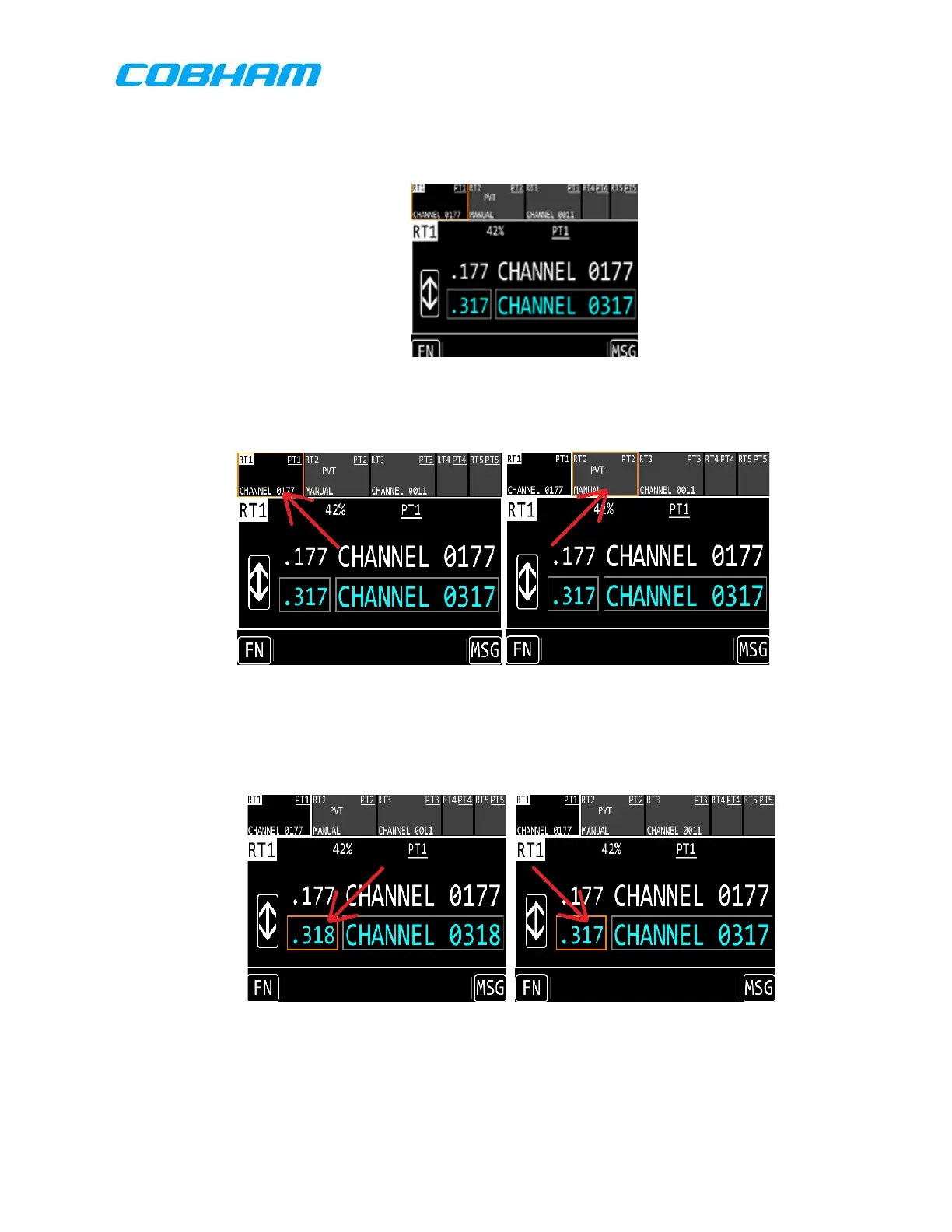
(5.) Turn the right outer nob to move the orange cursor box to RT1.
(6.) Verify that RT1 is displayed correctly in the main display as shown in Figure 8-2.
(7.) Turn the right outer knob.
(8.) Verify the cursor moves to different portions of the screen similar to Figure 8-3.*
(9.) Turn the right outer knob to move the cursor to the Standby Channel Number,
then turn the right inner knob.
(10.) Verify that the number in the cursor box number changes similar to pictures of
Figure 8-4.*
(11.) Turn the left outer knob left and right.
(12.) Verify that the “Set Brightness” display appears as shown in Figure 8-5.
These commodities, technology or software are controlled in accordance with the United States Export Administration Regulations, Export Classification
Control Number (ECCN) EAR99. When exporting, diversion contrary to U.S. law is prohibited.



 To Next Page