CB-MF-SOP-002
A/1
13
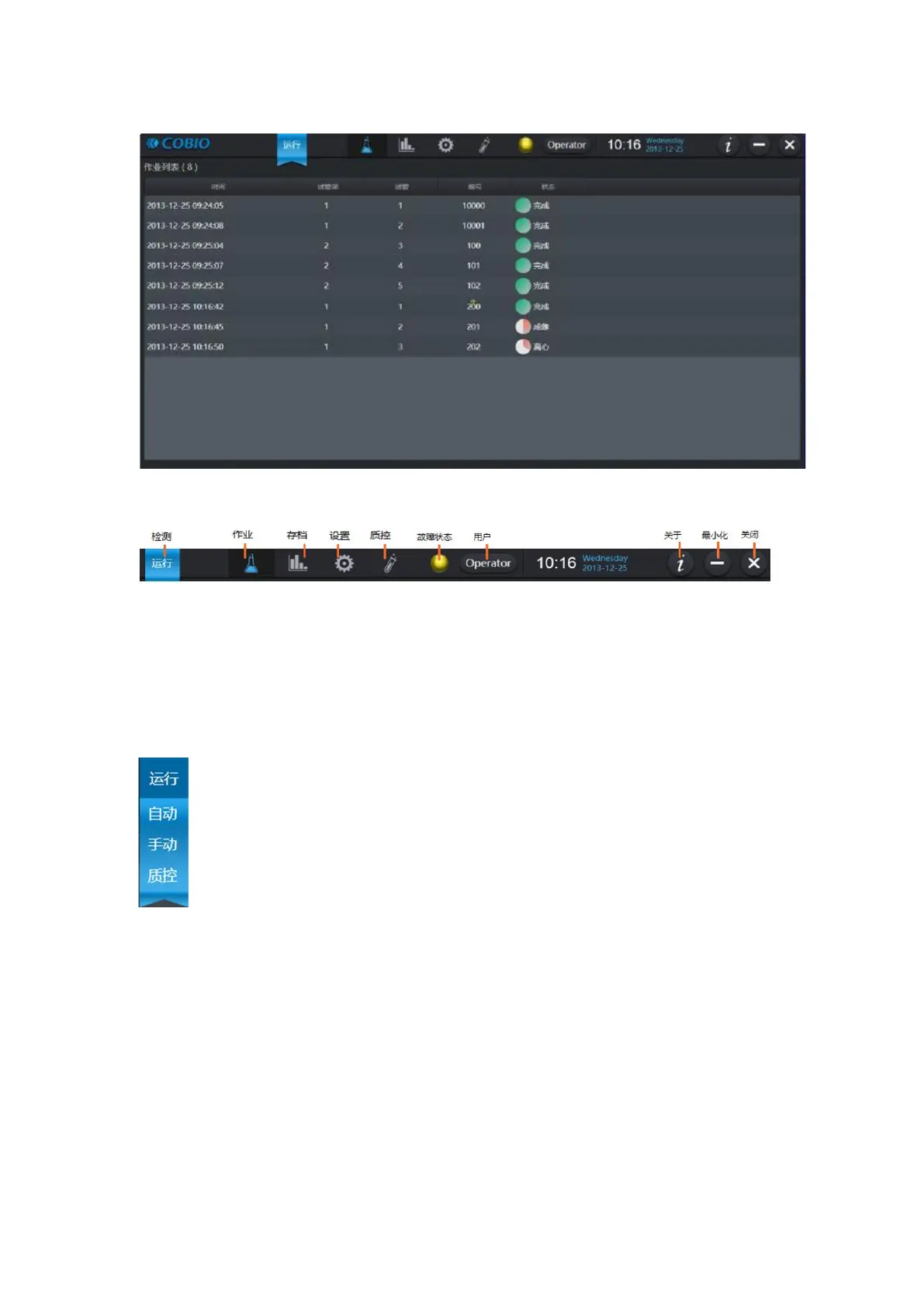
Figure 3-1
Top bar icon:
Figure 3-2
3.1.1 Operation Test
After the red indicator light on the feeding platform is off, put the tube rack on the feeding
platform and click the "run" menu on the top. There are different ways of testing according to different
situations.
Automatic: Use for batch automatic inspection for a large number of samples.
The equipment will continue to work, continuously complete automatic sampling and
sampling inspection, and automatically output results (can be viewed on the archive
page), without manual intervention.
Manual: you can specify the sample size for a test and the number of tests
passed.
Quality control: quality control for checking the availability of instrument.
Prepare the quality control product, the low-value quality control product is first, the
high-value quality control product is second, then start the quality control inspection. Status shows
success indicates availability and failure indicates unavailability.
You can set the start number before starting the instrument, as shown in the figure below.
Note: you can indicate different meanings by setting different starting Numbers, such as the
number starting from 5000, the number of hospitalized patients, and the number starting from 8000,
the patients who have participated in the physical examination.


 To Next Page